Protecting Pinner Passwords
Show original YouTube description
Show transcript [en]
hello everyone thank you for being here today just to let you know that there will be no slido today but we will be hosting a live q a after and thank you guys take it away all right hi everyone Thanks for attending um so the topic for today is protecting printer passwords or more directly protecting Pinterest user passwords um a little bit about us my name is I'm a software engineer on Pinterest product security team my name is Joe Rochelle I'm also on the production security team working on a product Security in my spare time I enjoy pinning cats on Pinterest so a little bit about product security team and Pinterest so we are part of the
circuit in fact our colleagues from our civilian team cup security they have another presentation this afternoon so if you're interested go check that out as well and the production team we do the typical application security themes and we also do account security which is what we are talking about today and we also do secure hdlc body detection prevention security Frameworks security libraries fantastic and we also run our backbending program so on the agenda for today we'll go into the background we'll talk about all things passwords and why they can be problematic then we'll jump in to discuss how we at Pinterest identify users with problematic passwords specifically those with compromised credentials and then which of those
users qualifies high-risk users we'll then go into the user protections and then finally our learns and insights so to start off with the background we're just going to go over some of the a few of the big problems with passwords in general and then delve into some of the bigger problems with passwords at Pinterest um and so to start off the problems with passwords one of them is that they tend to be predictable people tend to choose passwords that are easy to remember and that are familiar to them last year's most commonly used password according to nordpass was the word password followed by one two three four five six which probably corresponds to the minimum
password length requirement for most sites um so as you can see looking at this top 10 list when it comes to password creation creativity is not a priority um moving forward another problem with passwords is they're attempting to reuse so if you consider that the average U.S adult has somewhere between 90 to 120 different online accounts uh it's safe to assume no one's creating unique passwords for all of those accounts um and in factsecurity.org did a a survey and they found that anywhere between 70 to 75 percent of users will reuse passwords across multiple accounts moving forward another problem with passwords is that they are shared and can be easily socially engineered this is especially true when it comes to
streaming sites or sites where you can have multiple user profiles per account and also those that employ weak security questions as a means for account recovery and then finally one of the other bigger problems I wanted to touch on is that passwords can be exposed via data breaches which have been steadily on the rise over the years um for uh the the real issue I mean it doesn't really matter how secure your password is this is always a possibility but the issue comes from reusing passwords across multiple accounts if one of if that password is exposed via data breeds and all of the accounts using that same password are vulnerable and so uh this is the problem that we
are trying to solve at Pinterest it's the main problem that we're focusing on and that is users that are reusing compromise credentials and so in that regard the problem with passwords at Pinterest is that one we're subject to frequent ATO attempts and um and having as many users as we do the number of users that are reusing compromise credentials are is it's not insignificant and so you might think okay well why don't you just invalidate their passwords and force a password reset well we have a few things to consider one is that the user experience at Pinterest we really value the a positive user experience doing something like that would be a poor experience for
the user it'll also impact engagement we want users to be able to engage on Pinterest and if we raise the the frictions to returning it that would limit that and then another big issue is we don't require email confirmation on sign up and so that means that there are users that are signing up on Pinterest with uh email addresses that they don't actually own so if we force the password reset they will never get that email and they won't be able to get back into their account and so what that means for us is that we need to not only be clever but incredibly patient when it comes to improving our security posture um and so how do we do that that's the
question that we want to answer here and so uh the first part of that answer we have to determine well how many users and which of our users are actually logging in with compromise credentials and so we have two main detection methods um one of them is called penripper so pin Ripper is an internal tool that we use to identify pinners with the credentials based on third-party data breach records and the way that it works is that it ingests two types of Records one is a Pinterest user DB dump and that's going to include all of our users user IDs emails and Associated password decrypts and then the other type of record is the third
party data breach record and that's going to include email addresses and Associated plain text passwords that were exposed and so the trick is because the data breach record may or may not include Pinterest users we need to identify which ones are and so the first part is identify or checking for email matches between both records once that is made then the Big Crypt is computed from the plain text password from the database record and compared to our users decrypt on file and if there's a match then we've identified a Pinterest user reusing compromise credentials and at that point we flag them for Downstream processing the other method that we have is the recaptcha password check and this is
based on Google's database of 4 billion leak credentials and the way that it works it's much simpler we just make an API request with the canonicalized form of the user email or username and then assaulted hashed of the user password and um so once you make that request you get an API response that looks like a little bit like what you see on screen and the key that we're interested in is the credentials leaked and simple true false and if it is true we do the same thing with pin Ripper and we flag that user for Downstream processing the thing that I really want to impress upon you is that the uh pin Ripper and Ray capsu's password
check are meant to complement one another with pin Ripper we're able to cover all of our users whether they're active or inactive with the password check we're only able to cover users that are active and necessarily on one of four password flows but the benefit with the password check is that we can Leverage The user's engagement to protect their account which is not something that we can do with penripper which works asynchronously so now we have a look at the pin report internal tool and the password track and next I'm gonna talk about how we integrate them to our systems and how we actually use them as signal provider and how we provide a single Tower Downstream
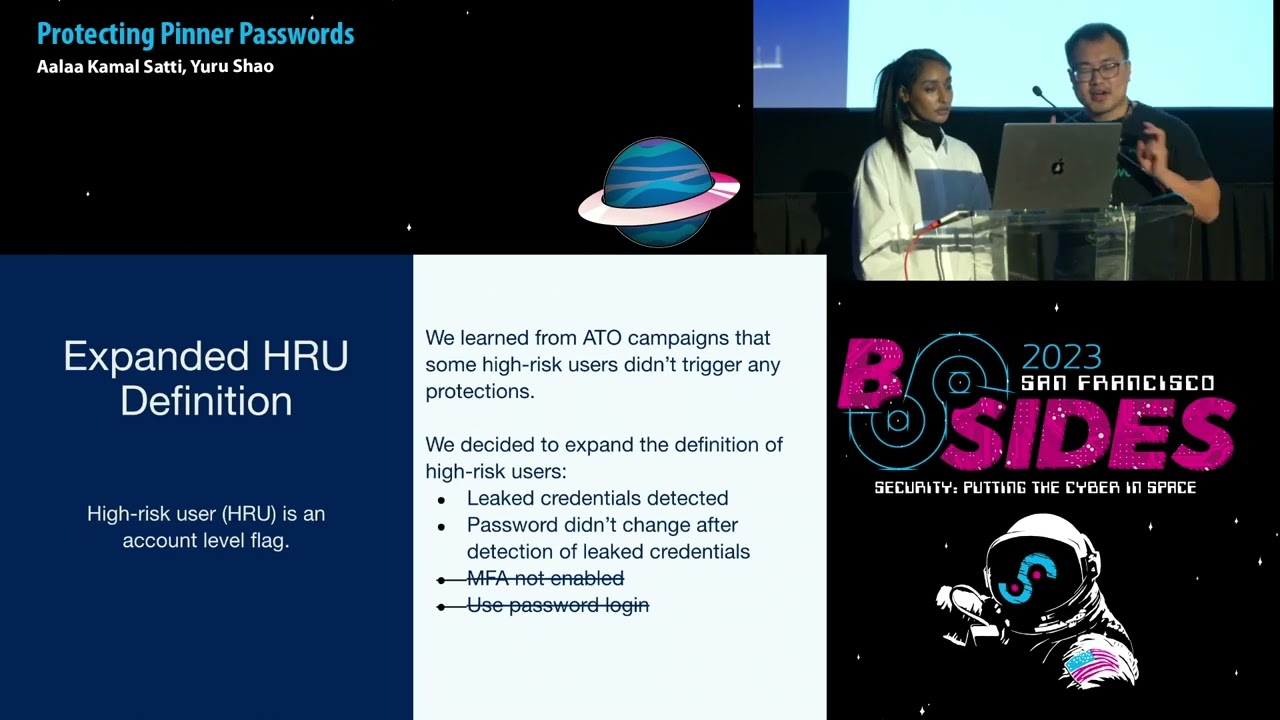
service services so our product security team in this work we are like the service provider we ingest the signals we ingest data from data sources and we do some processing and then we must find a way to provide that signal internally to our customers to our partner teams um sorry so here comes the hru or high research user um we create a definition of hybrid user and we put it as an account level flag so user accounts are considered high risk if they meet the following conditions uh we try to four conditions first of course the count should have the credential detected using the signals a second condition is that the password uh has not changed after the
detection of the credentials because we have offline processing and our math and average users is 400 million but our total number of users in convenient those inactive ones is a huge number of users and the procession takes some time so we must check the timestamp and make sure before we were able to forget the user they have not checked they have not changed their password yet and and we also believe that mifa especially we use SMS is sufficient enough to prevent ATO and users if they have MFA enabled we don't have to call them high risk um and we also provide the secondary logging methods in addition to uh you email and password unlocking we support
like social media logins and if you if users do not actually use password logging frequently or actively then we believe they're not at high risk um then with this definition and with the signal sources we build uh two approaches from labeling users uh so we have the offline process with the pin Reaper internal tool which fetches and process of my data set then we use a synchronized job to update our user DB uh this again this this allows us to scan our our users inconvenient those interactive ones or inconvenient those are not uh actually frequently with Pinterest with a real-time approach we are able to intercept some user flows and integrate the password track so
again the benefits of real-time track that we can integrate this with user engagement with users interfaces um here is a high-level architecture of the offline and online approach um again we have data sets from of compromise credentials and I will have our user DB dump we run some matches and we produce the data to uh I3 bucket then we use the pink which we use penetr which is our internal um asynchronized job scrambling service so this those synchronized jobs will pick up the data and write the data to our user DB and in real time we have integrated we have integrated with capture track to recover password track to the major user from those regarding authentication and
we will update the user DB from the real-time track
um so with Jacksonville kind of the hru original definition so we learned some lessons from recent ATL campaigns and we realized that uh some high-res users they didn't figure any protections and they are not they have liquid credentials but we somehow didn't detect them as high risk then we look at our definition and we realize okay the four conditions are pretty strict and we need somehow expand the definition to cover more users I think one reason is that we use isms based imfa and that's not uh as good as like Fido or key security business and user can can be still be user can can still be taken over by like a Sim swab attacks
and also for um user with social media unlocking some of them they still have password on their profile uh we just believe like when they send up uh with Google email they do not actually set a password but we that's a true first assumption some of them will come back and then set a password on their account and those passwords can be uh operated in a different website so moving on to user protection so we talked about which users are considered high risk so now we have specific protections for those users um and so before delving into what those protections look like I want to start off by talking about the two different classes of protection so we have
engagement protections which happen after the point we identify users with compromise credentials but before suspected ATO attempt and the programmatic protections happen at the point of when we suspect an ATO attack and so the main difference is one and engagement protections we believe that the the user that is online is the authentic owner and then in the programmatic protections we don't and so I'm going to start there um so account takeover protections take place when we detect suspicious activity on the account so we have an internal rule that's specific to users with compromise credentials so a few of the um the main points of it is that they must be a high risk user and they must be logging in
from an unknown browser and a new IP address and at that point um we invalidate their password we log them out of all of their uh we log them out of their active sessions and we invalidate those sessions as well and so they'll get an email that looks like this and essentially if they want to get back and recover their account they would have to go through the password reset flow or click on this link on the email and so that contrasts with the engagement protections like I mentioned before these are going to be for our users that we believe all actually truly on the account and also mentioned before with the recaptive password check we can
Leverage The user's engagement to be able to protect their account and so one of the ways that we do this is on password change and reset every time the user attempts to change or reset their password we check against the API to determine if that password had been leaked and if so we we block it yeah other forms of Engagement protections uh so we have the this concept of experiences at Pinterest and essentially a user a high-risk user whenever they land on the home feed depending on what platform they are on they'll see one of one of these modals or Nags on the left is what they'll see on web where we encourage the password change and also a
connection to either Facebook or Google on the right hand side are our mobile experiences for Android and iOS um and the difference between the two the reason why we're able to promote the social connections on web is mostly because of the availability of surface area um and if they were to connect to Google or Facebook uh we they'll see these nags and basically they'll will erase their password and we let them know that their password will no longer be valid and so if they want to start using a password again to access their account they would have to go through the password reset flow and so this is kind of what the engagement protections look like
um or the trends and yellow are the password protections and blue are the Google protections and green or Facebook um so you see there are a couple of main spikes that I want to touch on here the first one is the integration of new signals um so the more signals that we we receive the more users that were flagging is high risk and the more that they're going to see those modals on web or iOS or Android and uh update their passwords or connect to Google or Facebook and the second Spike here you're gonna see that this is when we started to revamp all of our modals on the different possible on the different flows and so
um the engagement is going up and then in this last one this is uh in reference to what you was discussing previously about the expanded definition we expanded the definitions so more users are classified as high risk and that means more users are seeing those engagement protections and updating passwords or connecting to other social accounts um I do want I do want to touch on here that the overall trend is that it's going down with more users that are being classified as high risk then the more they're protecting the accounts the fewer users that are seeing this over time and that's the trend that we want to see yeah I want to add something here just a
one small piece about engagement protection we built so actually in modern browsers like Chrome and Safari is supposed a thing called a wellness well-known slash change password redirect so the way it works that they have some builty um password managers and like Google like Chrome and Safari they store they can store your password and the manager the password for you they also have some capabilities for detecting Bridge password or password resources across different websites and they oftentimes give you some alerts seeing okay we have detected Bridge the password or you are reducing your password on different side uh do you want to proceed and and change your password or to update the password they would just grab the well-known
selection password of the set and read their user to there so again as we have talked about engagement protections we want to navigate user engagement and we want to make it I we want to make it as actionable as users so when users connect the button we should give them the red page and allow them to take the right actions immediately so next I'm gonna talk about the Learners and insights so so far we have talked about the internal tools and the password track uh which we we use as to ingest the signals we talk about how we enable hru AKA hybrid users in our system so that that they can be EOS by our Downstream and partner teams and we
also look at the engagement protection and the program protections which actually provide a proactive way for us to prevent atos from happening um so in terms of the overall kind of security there are some low high and fruits you should consider first apply different kind of security requirements for different users um this is uh especially true for Pinterest because we have two main categories of users one category is the personal users and second category is business users and basically those advertisers who have a different portal who are ping add content on Pinterest um you'll probably hit that but those are our valuable business users uh so we actually have different requirements for the kind of security for example for
personal users MFA is optional you can have my imfa enabled but you are not required for business users we actually provide some products so business owners they can require they can really mandatory for the employees to to turn on MFA otherwise the business user will lose the asset to the account so I think for our peer companies you probably should consider doing the same thing and it's not that difficult and written limiting is a small thing you can quickly build but it's actually very helpful for preventing Blue Frost attacks you can set a user-based return limiting and IP basic limiting and you can have more advanced reading limit team but actually at least you should
have some part there and supporting well-known expression password redirect is a such a small change you can do within 20-50 minutes but from other experiences we saw immediate increasing our traffic to the password change page again we talk about the protections and those protections will prevent atos from happening because you actually ask users or you actually protect the users prefer the successful logging attempts so you should also consider some proactive measures for detecting Precision support higher users I do want to come out some limitation of about the engagement protections again this is great for user experiences and for preventing eto's add-on early stage but the coverage really depends on two things it really depends on user
engagement and this limited for two reasons uh one reason is that uh users that do not come back to Pinterest they may never be protected by engagement protection because they will just now see uh the experiences we ship and also we have some users a certain number of users on unsupported clients is this is especially an issue for mobile because a web we will get the most recent build immediately but on mobile they have to upgrade their apps on their phone so there are certain users we can not receive the experiences because they're just on the answer political convergence um so we also marry the effectiveness and from the 2020 to ATU campaigns we found that 90 percent have impacted ATO
impacted accounts they actually usually credentials and we actually have detect them uh but they're still 28 percent Gap it's not 100 so which you need other detection defense capabilities uh so also we recommend integrating multiple sources uh to get most up-to-date data sets of bridge credentials um as you can see earlier after we integrated new sources there are some specs basically we have a better coverage with new data sources um so before we conclude here are some takeaways again our detection methods presented they are proactive and they actually significantly helped our sensitivity team deal with ATO side skill we cannot prevent all eight heals from happening at the beginning um because the coverage will never be
100 so reactive approaches are still very much needed um so here are the Pinterest we do not encourage we do not require email confirmation or MFA but we do encourage users to have email confirmed and have mifa enabled so I think having a value email is super important because if you take some actions or do that for example the actual user account you need them to to to be able to come back and with 10 to use we normally use Gmail addresses as social truth so I want to thank some early contributors to the project I mean who did an Eric I also want to thank our president Civic team for being our awesome partner it's very especially
Carmen and the president I actually trust and CeCe they have a blog post about guarding which is a ruining and actually we use gardening to create some rules for the ATL protections yeah that's it for our presentation today uh thank you for joining us thank you
Related talks
 29:24
29:24 32:41
32:41 31:58
31:58 25:39
25:39 42:09
42:09 28:25
28:25