Threat Hunting: Where Evil Hides
Show original YouTube description
Show transcript [en]
hello everybody welcome to threat hunting where evil hides my name is amber lee reynolds and i'm going to be your panelist for today if you'd like to get in touch with me after the panel or if you have any questions or concerns about the content you've seen here today you can find me on twitter at thredemology let's go ahead and get started to start off with briefly here's just a little bit about me you can see some of the alphabet soup there behind my name i have a pretty standard background in it and cyber security i was a former sock analyst i jokingly say recovering sock analyst but i am not in fact recovering being a sock analyst actually gives you
a great background as a threat hunter because you have a chance to see what's coming in on the front lines of your enterprise you can see all of the incoming malware attachments you can see all of the incoming phishing attempts and all of the different things that users see on a daily basis it gives you a really good idea of not only what to look for but how to look for it i have a particular interest as a threat hunter in malware analysis and reversing i'm very passionate about it you'll notice that i also perform root cause analysis if you saw my twitter handle on the first page you may have caught that thretymology is a
portmanteau of threat and etymology finding the root cause of threats i thought that was rather clever in my free time i am a semi-professional musician in a symphony i also spend time riding around on a motorcycle i do in fact dance with fire poi safely i might add and i do make very terrible jokes most of which you can see on my twitter so here is just a little bit of what i'd like to cover in today's panel you'll notice there's quite a bit to cover with each of these different categories i opted not to go into very specific details simply because it would take a little bit more time than i have today and also because i'd like you to be able
to use this content and the examples to build your own use cases and your own sim content for your enterprise which will be mostly dependent on the circumstances that you have so let's go ahead and get started
we'll start off with a little bit of threat hunting what it is and what it is not i will assume that everybody watching this panel has a fair idea of what threat hunting is but there are a couple things that i wanted to emphasize for those who perhaps may not know what threat hunting is or those who may wish to become threatened so i found this great quote on sam's site and if you haven't been to sans site i highly recommend that you go and visit them whether you're a threat hunter a sock analyst a forensic analyst or an incident responder as they have a lot of free resources that you can use to really enhance your
knowledge base the reason i put this up here is simply to emphasize that threat hunters are not reactive they're actually incredibly proactive we threat hunters are searching for things that security appliances and monitoring don't catch whether that's because of misconfigurations or perhaps a lack of signatures or even signatures that do exist but may not be written to look for specifically the things that you are hunting for that's what threat hunters do on a daily basis here's a panel from crowdstrike showing where threat hunters will tend to sit in your organization now this is showing you the socks at large in general rather than sock analysts as we traditionally think of them threat hunters will act alongside your
analysts they'll probably be looking at the same sorts of logs that sock analysts do they'll simply be parsing them in a different way and looking for different things another thing that i wanted to just mention as an aside is that threat hunters will typically not be the people who triage incidents they're not generally the people who are hands on a keyboard face at the monitor looking for incidents that are already coming in from your security appliances they'll tend to be creating their own content creating their own dashboards from those same logs and looking for patterns that point to specific artifacts or behaviors here's a slightly different view of what threat hunters will tend to be doing on a daily basis we
have here an artifact pyramid or an ioc pyramid the things that are on the bottom are still very important don't get me wrong threat hunters will certainly use domain names ip addresses and hash values in their daily hunts they simply won't focus on looking for the presence of those in your environment those sorts of things tend to be better suited for endpoint and network protections or security monitoring appliances threat hunters are going to tend to focus on things that humans are better at finding ttps or tactics techniques and procedures the tools that are used by threat actors as well as network and host artifacts that standard security monitoring appliances may or may not be able to find
now i know that there are things like ai and machine learning that are definitely working towards finding these on a regular basis and making analysts lives easier but for now it is still easier for humans to be able to find these in conjunction with their machine counterparts
here's just a small example of what a threat hunter might be looking at on a daily basis and this is a generic sort of splunk search this isn't particular to any sort of organization and you can see here that this is a sampling of web gateway traffic and there will be a ton of these logs in your organization you'll notice here that i've outlined in a red rectangle a source.hpg domain and the reason i box this is because this is something thread hunters will look for which is a pattern that attempts to look like a url spoofing that happens to have a typo in it typo squatting and typographing are very common things for attackers to do when attempting to
say fish for somebody's credentials or host a website that looks pretty close to the original and host malware on it so these are the sorts of things that threat hunters will look for that machines may or may not be able to catch currently and last but not least before we leave this section i wanted to show you guys this really accurate quote from malwarejake you can find him on twitter at the link you see on the screen every threat hunt is like schrodinger's network this is actually incredibly true you don't really know what's inside your logs until you actually do look inside your logs and when you do you may find that it's a little more like pandora's box than
schrodinger's network moving on to threat hunting researching and threat modeling when you first start setting up your threat hunting team or if you're trying to become a threat hunter one of the first things that you'll do is a lot of research it's taking in and ingesting a lot of data and then organizing it in a very specific way both for you to be able to understand it and for other people to also be able to understand the information that you're presenting to them so this first slide that i have here is simply how i as a threat hunter tend to organize my threat hunts i create theories and predictions based on what sort of behaviors or
artifacts i think i'm going to find in my environment and they tend to fall into two different categories these are threat agents which are the actual attacks themselves or threat actors the people and machines that are actually performing the attacks so you can look for attacks without worrying about attribution who's behind it so i can look for say a pattern of different subject names for a phishing campaign or i can look for a threat actor if i have a particular apt an advanced persistent threat group that displays certain behaviors repeatedly then i don't have to worry about simply looking for the attacks i can look for artifacts that are specific to this one group
another thing that you'll want to research is what is important to your company or in the case of your home network what is important to your family these are generally called the crown jewels the pieces of information that are most valuable to you and would cause the most impact to you were attackers to be able to get into your network and get a hold of that information not everything in your network is going to be considered crown jewels you won't need to defend or hunt everything equally some systems will have more importance to you than others and it's very important as you threat hunt to identify these systems not just to be able to threat hunt
around them but also to get an idea of what the attackers are going to be after attackers generally aren't going to go looking for everything in your network it simply takes too long they're going to go for the most valuable things they can find smash and grab and then leave your network so if you know what they're looking for you know where to look for it once you've gotten a bit of research together on the different sorts of attacks and maybe the different sorts of threat actors that you want to research and hunt for you'll want to organize that knowledge thus we have threat models it's just a way of making all of the research and
information you've put together makes sense both to you and to the people that you're going to report to there are many different threat models some companies even have their own proprietary model microsoft has one of theirs but the ones that you see here are fairly common you'll see the diamond model up in the top in the lower left corner many of you are probably familiar with the cyber kill chain from lockheed martin in the lower right is the ooda loop the observe orient decide and act from military applications and in the upper right corner i put simply the text miter attack and that is because the miter attack framework is so large it won't even fit on its own slide
because they now have multiple spreadsheets that cover the miter attack framework incidentally if you haven't ever been to mitre's website i highly recommend that you go and have a look at it there's a ton of information that's very helpful to you both as a sock analyst and as a threat hunter and i'll provide the link for you in a later slide in fact speaking of later slide here it is these are some of the reference resources that i use when i'm gathering intel both on attacks and thread actors i've divided it here into two different columns for you the commercial and licensed set which you generally have to pay for to get a license and then the free versions and i
will say here that free does not necessarily mean bad this isn't quite a case of you get what you pay for because many of these free resources are actually fantastic at providing you information especially the links here that are about the apt groups it's valuable information for threat hunters i also encourage you to look at social media because there are threat hunters there who network and share all sorts of information freely with the public you can also look at vendor blog posts because they also contain information that the vendor is allowing the public to see freely to help not only increase knowledge but to increase all of our security
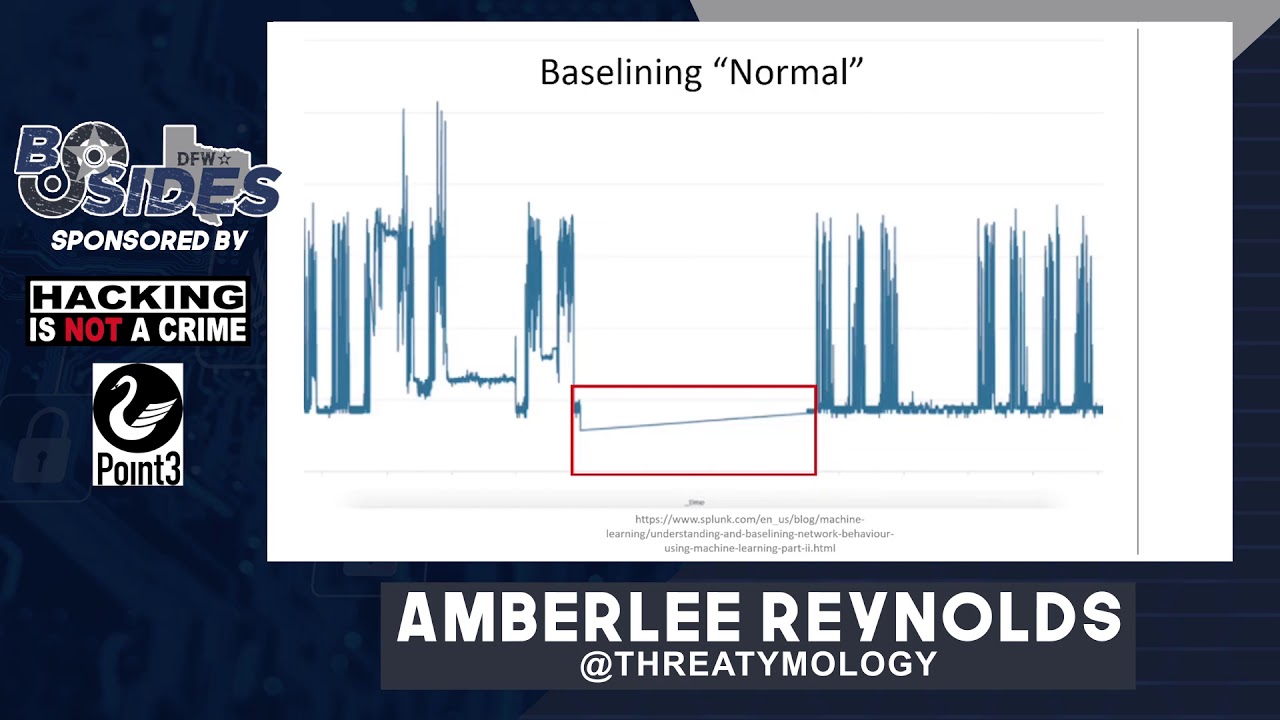
and with that let's go ahead and take a dive into some of the different artifacts that you can find threat hunting in your network traffic one of the first things that you'll want to do in your enterprise is to baseline normal and what i mean by this is that you need to know in your environment what is considered normal behavior for both your users and your machines and what is not normal of course you can't find evil unless you know what is evil and what is not and you may need to coordinate with some of the other departments and personnel in your enterprise to be able to know what is normal it's good to be in touch
with server owners and users of all different departments and in all different areas of your company to be able to know what they do on a daily basis so that you know as you see here on this graph that a s of severe drop in traffic i'd say is not a normal thing to see that may end up being an outage due to maintenance or it could be because there are attackers in your network who have taken out one of your security appliances it's definitely good to investigate either way now i know that i mentioned earlier the threat hunters don't tend to focus on the presence of ip addresses in your environment and in a general sense that's very true
what i mean here by known evil ip addresses is that sometimes security appliances do fail or sometimes they're misconfigured so if you happen to see quite a few machines in your environment suddenly attempting to reach out to known evil ip addresses like you see here in this alien vault threat feed for malware command and control ip servers you'll probably want to have a deeper look at it even if the traffic is blocked by your security appliances and your monitoring that still may indicate the presence of an infection on one of your machines or maybe multiple machines so it's definitely worth having a look and ruling out something more nefarious similar to known evil ip addresses i've
listed a set of known evil ports for you and i don't mean to say that all of these ports if seen are automatically evil some of the software that you see here can be used for both good and evil in some of these cases though especially recently they've been seen to be used by malware for c2 purposes and that's why i've got them listed here if you don't use these pieces of software in your network i highly recommend that if you see this activity in your environment that you take a closer look some of these ports like 1337 or 6969 to the best of my knowledge don't have common software associated with them and thus should always be investigated
similarly 4444 is a well-known metasploit port generally that won't be used in enterprise environments either unless you have a red team or pen testing team present some of these others may be very commonly used like 3389 for rdp however if you have external traffic coming inbound to your network on rdp and it's not from a known system i'd highly recommend that you investigate it promptly i found this really neat article on splunk's site called hunting your dns dragons and you can actually find it on their site by googling that phrase and they've provided a fun search here with a dashboard and let me explain what the graph is showing you have on the bottom variance beacon
time this is simply the difference in time between packets the count is simply showing you the number of packets that are sent and that's on the left hand side so what you ultimately want to look for is a high number of packets or a high count with a low variance or change in the time between packets this would represent beaconing behavior and there are some legitimate sites that will appear to beacon and these can be things like heartbeats if you're sitting on a new site or ad sites especially if they sell slots to different advertisers when the ads change you may see very consistent traffic that looks like beaconing but actually ends up being legitimate
note that i did not necessarily say benign just legitimate but it's still worth a look to ensure that it's not to a malicious site another way that you can look for beaconing is to look for consistent packet size this is actually a screenshot from active counter measures and it's showing dns traffic with an identical packet size all the way across the session this is highly unusual you probably won't see such identical packet sizes in a session and this can also be indicative of tunneling or exfiltration with consistent packet size you don't necessarily have to worry about time between packets so malware that attempts to sleep or attempts to increase and decrease its jitter widely can still be spotted using this
technique so i think it's worth looking at the next type of threat hunting use cases i'd like to look at involve web traffic so let's go
similar to looking for unusual ports and network traffic you can also look for unusual ports in web traffic now generally this will be a smaller set of ports so this can be a little bit easier to look through remember that i said at the beginning of the network module that you need to baseline normal and that still applies here and in every other module that i'll be talking about today i'm not going to repeat that slide for each module because let's face it that's going to get old very quickly what i wanted to show you here is that there is traffic being shown to a port that's not normally used for http and as part of the baselining you'll
need to know if your enterprise uses any alternate ports for http or https such as 8080 or 8443 once you've eliminated ports that you normally use for http traffic you'll want to investigate anything that's left such as the one that is highlighted here if your web gateway logs happen to keep user agent strings you can also hunt through these as well to see what sort of traffic is going in and out of your network here i've got a bad user agents list and what this is is simply a list of different user agents that are associated with scanners sweepers scrapers and bots of all sorts generally things that you may not want to be gathering
information about your network and you can find several of these lists on github and the internet at large this isn't the only one you can block these if you have that capability via your web gateway but it's also good not just to look at the traffic coming inbound to your network but the traffic going outbound from your network because you can also hide things including code in your user agent strings now this won't necessarily work 100 of the time because user agent strings can be spoofed they can be changed by the attacker so it's not a catch-all but it is definitely worth a look through to see if you happen to see any low-hanging fruit
similar to beaconing with network traffic you can also look for beaconing in http traffic this may indicate that exfiltration is taking place in your network or that there's a malware infection the same sort of criteria apply looking for similarly sized packets looking for packets that are sent consistently with very little variance between them and or a high number of packets being sent to the same place this example that you see here on the screen happens to be a timing example where the packets are sent exactly one second apart all to the same website and if you happen to see this it may indicate something is going on or it may simply indicate a heartbeat but
i think that it is definitely worth having a look at just to make sure that it's benign
known evil uris and urls now here i'm not necessarily referring to entire urls that are known evil that point to very specific malware downloads or phishing sites here i'm actually referring more to a pattern you can see what i've got highlighted here in the cnc section is gate.php the reason i highlighted that is because z-loader this particular piece of malware here likes to use urls that end in gate.php so if you happen to see any url in your environment that ends in gate.php and it's not something that you use for your environment you'll probably want to have your sock analysts take a look at that person's web gateway traffic to see if perhaps that system is infected
then maybe initiate an av scan just to be safe so if you see patterns like this you can use those to pivot and perhaps look for other infections in your environment now i promise this is not a splunk presentation i just happen to find a lot of really cool stuff on their site and this is another use case that you can implement in your environment using entropy to search your urls entropy is simply how random a url is what it's telling you is whether it's likely that a human created this particular domain or whether a machine might have created it like many of the artifacts here it's not 100 percent for example cloudfront a content service
provider tends to have a lot of what look like machine created sub sub-domains that doesn't necessarily make them evil but it does increase the entropy of those and here you can see a search implemented in splunk that shows the domains that are coming out of your web gateway traffic and the level of entropy or randomness randomness as represented by ut underscore shannon for each of those different domains the higher the ut shannon score the higher the entropy or randomness so the higher the score the more suspicious that a domain will look and the more likely that you should give it a second glance known evil top level domains these tend to be domains where a lot of phishing sites or
sites hosting malware have been reported by users it has nothing to do with the origin country of where they come from it's simply that these sites have been reported to host bad domains this particular list is from spam house that's h-a-u-s and there are more than 10 on the list i believe there are actually 25 on the list and they do keep it updated so it may be worth having a look and if your company does not host any websites in any of these domains and your clients also do not host any websites in any of these domains you may wish to block them and monitor in case any of your users attempt to visit them because again
even if they're blocked an attempt to reach one of these may indicate infection if you remember earlier in the presentation i mentioned looking for packets that are of identical size in this case i'm showing a set of dns queries that have much larger than normal packets and this can also indicate exfiltration dns queries will tend to be fairly consistent in your environment so if you happen to see like this graph shows packets that have very long queries or very long responses not only can it indicate exfiltration but it can also indicate malware c2 commands running back and forth into your environment which is generally not desirable so any time that you see excessively large packets especially in
protocols like http or dns i think you should definitely investigate it
here's one of the more fun use cases i think i've developed workstation metadata in post strings this one i actually developed while studying trickbot and what trickbot and other malware occasionally do is they will exfiltrate or send out metadata about the machines that they have infected in the actual url itself that it sends out in this case it is a post request and you can see the area that i've marked with a purple rectangle here the center portion of that url actually contains a workstation name it starts with d-y-i-t and it shows the operating system that's currently running along with the architecture and the host name this is pretty general information to be sending out of your environment to be fair
somebody knowing the host name of one of your machines may not necessarily be able to do anything with that information but the reason i list it here is because it can also be an indicator of infection and i think if you see this in your environment you'll probably want to notify your cert
this is a little bit more esoteric of a use case but if you do happen to get mime type or content type within your web gateway logs then you can compare the reported content type to the actual file extension that's being provided here in this screenshot you can see that file.php is definitely not a jpeg image file so that's another way that you can look for potential malware coming into your environment
another thing that you can hunt for in your web gateway logs as referenced here by the ineffable mr troy hunt http downgrade attacks so if you happen to see traffic in your web gateway that starts off as https and then suddenly changes to http you may want to have your analysts have a second look at that traffic just to make sure that you haven't suffered a man in the middle if you have http 2 https traffic that can be legitimate and normal if a website is redirecting to its more secure counterpart however https to http can be unusual
and now let's move from the network onto the endpoints let's start with endpoint files now the processes that you're going to see in this module are going to be windows focused because i tend to be a much more comfortable person in windows rather than linux environments but the same concepts apply that said if you look at the left hand column can you guys tell which process is misspelled that's right it's svhost.exe it's missing the c it's very common for attackers to name their processes similar to existing system processes to make them seem more legitimate another thing that they can do is place them into a folder that also seems legitimate such as system 32 can you tell which of the processes on
the right is in the wrong location
that's right it's explorer.exe which is normally in the c windows folder not in system 32. another use case i've had success with is looking for executables that are running from user writable locations in this case i'm referring to a user with standard permissions and not an administrator who can write to many more folders but generally users can write to c program data any user folders like c users insert username here documents downloads and pictures also the app data folder and this includes both local and roaming folders malware likes to install itself here because all users have access to them so it's a good place to hunt for malware
unusual or uncommon file extensions now this will also require baselining or knowing what sorts of files are common in your environment for example if your administrators tend to run powershell scripts for server maintenance then you'll have ps1 files in your environment but if you don't allow that in your environment and you suddenly see a ps1 file appear it can be indicative of the presence of an attacker here i've shown an iqy file which is an internet query file that's normally associated with microsoft excel this sort of file is generally not very common in enterprise environments and its presence is definitely suspicious in my opinion at the bottom of this slide i've included a few different file extensions
that are typically considered uncommon and so should probably merit a second look in my opinion if you see them in your environment
this one is also a little esoteric files with unusual department locations what i mean by that is if you happen to have an invoice file say invoice.doc and it's located on a system for a user that doesn't typically handle invoices that can be highly suspicious it means generally that the person has probably opened an email that had either an attachment or a link in it now this can be a little bit more difficult to hunt for so what you'll probably end up doing is stumbling upon it as you're looking through various lists of files while you're doing a different investigation that doesn't make it any less valid though so if you happen upon a file that doesn't appear to relate
to the user on whose machine it is currently sitting then you may want to give it another look
bonus fun if you happen to work for an enterprise that takes in customer service requests from external users like clients or even just visitors to your website this can be a fantastic place to hunt for malicious attachments and malicious links especially if your enterprise doesn't limit the type of files that you can upload or the type of text that can be submitted in the description area i will caution though that you should be very careful if clicking on these links or opening these attachments please always do so in an isolated sandbox wherever possible otherwise have fun hunting because you can find plenty of stuff submitted from the outside since bots can also post to these forms
and from files let's move over into endpoint processes if you don't happen to recognize this poster this is the venerable sans hunt evil poster and you can download it for free from their website along with a bunch of other posters and resources now granted if you want the poster version those come with the courses but you don't have to take a sans course to download a version of this poster that you can definitely use and what it does is it describes most basic windows system processes and more importantly in my book it describes the parent-child relationship between those different processes so you'll know that wheninit.exe is supposed to spawn an instance of services.exe if you were to see services.exe
spawning smss.exe you would be able to look at this poster and know that that's not supposed to happen and it may be a spoofed process so it's important to know the parent-child relationship for these different processes so that you know what is supposed to spawn in a chain and what is not if you see something that is not say something this goes along with what i mentioned earlier about executables running from user writable folders oddly named processes especially in these user writable locations definitely tend to stand out if you happen to be looking at a live image of that machine you can see here that i've highlighted in red an executable that is clearly not human named malware
authors don't always necessarily take the time to name their things something legitimate especially if they're in a hurry so this can be a very red flag as it were to identify that there is something going on on that system that should probably be handed over to your cert team so if you happen to see anything like this i would consider it very suspicious
this one many users may recognize as the install location for the google update application and it shows up whenever you install google chrome google helpfully lists and you can see it on this slide the locations where this executable is supposed to reside google update is actually a very popular program for malware authors to spoof they like to call their program googleupdate.exe but they will place it in a folder that is not one of the three that you see listed here so for example they might throw it in c program data google update.exe or worse if your user is an administrator they may try and throw it in c windows google update.exe if you happen to see an executable like
that in a location where you know it doesn't belong it definitely should be investigated in my opinion
this one is actually probably my favorite as a malware analyst processes that are launching command.exe or conhost the console host executable as children this particular example is showing a pdf in foxit reader generally pdfs are not going to launch command prompt windows or console host windows if you happen to see a pdf that is doing this it can be an indicator of infection and that pretty much goes for any sort of office document or email any program that your average user might use that doesn't normally perform this behavior and isn't purposefully running a batch script will show up as showing a command.exe child and should ring alarm bells in your environment
this one is also popular with malware processes requesting elevation or worse self-elevating without asking the user at all and that would occur if you don't have uac user account control turned on anytime that you see a program requesting elevation like this where the user did not explicitly choose run as administrator then this is definitely a red flag in my opinion programs generally will not ask to self-elevate unless they have been tampered with or if the user has explicitly asked it to do so
this one i actually just recently learned about and i admit it blew my mind that notepad.exe can actually connect to the internet i did not know that and so i give you this use case processes initiating network connections that don't normally do so now this particular example actually has a couple different things wrong with it and if you combine the knowledge that we've discussed from this module and previous modules you can see here that the bottom entry there notepad.exe is located in the wrong place it is not in system 32 it is actually in a user-writable location even though it is called notepad.exe you may also notice that there on the left that the icon with notepad.exe
appears to be drawn can't really tell what they were going for with the red dot and the semicircle over it but we'll set that aside for now the other important thing to see is boxed in on the right in red you can see that there were two network connections initiated by notepad.exe notepad does not regularly do this you actually have to take a very specific set of steps to make notepad connect to the internet since it does not regularly do this anytime you see it attempting a network connection is suspicious and this is of course for notepad.exe the built-in executable and not notepad plus plus which does connect to the internet to check for updates
and from files and processes we will move over to registry hives now many people who have had a chance to look at malware know that the run and run one's keys tend to be the most common for malware to use whenever they want to establish persistence so this is one of the best places that you can look for artifacts surrounding malware and persistent programs they'll tend not to use run once unless they are changing to a different registry key or if they're trying to establish fileless persistence because it will only like the name indicates run once the run key indicates that it will run each time your system boots up now there are more than two keys in the
registry that can be used to establish persistence it's not limited just to the run and run once keys and here i wanted to introduce you to the magnificent blog by hexacorn and the link is here on the slide for you and the blog is called beyond the good old run key and i believe there's something like 150 entries now each one dedicated to a different section of the registry showing where a program can establish persistence beyond the run and run once keys it's terrifying to read in a way because it just shows how many different ways there are to establish persistence that the average user might not even think of so it's a great read and i highly
recommend it
there are also debug keys for each different type of process this can be used in two different ways it can be used by malware to run malware whenever you're trying to launch a legitimate program like in this example taskmanager.exe if you were to click on taskmanager.exe per the debugger key that you see here on the screen it would not run task manager it would in fact run process explorer instead so malware can use that to launch a different process it can take a security programs key such as windows defender and you can tell it instead of running windows defender to run svchost.exe instead which means that your security program will no longer function as it normally
would so malware can use it both to run itself and to disable your security applications both are indicative of suspicious behavior a slightly different use case for you here you can look for excessively long registry keys and this may be a little difficult to look for if you don't keep registry key data in your sim but if you have this capability looking for registry keys that are excessively long such as the one shown here in the screenshot can indicate the presence of a code or a script that has been injected into the registry by malware doubly so if like the screenshot here it is base64 encoded it's generally not common to have such a long registry key
especially one that doesn't point to say a file location or a cls id something like this is definitely indicative that something is wrong
let's quickly move over to thread hunting through emails since email hunting tends to be a lot like web gateway hunting i'm not really going to go into detail here about it but i will tell you that as a threat hunter these are the three primary things that i hunt for when i am looking through email logs subject lines and attachment names both kind of go together in that if you see the set of phrases that i've put down here at the bottom of the slide anytime that you see invoice receipt payment document proposal inquiry in either the subject line or as an attachment and generally these will be office type documents so word documents excel files
powerpoint presentations and occasionally zip files if you see those keywords and it's not from a client or a prospective client that you were expecting communications from you probably want to have a second look at that email and also caution users not to open it as malware authors like to use this quite a bit to either phish the targets or deliver malware to their systems the other thing that i look for are urls within the email itself the links contained within these can be investigated independent of the emails that they are part of and it works very similarly to web gateway log research it can be very very fun threat hunting in terms of timing now when i say timing i mean the time
that the behavior takes place so for example as on this slide if you have a dip in traffic or a spike in traffic outside of your normal business hours say that you have an enterprise that is open primarily from 8 am until 5 pm your local time if i suddenly had a spike in traffic at 2 am i definitely want to have a second look at it and make sure that there wasn't a user say traveling out of state or out of country who was trying to get some work done in a different time zone while they were traveling some of these may have legitimate purposes or benign purposes and the only way to know is to go ahead
and ask the user similarly if you see a sudden dip in traffic it can indicate either a failure or worse an attacker in your network that has disabled one of your monitoring appliances likewise if you see traffic outside of your normal business days it merits investigation if you're normally only open monday through friday and you suddenly see a traffic spike or dip on saturday or sunday and it's outside of normal scheduled maintenance or any sort of user interaction that you previously knew about say a user gave you a heads up that they were going to be working on a presentation while they were at home on the weekend any of those can generally discount traffic anomalies but if you don't have
any of that information then i think you should definitely give it a second look and lastly a sudden spike in a particular user or machine this also involves of course baselighting what is normal so if you see particularly a sudden spike in traffic it can indicate not only an infection but that somebody is trying to exfiltrate data on a machine this can also indicate an insider threat it may be an employee that has malicious intent toward the company and is trying to send out data before they are terminated on the other hand it can also be a legitimate use whether benign or not perhaps the user is trying to back up some data it's definitely worth
asking the user not only what they were doing but why they were doing it just to rule out anything nefarious all right and last but not least threat hunter story time these are tips and tricks and various pieces advice that i have learned in my time as a threat hunter know your architecture and environment this is very important to threat hunting because it helps you rule out false positives it can also help when you trace the traffic flow in your environment you can tell where changes may need to be made so that you can either detect better or detect at all in some cases
so many logs as a threat hunter you're going to look through tons of logs so many logs from so many different sources and one of the best things that you can do is determine what is the best way for you to parse that information for me it happens to be graphics based dashboards it's much easier for me to look at a picture and know what's going on very quickly than it is for me to look at like this slide a table full of text but that may not work for everybody so figure out what works best for you in terms of your threat hunting style and then make the logs fit into the format that works
actually finding stuff can be terrifying we have actually found things in our environment here where i work this particular example is not one of them this is actually a power shell from the terla apt and it can definitely be terrifying if you see something like this in your environment that indicates the presence of attacker for who knows how long they've been in there but something important to remember is that it's not on you personally you did not cause this apt to be present as far as i know you did not invite them in if you did then your company may wish to have a chat with you but don't take it personally when you find
things like this in your environment and also don't take it personally if you don't find them in your environment i know i've been frustrated quite a few times when i find out after the fact that our penetration testing team has done some testing in our environment and i did not see any trace of them and it makes me feel like i am personally a failure because i did not catch them and it's my job to catch them it's a learning experience coordinate with your penetration testing team ask them how did you do this what sorts of techniques did you use so that you can write better content and catch them next time the whole point of this is for everyone
to work together and make better security always be reading this is one of the best pieces of advice that i can give threat hunters weather new threat hunters just starting on the job or experienced threat hunters find the sources that appeal to you whether it's blogs it's social media it's vendor posts whichever works for you and read constantly keep up on who the latest threat actors are what the latest attacks are what the latest vulnerabilities are because that's what attackers are going to go after and all of the different updates that go on with various products knowing when windows updates are coming means it's time to go and read the microsoft blog that details all about what those
updates entail so that you know what sorts of attacks might be coming at your environment and you can plan patching around it well not you as the threat hunter will plan the patching but you'll know to prompt the people who actually take care of that
and that is my presentation i hope you guys enjoyed it again if you have questions i will happily take those now in the discord chat alternatively you can reach out to me i am at thredemology on twitter thank you so much for attending today and i hope you guys enjoyed the rest of besides the
Related talks
 50:58
50:58 45:41
45:41 50:00
50:00 40:55
40:55 1:05:35
 46:01
46:01