Secure Browser and Browser Isolation 101
Show original YouTube description
Show transcript [en]
like uh welcome to the b-sides Vancouver 2022 um either Jenny is going to speak about browser security isolation 101. um take it away Jenny thank you very much good morning good afternoon good evening I guess it's more good afternoon for Vancouver it's a bit slight older uh later for me I'm in Toronto so it's 5 00 PM for me so let's begin as you probably know we all spent quite a lot of time in the internet and majority of the applications we are right now touching our browser related and it means that we're spend quite a lot of time in the browser and with the amount of the bad guys in the amount of automation right now having in the
Internet it's quite important to protect ourselves much much better if you think about this and all the automation we've been doing so far in our corporate environment the bad guys can do pretty much the same automation on their end and it's been the moment we spin or start a website in a couple of minutes the bad guys can spend a very similar websites or the potentially we find vulnerabilities in the websites and they may in fact this website with a lot of malicious things or put fishing links there as well so it's quite important to figure out what's the best way to protect us and we're going to talk about browservation and browser security what's happening in
this market why it's important and what you can do to protect yourself better I kind of miss the slide by mistake so I'll go back I'm evgeny I work full time in a company called herjoy group you may know Robert from Dancing With The Star Shark Tank Dragon then and many other shows but his main business is cyber security been there for 15 years I also started a podcast with Dimitri around two years about security architecture we did a lot of stuff Network related and security related security related but today we will talk about browser isolation and browser security so let's look on some stats there's more than 18 billion different websites on the internet and based on security weekly
around two three years ago was did the research they realize there's one percent of these websites are malicious one percent is actually 18 million websites if we look on awesome top 10 we'll see that they found more than 95 four percent of websites are susceptible to some kind of an attack broken Access Control injections and many many other things and this means that it's relatively easy to do something bad with the websites and when you browse you cannot be very reactive you want to be proactive when you're browsing and when you're defending your companies and your networks as well interestingly enough last week I was checking for Teppanyaki this whole code in Canada and if you're in US you're
probably called Hibachi and I want to eat some food in Markham in Toronto because I was doing a bit of research on the topic I popped and want to realize how many javascripts and domains and links they have in a website this is a simple website for food for restaurant there's no even order online they have 55 different javascripts and certain domains that link to somewhere you know how much CNN has and many other sites has much much more and what I want to show here is that there's a lot of dynamic things happening with the website if you're not always aware about them so it's important to figure out what we can do about it the and the web
itself is very very big attack Vector majority of the phishing attacks and social network and browsing are happening through there we always talk how the attack started it was efficiently somebody send us something we got a text message SMS or something else when we click on the link and we downloaded malware or something else I do want to speak quickly what we can prevent using browser isolation and browser security type of controls the list is probably very very familiar to you you see many many attacks that are very widespread and used all the time and I'll go a bit deeper later on even so it's one-on-one we're not going to go very deep but I
will explain the ideas and how it can be done and why it's very very effective interesting interesting part our industry is pretty much not going around but we are very focused to explain how we can work with miter Q chain was one one of course miter is one of the main Frameworks that we explain how we can defend what we use in a stock how vendor aligned to this as well the interesting part that Q chain has seven steps miter has 14 step the surf tabs steps in both framework is one delivery One initial access it's basically the part where a malware is downloading on your machine or something happen with your machine where everything else is started with browser
isolation and browser security this is where we can stop it that's it there are no more steps because it didn't go to us it's isolated from what we're doing right now and what's happening right now when I present this information there is nothing really in miter that talking about browse resolution but I did support with certain people and folks in miter and they do working to add more isolation in the miter attack framework because we all believe understand how important it is also if you look on zero trust very very popular topic almost magical acronyms that people use all the time and it's 800 207 they talk about how we can align to zero trust and what we can do and
they do call about price oscillation is one of the techniques on the left you see how it can download the endpoint basically something I have on my laptop and how it's done remotely both framework and architecture are aligned to what we're talking today so it's a very interesting document around 50 pages is even already before you go to bed I suggest to read because there's a lot of interesting good information there as well I do want to go back and talk about the history a bit this is not progression it's more about the history because in the end of the day we're talking about web we're talking about URLs we're talking about where we're browsing it's
mean we need to classify in a way and figure out what potentially we allow or not allow so around 20 years ago we started with your categorization in majority of the cases where it began it was in school and universities because there was a mandate to prevent people to go to sort of websites you can probably guess what kind of websites later on with tradition to more Dynamic categories where we were able to block malware with rock fishing or basically new domain websites it's quite important because there's probably no reason for you to go and browse to our website that was started yesterday only if you're doing your research and of course we still use all
these categories and all these ideas in the modern technology as well later on the other core geolocation and a bit more Dynamic information that will not just block by zero one it or more block about what are you doing maybe it's a malicious document or or it's a data protected document or maybe this particular website has a different score based on what we check for example a Dropbox website that shares document we have one score but if again ishare.com may have a different score even so it's also sharing document but probably not as reliable as Dropbox with browser isolation we added even more information because I can now enable browser isolation on potentially new domains or uncategorized traffic or
where we don't trust or believe what's happening and I can also merge and mesh between all this so for example if you're going to a website that looks fishy because it looks like your bank account and we can present you a logo that will say this size look fishy but you still want to go there but now you want to put your credentials it may not allow to put your credentials because the risk of this website is quite High or if you even block it as well or will not allow you to download or upload files there as well and the last category are reality relatively new call secure browser some people also called Enterprise browser
it's a agent that you download it's a browser chromium based base to talk about it later on as well that you don't allow to your laptop you need to log in and you can use it with a similar functionality on what we so so far so we're going to talk about four type of different solutions browser isolation the remote part browser security browser extension and endpoint isolation technology that still exists but not as popular as it used to be people try to have so what is about resolution let's think about have two examples one when you go and clean your apartment if you clean your apartment or clean something else you know for sure you're going to work
with chemicals and you're not really thinking about which chemicals you're going to work you know reading the labels on every bottle you just probably putting gloves and just working with the gloves because you want to be sure you're protected so this is one example second example on the left you see a bomb a person they need to disassemble the bomb doesn't go and touch it directly it's using a robot that doing the work for him remote browser almost within the same work but we're not touching so something happened with the robot there's not nothing will happen with the human hip operating the robot if we switch and go more technically technologically here we'll see on the
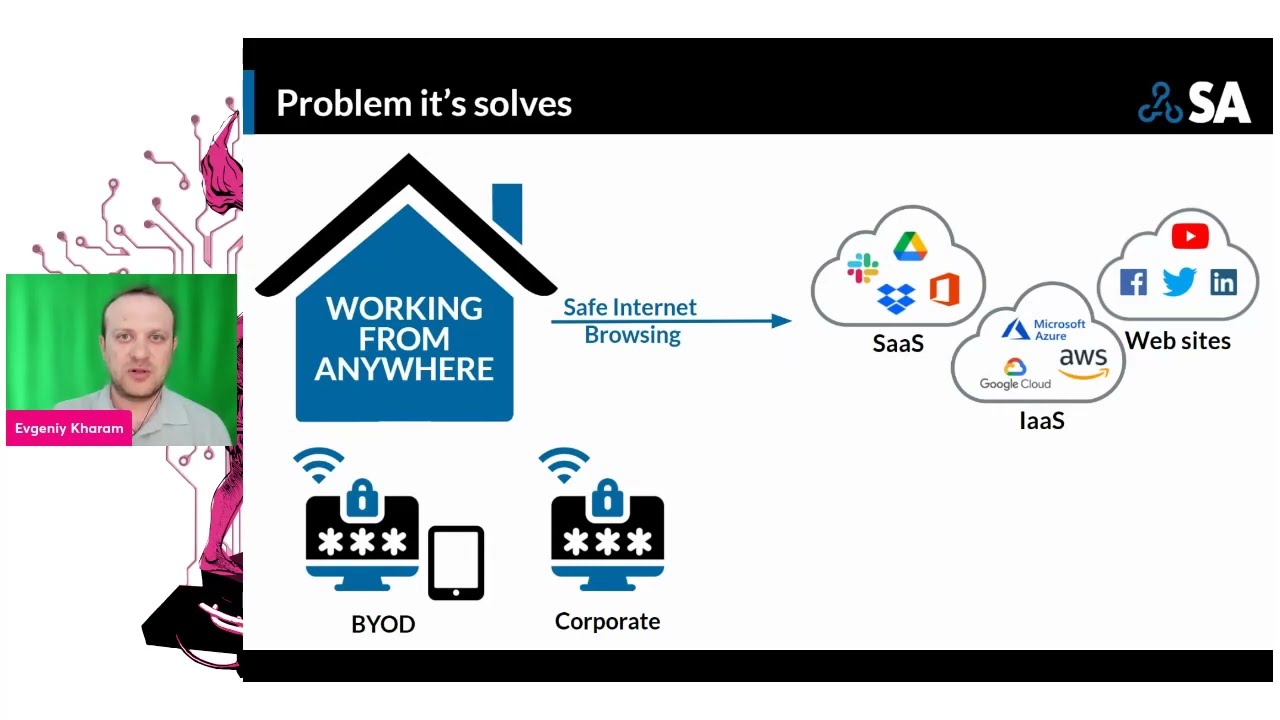
left we have different browsers any browsers we want it could be a BYOD or it could be a corporate device where in certain technological way it could be a client it could be a proxy file or different other technique where we connecting to a remote browser almost like a remote machine but I don't want to talk about this right now it's because it's not a remote machine that doing the work for us you tagging your comments and the remote browser doing all the work for you all the tabs are separated virtually or virtualizationally and doing the work if something happened with the browser over there it's not happening with your motion it's happening remotely of course
similar to remote Network Technologies like sassy secure OB Gateway or firewalls you want to be connected in the fastest ways possible with the latest latency is possible that you can have a good experiences if you check some of the vendors you will see the technology came to the point that you can watch YouTube videos you can have fire clicking in a fireplace you can play video games because the technology is very very mature this is one of the ideas I do want to show an example of what you actually see on the left here in a small and make it bigger in a second we will see a CNN website and if I make it
bigger you will see there's a lot of information here and I can scroll down here probably for for like a minute if I will analyze CNN website I will see it has more than 200 links more than 100 different javascripts there and I'm basically only went to CNN but there's so much information in CNN there's so many links it's going to scene and and in case you can put like a method inside the metrics because one link could go to one another website to go to another website that potentially May sorry something malicious overflash for example this this is typically what you're gonna get from a vendor they're doing remote browser isolation basically one link to
the remote browser and certain information there as well that's it it's very simple not a lot of information all the garbage all unnecessary information is removed so the chance that you getting something infected is almost to zero we cannot say zero but it's a very very slim and you can of course definitely also document work you can it's not just almost like a video it's actually interactive you can you you can manipulate you can work with documents you are working and with the website you're working if you look on the features lesson attack more on the features you will see that there's a lot of similar features to secure web Gateway but there is also
other features like self document access for example I can actually access a document that will be deconstructive with the remote browser isolation vendor and you were able to work with this secure you can even download the document if you want depend on your settings or upload the document it will work also with your IM provider for single sign-on so you can support the zero trust you can support access to only the person that need to have access and many other interesting things that you can see here I don't want to read all of them you can probably do it by yourself so that will become possible right now with safe browsing so your browsing is is the last one because I'm
basically read only I cannot do anything beside reading this could be good for contractors as well this could be for your remote employees certain vendors allow you to do this for the entire traffic certain vendors only suggest you to do it on uncategorized or unsafe traffic depend on the vendor of choice you will choose they will suggest different things in the beginning when it started because it was a recess hungry majority of the vendors only did it for uncategorized traffic that in my research was 7 to 15 is because it's 20 of the internet let's talk about the browser security part this is a brand new category not a lot of vendors there as well I'll
do show the one I know right now I'm not promoting any of the Avengers just providing information they are chromium based so not Chrome but chromium based chromium is the Enterprise Edition obviously almost open source they took the base to change the base it's not just chromium they change many things in the browser they also created virtualization and separation between the tabs the basically mandate you to log into the browser that's why they call the enterprise browser before you can use it they support the zero trust idea when they need to know who you are from where you're coming is interesting part because the browsers can also do poster check a host Checker to understand are your corporate device
do you have all the patching do you have the antivirus or certain other settings that you want to configure to make sure to give you access before before you actually can log in and when you log in then they can provide access to the corporate infrastructure that you need some of them work together with SSL VPN ztna providers some of them not but think about this you need to have access to AWS to do some sort of changes with this idea you're not just doing the IEM authentication and single sign-on you can also mandate from which browsers you have and to have the browser you need to download the browser so from somewhere you need to install it you need to check
that you can use the browser as well so you are elevating the defense in depth by a lot this could be also a very good solution for third party vendors which is doing work for you or contactors because in many cases you have an easier way to control what they can do and how they can do it now the weight of a design that you cannot just download files to their PCS there are certain protections that happening there as well to separate this part and create more acceleration as well very very interesting category a lot of interesting things here there's certain similarity to remote browser isolation from a feature perspective but there is also things that are different as well
like the checking you for you have certain applications or post to check on your device it also do a password protection on the browser so right now if I install a software malware on your device and I will try to scrap passwords from Edge on Chrome I'll probably be able to do it not me person but actually doing this work with this browser security part this part is not able to happen because you have a wall they have a much secure way to actually let's say attach password you can also mandate and figure out which extension you have or cannot have with this technology so it's quite interesting as well there is another section that is similar
to browser security but they use extension only so you install for some extension in your browser that will help you to identify phishing attacks you do URL filtering as well and do many things without installing a browser and just installing the extension so it's also quite interesting not too many vendors there as well it could be much easier to deploy them but they may provide not as much as functionality as remote browser resolution or browser security there was another part that we promised to discuss and it's called local endpoint isolation if you're familiar with bromia from a couple of years ago they're one of the main companies was another company there as well where they basically creating
virtualization as part of your entire desktop it worked perfectly and was very good but unfortunately people suffer from usability I mean there's a security idea it was great but my personal experience there was a lot of issues of his usability of his extensions with the amount of Hardware people needed on their devices so the idea was great but it was just very very not usable for day by day and the user experience was not degrade right now in my mind we shifted from this idea there are still certain vendors that pushing this in a different ways but I think the browser security extension and remote browser will be the key Technologies for this certain people asked what's the
difference between RBI and remote desktop and the main part is that the amount of speed the amount of latency you want to achieve and the new technology is using right now will be very hard to achieve with just remote desktop or Citrix for example in certain cases if you watch our kickoff episode in secret architecture you will see that a quarter of a second this is the latency people want this is what people continued with the eye and do not get frustrated that's why the remote desktop Technologies are okay but they're not going to provide you the same look and feel depending on what you do it may be frustrating that's why having a much personal experience can be
much better as promised I do want to show who playing in the pond as you can see there's a lot of vendors here on the slide some of the vendors are very new vendors and some of them are very mature they've been here for a very very long time like men who've been here for ages of course you know McAfee is Carrier netscope I was growth point on the lattice the older RBI vendors on the right side you can see the new Orlando Island and Thailand that literally been around for a couple of months and the Roman and Vinci is there a local isolation isolate is still around and doing a very interesting work especially for
Enterprise dedicated spaces where you need a lot of segregation and air gapping but I do believe if there's a lot of vendors in the industry in the space it's mean that there is something very interesting and very relevant happening in the world if you do look on the oldest vendors you will see some similarity and they will talk about the similarity very very quickly and it's called sassy and SSE majority of the vendors we just saw and I'm gonna go back for a second are playing in the SSC and Sassy space if you're not familiar with SSC in sassy space secure access service edge was defined by Gardner as a framework 2018. SSC C2 service edge is a new magic
quadrant that was released in January and it's quite dominating right now in the industry the secure object with the casbians the ztna are important the remote browse isolation and the browser security are playing insecure Gateway and ztna because I need to log in and I basically using the part of inline inspection in the ztna part I want to provide a remote access secure remote access from where you're coming so they're playing their all the vendors in the space we're going to provide you some kind of a URL filtering some kind of protection of what you can do so it's not going to be just a remote the Isolation part it's going to be many other things as well and they're all
going to play in this umbrella so I think it's important that it is aligned to this Frameworks this aligned to this magic quadrons so watch for them and have a look important part when you're going to look and choose majority of this vendor is going to be as a service it's mean you're not deploying any hardware on-prem even so there was earlier models of on-prem browser isolation I don't think they're scalable right now majority of the vendor at least I'm talking with are in the cloud it's mean they're scalable they take care of your version release so that you shift responsibility to them they provide and availability and you Outsourcing it's mean in some cases if you're removing a lot of
headache from you but you may paying a bit more money because in our responsible on all these important stuff and I'm just looking at my time because I know we want to leave time for questions significant concerns when you choose a vendor you really want to understand what is the latency what else they provide are they aligned back to everything else you have how the traffic will be routed remember we spoke about where is it located so if you are in New York but the company you're working with the vendor is in Europe it's mean the traffic will have to go all the way to Europe so you really want to ask these questions when you choose a vendors and
choose an architecture how many problems you have where is located where the traffic will be going I is an architect be very very strongly believe on alignment on your current architecture and what's happening with you inside one of the things you want to look is if you don't have sanction and sanctioned apps or you don't know how to find them you really want to do it before you go there because it's going to be very important part of your entire portfolio and what you're going to do there as well and of course the device posture and user identification I do want to touch base on monitoring logging because you may find such interesting things with these
Technologies for example you have a vision fishing campaign people may report on phishing but you can also figure out from the logs from RBI and browser security was actually clicking because you're going to see these things in in the links and you potentially may find a lot of interesting information in the link at you or thinking are safe but not actually safe trans Behavior device posture all this past can be monitored and you can create very good metrics on your environment what's happening and not happening and last couple of things as part of the studio broadcast we are actually covering RBI and security browser right now season four so you are more than welcome to to think we
actually only release our kickoff episode yesterday we're going to have majority of the vendors used on a slide here and it's a good time for us questions
yeah one sec there's been lots of people talking about different things in the chat here I definitely got one question for you let's just see here uh Toby's asking Toby asks um I recall liking PF blocker quite uh some time back uh PF sense here too but pie hole has a lot of very nice functionality to tweak exceptions on the Fly anything like that in pf blocker these days so I'm not sure about PR blocker but pie hole if I remember correctly it's dynastic it's more about DNS security and deep sense of course it's all open source viral so we're looking more about yes or no with the browser session about the security we're looking about much
more dynamic range I can give you access but I'm not gonna led the bad information and malware get to get your device so it's not just zero yes or no black and white it's more about isolation and I can let you browse anywhere you want but I will not let the bad things happening and coming to you laptop that makes sense yeah um yeah let's see if there's any more questions there if there's any uh interesting talk I like it some good information there yeah 25 minutes is probably not enough to but uh I know I know it's we definitely you could get you could get very in-depth there's a lot of things to learn and a lot of
things to talk about you gotta I agree you know what you mean um I don't see any more questions there right now um if anybody does has questions uh if you're Jenny they can definitely DM him here and it's the contact information is available here um so thank you Jenny I appreciate it very very interesting and thanks for presenting today um thank you very much okay have a good day thank you very much
Related talks
 22:50
22:50 53:01
53:01 31:31
31:31 1:12:41
 48:05
48:05 23:23
23:23