Modern Memory Forensics with Volatility 3
Show transcript [en]
so thank you all for coming to my presentation for those who haven't met before my name is Andrew case I am the director of research at VX City and also one of the core developers on the volatility project today we're going to be looking at a number of cool features in volatility 3 things that are new to the framework and that also work much better than they did in volatility 2 if you use the original version of it and for the instead of you showing you a bunch of random memory samples in malware we're going to focus on two particular malware techniques the ones that we see the most in our investigations and the ones that are the
most devastating in particular credential dumping attacks as well as uh loading root kits and what we're really going to focus on with those are the ones that work on Modern versions of windows so with Windows 10 with Windows 11 and their server equivalents there are a number of protections built into the operating system ways to try to stop these attacks uh but as we probably all know there's bypasses there's uh weaknesses in them and during our investigations we still see them working uh pretty regularly so some quick recap for people who've maybe never seen memory forensics before the reason we care about it so much the reason it's used industrywide now is when you look
at modern attacks uh there's either very little or no artifacts on the file system so if you reboot that machine or if you're method of acquisition is just to pull a dis image well you just got rid of all the evidence and you're not going to be able to recover anything and then even if you have full peap on the network whatever is there that's traversing the network is going to be encrypted it's not going to be very helpful anyway and then as we all know uh live forensics the whole point of malware is to hide from that so if you run a live utility to enumerate processes or network connections or Services the first thing malware does
when it loads is hooks those apis so that it's not going to show so we really end up in this place where if you're not doing memory forensics then you're not seeing the malware that is out in the wild uh what I have down here at the bottom this report with some quotes there's an infinite number of these reports now but Microsoft actually did a really cool one late last year this was on a commercial company out of Australia that was selling basically spyware at industry scale industrial scale Microsoft shut their business down basically overnight burned all their malware and the reason I'm talking about here is uh Microsoft named this malware core lump and all throughout the report
every aspect of this modular framework it talks about how it all resides exclusively in memory and then the capabilities are everything you'd want to stalk someone right so key logging screenshots the webcam the microphone uh all of the key aspects of the malware the stuff you would actually need to figure out what happen and to detect it is memory only and so like I said we see these reports and types them hour all the time but this was a really high-profile one uh because it was basically a commercial company getting shut down in terms of volatility 3 especially I've met some people today who are long-term volatility 2 users so back when volatility 2 was first created in
2007 and then uh demonstrated at black hat 2007 uh things were a lot different right we literally did investigations on memory samples from machines with 512 Megs of Ram uh if a if there was two machines that were compromised in investigation that was a large scale analysis type we had to do and volatility had like 12 plugins all of that is orders of magnitudes uh greater now so we regularly see systems with 64 gigs 128 256 gigs of RAM we have dozens of samples that we want to investigate at the same time and there's so much stuff in memory that you have to run many many plugins to get all of that out so with volatility 3 we started from
scratch rather than trying to patch in core parts of volatility 2 we literally started from scratch every line of code the way the framework works all the backend all the plugins is completely new to meet these more modern needs to start it's Rewritten in Python 3 so python 2 is not maintained for a long time now it also has a lot of volatility itself was not written with a major performance in mind back when the largest memory sample you could possibly get was 1 Gigabyte with fil 3 Performance is at the Forefront of all of the backend design and another big thing is you don't have to do the D Das profile anymore you don't have to know
the OS before you analyze it so if we compare looking at volatility 2 against the sample versus volatility 3 with volatility 2 we're focused on Windows on this slide right you have to run K debug scan or image info figure out the OS run the plugin with volatility 3 you just run the plugin against the sample so if you're in a modern investigation as we call it and you have 10 50 100 memory samples you can just script around volatility run it against all of them in parallel and now you have the output that you want so knowing what we that we can do this across a bunch of samples volatility 3 will let us get all of that
data out no matter how many memory samples we have available what we're going to do for the rest of the talk is looking at volatility 3 actually finding this malware so at vity we had two pretty large internal research projects over the last year or two like I said credential dumping and the root kits the types of Investigations that we work uh the clients are very targeted they get hit with malware that is purpose built uh the vast majority of it's automated and the first thing we see basically across every attack is access to credentials because you can imagine if you want to perform lateral movement or if this is ransomware that wants to spread as far as it possibly can you
need credentials to do that if you have a fishing attack and you get say one person access to one person's account they're probably not a domain admin in many cases they're not even local admin on their machine so you need to be able to perform lateral movement with much higher credentials and unfortunately what we see in a lot of these cases is when this works when those real credentials are accessed it leads to a complete Network compromise uh you end up in a very very difficult situation where if the attackers have enough credentials they can impersonate any user on the network and in many cases they're going to tamper with the domain controller so you don't even have
authentication logs so uh if you look at what consider kind of outdated playbooks for incident response it's like find the one account that was compromised disable it look for in the logs to see what it accessed that does not work in real investigations because you end up in a situation where any account in your environment literally could have been used during that attack and that's what we see is the attackers bouncing between attacks in case you do close off one or two well they're already ready to use 20 or 30 more and we've seen over and over again it get it's being talked about publicly more now I've seen it in other talks that conferences when I read white
papers a lot of companies just rebuild their network from scratch trying to work around this especially if they wanted to say get an all new environment on Prem or they wanted to move to the cloud this is kind of their kick to say hey we're so insecure this is hopeless let's just redo everything from scratch which is obviously expensive it's hard for the company to do but if attackers have access to literally every account in your environment what can you do at that point so when we look at Gathering credentials we have what I would consider more of an old school way now which is the direct access so you're going to inject code into Elsas if
you're not familiar with this LSS has all the credentials on the machine uh this is on every individual Windows machine on the domain controller it is involved in authenticating all the users across the network so by getting access to Elsas you have access to the credentials on that machine so if you can inject code in there you can get the cash credentials in many cases as well as the live credentials as people log in and so on I call this kind of old school because Microsoft has shut this down a lot as we'll talk about in a couple slides but if you're in an environment where they're still on like Windows 7 or even if they're on Windows 10 and they
haven't configured things correctly these still this is still possible and we still see it from time to time fortunately uh memory analysis works great on this the vast majority of the malware that we see uh still doing this type of attack just rips off MIM cats right A lot of times it's mod ified source code it's not mimic cats itself don't think hey we're detecting mimic cat.exe it's just malware reimplementing those ideas volatility in this case malind is going to catch that right away this is metas sploit again it's metas sploits implementation is basically the Mimi cats one so in this case uh we're not catching it through malind but we're doing analysis on the threads so we're
saying hey all of these different parts of a pro Els asses code where it's running one of these parts of asses code is no longer backed by a file so instead of being in a dll it's in a Shell Code region uh we can catch that right away the Maline was very similar uh over here we have the API names for getting access to credentials we then have a memory region with that code like I said we're not going to spend a lot of time on this because this is credential Gathering From a couple years ago right so people are more familiar with it the really interesting aspect to credential Gathering and how we see it most often
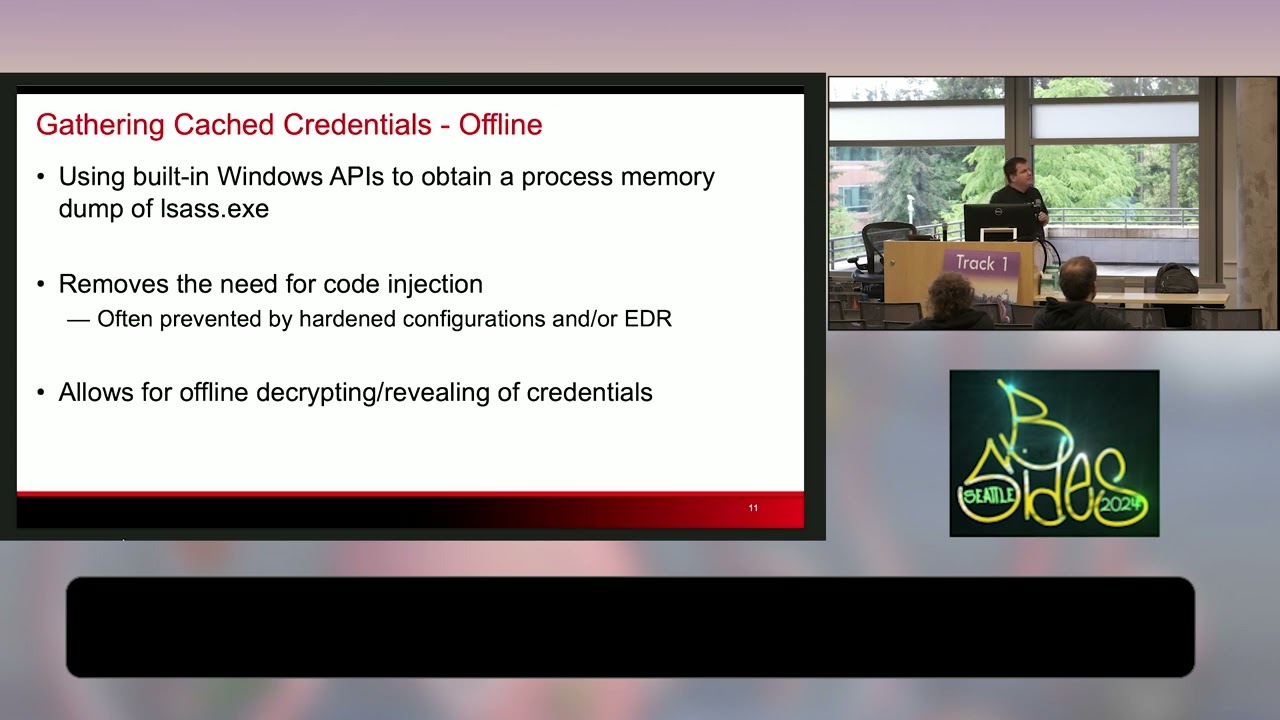
in the wild is what I call offline analysis so we're not injecting code into Elsas CU a properly configured Windows 10 or 11 won't let you do that anyway so what we're going to do is abuse some of the built-in apis to access the credentials and this is where this particular research project we did was extremely fun because all of us at vity learned one or two things along the way so the idea is whether it's the OS or whether it's your EDR trying to inject Shell Code into Elsas is very difficult but what you do is abuse one of these apis you get a copy of the credentials in some cases that can be
the clear text plain text credentials and now you're good to go other times it's the cache credentials which then you can bring to your machine to start doing password cracking and again this is what we see as the most common variant the most popular way we see for this is this very complicated API name which is create process with log on W user the basic idea is it's a built-in API and a subsystem behind it that will allow you to leak a handle from the security log on on service into Elsas and then you can use impersonated credentials to then have a handle inside of Elsas and with that handle you can then access uh the memory of Elsas to
get the credentials out so this screenshot here is from an open source tool called Nano dump that implements this technique when we do talks like this we try to always find if possible an open source tool that does what the actual Mal does so if you want to go recreate this on your own so the references here the last slides have all of these references by number we'll see that at the end so this is nano dump it's talking about abusing this API to get access to credentials and when you look at that look at this it's kind of insane right so basically what they're saying is we want to create a process the login user that we want is malc log
on user the password's malac log on domain and the passwords malac log on PWD and if you're familiar with uh sln net on login from the command line This is basically the API doing that so it's saying net credentials only so this isn't actually a user that exists on the machine it doesn't exist anywhere why would you have a user named and a domain named after a exploitation Tool uh so it calls this API with these madeup credentials and if this succeeds then it's going to be able to have those credentials stolen now the other thing I have highlighted in red here which uh the malware we see in the wild doesn't have this problem
uh basically what it says is hey we're opening this Handle by abusing this service and we don't know how to close it which I just thought was hilarious because that's going to make another indicator we can find so with this we ran the tool took a memory sample and things start to look really strange so first off if we look at the parent child relationship of processes on this machine Elsas has spawned a child process called mous SEC log on if you're familiar with Windows Elsas shouldn't be spawning anything this is like your browser responding command. exe it's going to be a long day right so the other thing you might wonder is like okay does this mean you got the memory
sample like one second after the tool ran and and this is not a realistic detection for it fortunately for us as uh IR people this is an amazing indicator because if you look at the volatility output if you're not too familiar I'll explain uh these columns here basically these columns here in red this is the number of threads that are running in that process and then this should the number of uh handles that are open um in for running processes but basically we get dashes which is volatility way of saying hey this handle table is busted it's not a valid pointer so this is a dead uh a dead giveaway that this process is terminated and so
what we're seeing here is volatility is able to still recover information about this process so as the create time it can still map it back to its parent process but it's no longer running and we saw this in every variation every tool that implemented this technique by abusing that API with a long name they are getting a child process of Elsas created and then it's permanently stuck in the process list at least until until reboot because there's a handle leak and so this handle leak that we're seeing here uh being described uh that's causing this process to stay forever now what we did see is there was some private malware in real attacks that would try to clean up the handles but
even they didn't get it right and you always end up with this child process so it's a dead giveaway if you have a child process at Elsas something is wrong now with MC log on because the thing I highlighted in the comment where it couldn't close even the outer handle in the process in its uh processing volatility also has a plug-in called handles you can say that you want to filter it just to handles to a process in this case we're focusing on Elsas which is PID 80 872 and you can see that Elsas has a handle from malc log on and you might not recognize one with the fs behind it but this is a full access handle the
only reason you have a full access handle to Elsas is you're either an EDR that's written really crappy or your malware which are both basically the same thing right so this is a dead giveaway of credential dumping if you have the malware this full access handle to Elsas and then whenever you have children processes of Elsas you know something is wrong so this super stealthy technique where you don't inject code and malou can't catch you and all of that all you do is look at the process list Elsa CL the sponding processes something's wrong the other great thing about this is like I said this is the process create time so you know the exact second that credentials
were taken another thing we noticed which there's zero references to a lot of online to the stuff we noticed uh what I was doing is we had uh this a memory sample infected with this technique I was going through a timeline if you're not familiar with forensic timelines it's where you take everything that has a time stamp put it in order and what I noticed is that inside of the service for SE log on which again that's what that API is abusing every at the exact second so like as it's servicing that API call it loads dlls related to uh CP base and so we have access to a bunch of client environments and like historical memory
samples and so I queried through those of which SE log on Services loaded CP base the only ones across well over thousands and thousands of machines were ones where this itial dumping attack happened and the beautiful thing about dlls starting with Windows 7 is when they load into a process there's a time stamp associated with that so again you get the exact second that credentials were stolen you can look at the file system other places with timestamps and now you just pivot your investigation to there but if your SE log on has CP based loaded that means you had credentials stolen off that system
this is event logs and so just to point out this is outside of volatility for a second but with the vent logs uh you have the log on records these are not recorded by default but many environments record it anyway and I just wanted to show it because of how ridiculous this log on record looks when you have this attack so basically what it's saying it's a log on type 9 so that is your network credentials log on and if you look at the username it is the one from the API called malc log on user and the outbound domain name which is not an active directory domain that exists in this entire environment is
also malc log on domain so if you can query event logs across your environment maybe minimally you probably have event logs from your critical system centralized and you search for log on type 9 you see usernames of something crazy like this you definitely want to dive in the next technique that we saw during this research project was process forking or cloning obviously this name is stolen from Unix but the idea is you're making a copy of a running process to then start its own process in that same context same address space threads and everything so this is again documentation from the open source tool that implements it and we were reading through it it's like yeah basically you
set certain Flags to create process uh that's going to make that process dumped so if an EDR is looking for the real Elsas being dumped to disk that's not actually what's happening the forked child process of Elsas is what's going to get dumped out which the EDR is probably not going to look uh notice so but what I saw when I was reading that it says while this will result in a process creation and deletion it removes the need to to read Elsas directly but I immediately knew we could catch this through the same PS3 thing because you're going to have a child of Elsas so with the sample that has this technique now it looks even Stranger
Than A MC log on process you now have Elsas spawning Elsas which makes literally zero sense in a normal environment and then if you look at the same records so the process creation event logs it looks again ridiculous you have Elsas spawning Elsas you can easily query that uh across your aggregated event logs or in your memory samples again looking for children of Elsas so with the techniques we talked about before uh this generally was to get cash credentials right so if you're getting that memory dump of Elsa as it exists the moment your tool runs to get credentials those are the credentials in memory at LSS at that moment and then you take that you ship that out to your
own environment to crack the passwords or to get the pl text ones what we also see quite often and again uh you can imagine is pretty deadly is live credential Gathering so rather than just having access at a moment in time to credentials you want to have your malware set up so that you're pulling credentials every time someone logs in as soon as they send the password in it shipped out to a C2 server or wherever the staging server is internally and it's very hard to keep up with this from an IR perspective now you're probably some people might know where this is going we're going to see Mimi cats a little bit because it's the open- source
version of it so Microsoft got tired of this and they tried to fix it they put in a bunch of fixes to try to make it where you cannot just get the credentials live because it's impossible to keep up with ir at that point and lateral movement is Trivial the main way this is done is through ssps uh so this is a built-in way to Windows to load dlls into Elsas so if you want to have password auditing or also some really cool login technique so if you want to be able to log into Windows through like an SSH public key or a hardware device the Microsoft provided way to do that is through an
SSP now of course malware is going to do the same thing because if malware can load an SSP windows will be nice enough to load the malware into LS every time the machine boots so this wasn't great from a security perspective but there was actually some pretty cool custom authentication schemes that you could add to your Windows machine but once malware's in LSS memory it can get the cash credentials it can steal credentials as their input and it's just not a good situation to get an SSP loaded there's an API on the live machine you can call uh This Is Not Great from a persistence perspective and basically malware doesn't do this uh it puts keys in the
registry it populates a link list memory that edrs will parse we have a volatility plugin to parse it uh so this is what I would categorize as pretty loud especially if you're in an environment where you don't want to get caught so there's also a memory only version of it which is the one that we actually see in real attacks this is implemented in the mem SSP command in mimic cats if you're familiar with that and there's infinite variations of it in private tools and malware that we see in the wild the basic idea though the thing they all of these techniques and and different tool sets boil down to is you want to hook the control flow of SP
except credentials because that's where that clear text password just a string in memory is going to be sent through to this function so as long as you hook this in some way or mirror or Shadow it whatever you're doing as long as you get access to those function parameters you will have the username and password of in clear text of everyone who logs in now thankfully this is like one of the main reasons memory forensics became popular because you just look for API Hooks and you're like hey in Elsas this function's hooked that never happens legitimately and one plug-in run later you found the malware but from a live machine where in some cases your edrs
can a monitor Elsas you certainly can't have like your own homegrown tool to do it the malware will be there Elsas is locked down to everything else and you can't see this function and we literally see malware that just as soon as someone logs in the passwords beaconed out across the internet and now it's stolen and so it's a pretty deadly attack
as I mentioned uh Microsoft wanted to stop what what is considered these very trivial attack methods so they put significant effort and tons of documentation on stopping this so they put in features that were meant to prevent direct injection into Elsas and the cash credentials and so on but like I mentioned there's been bypasses along the way so let's discuss what these look like the first thing they did was disabled W digest by default W digest is what you see if you run this command the W digest command of mimic cats which is where you get the clear text passwords of the users so this is obviously painful right you inject into Elsas there's a double aink list waiting for
you of all the users that have authenticated you get clear text username and password kind of ridiculous right so starting with 8.1 and so onto Windows 10 and 11 and so on Microsoft disabled this by default so you do not have those cash credentials but then of course what the malare authors did is they looked at the implementation and they saw hey there's this W digest key which at this point is documented on the msdn also so there's a registry key that actually controls whether W digest is going to hold on to credentials or not because for backwards compatibility it's still there the dll still loads it registers and so on it's just not active by default so this is
from that same Microsoft report that I quoted before where they were uh tracking down this particular threat group if you want to consider them that a commercial company and basically through the reg ad command so changing the registry on the running machine you're just like hey use log on credential which is W digest let's just turn that back on so that the credentials immediately populate again and windows is nice enough to basically notice that key Chang and be like sure I'll store the passwords again for you so thankfully people I'll talk about this in a couple slides you can monitor this key in real time through object access so companies and and edrs and such would watch this key if something
changed it it's like why would you enable W digest again this would get caught so you might know where I'm going because the next thing Mau did the next iterations like writing in the registry is very loud it's persistent on disk things are monitoring that key let's figure out what that key is actually manipulating in memory so in memory there's two Global variables related to that key and it's is credential guard enabled which we'll have a visual of in a couple slides and the Ed log on credential which is the same as that registry key so if you flip these in memory from the default they get changed back to where the credentials will be uh
cached again so you have those plain text credentials cashed in memory the registry is exactly the same this doesn't magically change the registry key so even if you look at the registry key on your domain controller or other critical systems it still looks off but in memory these values have been switched and then results the same all the passwords are there and you can steal them so you can imagine you want to detect this through event logs it's definitely worth using object access on that registry key if you don't have an EDR or some other tool doing that already but like I said the malware is going to get into Elsas and just flip those global variables around and
credentials are stored anyway which you might imagine memory frics is really good for because we can read the memory of Elsas use the symbols to find these variables and then see if they're flipped so it's probably like a 10line uh volatility plugin to catch this and then now you know whether the credentials are actually being accessed or not and this is something that uh these two Global variables and how easy it is to flip it is something that malware definitely takes advantage
of so with credential guard I me I mentioned it before it was kind of encoded in that Global variable name the idea is trying to keep malware out of Elsas so it can't just come you know a week or two later after you logged in and steal your credentials Microsoft was tired of fighting that battle so for that and other reasons they came up with with what is actually a really cool security feature which is what you see as your desktop environment so I'm on a Mac so I can't exactly show it but if you have a Windows laptop desktop with Windows 10 or 11 you probably have credential guard on unless you turned it off so what you
see as your desktop or your browser runs and all that stuff is a VM of a very small security hypervisor and then all the authentication controls and the the hashes and so on those are in a totally separate virtual machine and so the idea is in your VM you cannot access that other VM without some crazy exploit uh and so and the Els that's in your side of it does not have the credentials so even if you use the apis and techniques we talked about before to dump out Elsas memory their credentials simply aren't there but there was the Li itations to this of course right because even when you log in and you're typing on the
keyboard or someone like rdps to that machine the way that bridge works if you want to think of it that way between your desktop or that machine and then that secure guest of the hypervisor is the credentials still go through the elsass that is on your system and then it's passed to that hypervisor VM so sure we can't get the cache credentials without getting access to that VM but we can still use techniques like memis P to just steal them in real time and if you're an individual user on your home network you might think okay this is cool I only log in once a day or I do something else but in a real Network
Enterprise environment people are logging in all the time so if you have to wait 30 seconds to gather a 100 credentials it's not that big of a deal in the grand scheme of things so all that effort for credential guard really didn't do a whole lot because malware could still uh get into lsas and launch their M SSP techniques so at this point uh Microsoft started Ed going really hard against the malware there's this notion of protected processes which says if you're a protected process then code can't be injected at all we're not going to take unsigned DLS only uh dlll signed by Microsoft specifically all these other steps and the long the long story short
is that most of the stuff I just talked about isn't going to work anymore with protected processes or at least that was the idea of it but then of course there was a bypass like two weeks later where the bit in kernel memory that says hey you can't actually inject into Elsas and steal the credentials rootkits would just flip that bit literally from 1 to Zer 0 to one whichever way you want to look at it and at that point all these techniques came back to life you could enable W digest again you could load a Ms uh SSP provider to get access to credentials as they were entered and this is what you were this is what was
seen in rits in the wild which brings us to Microsoft's final push against this which I'm only going to say it once then I'll say the acronym hypervisor protected code Integrity or HCI uh this is incredible this all the stuff I was talking about with uh code injection and so on it really stops it in its place uh what protects was you can't make Elsas unprotected anymore if you flip that bit in kernel memory uh the machine will blue screen and you'll have then have a crash jump of exactly the malware that did it that you can analyze a wind debug or volatility and so on uh all there's even more protected information in that
isolated VM and the other thing malware was doing once uh once some of these protections were in is instead of trying to rewrite Elsas memory from a different process uh Mimi cats got a signed driver which was kind of hilarious and then all of Mimi cats was reimplemented from the kernel so it would just attach to the Elsas address space from the kernel get all the credentials out all the same stuff uh so with HCI you don't have that either uh because you can't write into lsas memory the only thing you can do is read and then it's basically like a race condition you'd have to like pull the page where hopefully credentials pass through and then maybe you could get uh
credentials out so with HCI uh things are really locked down uh in my own experience with our the investigations we work plus all the reports I read Around the industry I don't know if any attack technique or like recent attack where HCI was enabled and credentials were just flowing out of the environment so if you're in a situation where you have any influence on configuration of your servers whether you do that yourself or you can talk to the uh the IT team whoever is controlling that configuration if you can get HCI enabled uh you'll need a somewhat somewhat recent Hardware last couple years you'll obviously need Windows 10 11 the server versions of those uh but if you can get
this enabled a lot of these credential dumping attacks simply uh don't work but like I said with rootkits loaded there's still some some windows open and you really have to have everything configured correctly to make this happen which brings us to the second part of this big research project we did uh which was the rootkit aspects so we saw where with these credential dumping tools uh in many cases there was a rook kit involved with it a rot kit would come down as part of the malware that was downloaded initially or what the attackers later loaded on the machine and quite honestly we were really confused um very very confused uh the first time we saw cuz we went a long
time without seeing a rook kit on a Windows machine and that was because of this driver signing enforcement uh it's really annoying if you try to load like custom tools or different things on your machine uh but it provided a great security benefit because the idea was if your driver wasn't signed you couldn't load it on the machine so we went what was probably a 2 threee period where I don't think we saw a single new Rook kit in the wild because you couldn't get get it loaded anyway so why would you put the effort this led to a bunch of interesting uh techniques new techniques of userland malware so malware that runs in process memory but we really didn't
see kernel memory or kernel Rook kits and then we started having investigations where we were detecting kernel Rook kits which everyone at Flex city was confused at that point because how are these root kits loading and so the way this is supposed to work is if you're going to load a driver the way Microsoft provides you're going to create a service you're going to say that that service loads a kernel driver you give the path to your kernel driver on disk that information gets encoded in the registry and then the next time the system restarts that service is going to load so this is the boundary right you create a service the operating system goes to load your
driver and you just compile that driver on your own machine you don't have a code signing certificate from Microsoft and the rootkit doesn't load so something was breaking this boundary right somewhere in that service creation these rootkits were starting to load and infecting systems with the driver signing changes so this was some of the first information Microsoft put out about driver signing it says everything has to be digitally signed with a certificate from Microsoft and not only do you have to sign it directly you also have to get it cross signed for Microsoft and the reason for the cross signing is what's down here which is basically they were giving out codes driver signing certificates to companies those
companies would get hacked the attackers would steal their certificate and then what's the point now the root kit looks like I won't call out company's names almost just did uh but companies that we all know uh they had their uh file their signing certificates stolen and then the rot kits would just load at them and then what are you going to do like Blacklist the provider of your network card or other Hardware on your machine it really doesn't work so this picked up a lot of steam um many many stolen certificates and many high-profile attacks and it really became a huge problem so you can read some of those um for historical information on this this is
the page from the cross signing so not only do you have to pay Microsoft to get a certificate in the first place which uh we've gone through this before it's not just like hey fill out one form put in whatever email you want and they give it to you they check your company check your address like make sure you say who you are just to get the certificate and then if you want the driver cross- signed to then load on Windows 10 Windows 11 and so on that cross signing means you have to upload it to Microsoft they run whatever magic they do on it once it hits their servers and if that magic says it's okay then you're cross
sign and you can load on Windows systems so you can imagine as a malware author one you're probably not giv Microsoft your home address or whatever else and bypassing that even if you fool them in step one and you get a certificate if you want your malware to load normally you have to upload it to Microsoft to sign it so it's like hey Microsoft take every iteration of my malware to keep signing it's just not a realistic workflow and again this is why we stopped seeing uh Rook kits for a while but then came uh the attack technique with a painful acronym uh bring your own vulnerable driver or bovd uh but this was a pain this is the
reason Rook kits were able to load again and I just wanted to point out in this slide that these attacks started probably in 2020 2021 there's this article here from 2022 that says bring your own vulnerable driver is basically breaking Windows the attacks are happening all the time all the security controls are being bypassed and then I have the arrow here this article is literally from last week these attacks are still ongoing still vulnerable drivers it is a huge issue so if you haven't heard of this before uh like I said you can get a copy of the slides after these are some reports uh this is from Rapid 7 so back two three years ago
now with the versions that were out there then uh even though this report is a couple years old it's amazing uh they break down every roof kit every way it loads through the kernel and so on if you want gory technical details this report from Rapid 7 is extremely extremely well written and worth the
time so the idea here is you have a vulnerable driver vulnerable in this context means that that driver is in kernel memory right it's where it has access to the full system State can access whatever process memory it wants and so on and you're in user land you're a process you don't have access to all that data so you want to leverage a vulnerability in that driver to get access to Kernel memory once you can do that whether you can exploit the driver whether there's some just bad design in the driver so you can send it a magic uh In-N-Out control call whatever gives you access to the kernel through that driver you have two approaches one is you can
manipulate small pieces of data in the kernel which we'll see on the next slide but you can't really do complex stuff here you're not going to write a kernel driver and Shell Code and like copy it into konel memory four bytes at a time what you really want to do is make it where the colonel will accept your driver and then you can move to stage two which is once the colonel will accept your driver so you're going to bypass the driver signing enforcement then you can just load any root kit like you did before and this is what we see over and over and over again uh it's plaguing the industry this is not just
some magic that only VX City sees the first version of this bypass was uh honestly kind of painful you can imagine that all the research and stuff that went into trying to stop these drivers from loading but then the end result was in kernel memory there was a global variable called GCI options where if it's set to zero driver signing enforcements disabled and if it's anything else it's enabled so going back to this slide what The Rook kits would do is take advantage of whatever vulnerability gives them readwrite access to the kernel they would flip this one bit in all of Kernel memory and now they could just load their root kit as a service and take over the machine
so thankfully Microsoft cleaned this up a little bit uh what they did is patch guard now protects that bit so if you flip that bit the machine will blue screen but it led to uh one of my uh favorite pairs of blog posts ever so this blog these are two separate ones the links are at the end of the presentation but these are very very technically detailed post on how all of this works what's going on in the background and the end result is like sure you can't flip this bit anymore but that bit is checked through like 40 different function calls so all you have to do is hook one of those 40 functions
and it's the same thing and Microsoft can't magically protect all of those functions uh through patch guard or whatever else so the end result is we had this one marker to know if DSC was disabled or not and now we it's there's no way to do it directly in memory because you could just hook anywhere along the code path but what we figured out during this research that was uh really really nice is there's some event logs that track this really well but it's also extremely painful so the first one is the windows code Integrity operational log in particular event ID 3004 so you can see that here uh the provider the event ID and then what this
is doing is recording the path so this is the full path of the unsigned driver that loaded and if you look at the description I'll just read the first sentence it might be hard to see up here it says this event isn't common and it may occur uh blah blah blah it typically indicates a kernel driver tried to load with an invalid signature so this blew my mind because it is a perfect ioc for a vulnerable driver loading or like a a vulnerable driver being exploited and then a root kit coming behind it to load so this is Moria this was a a root kit used in a bunch of AP attacks and what's amazing is Windows is like Hey we're
going to generate this event log that this unsigned driver that we don't know about is loading but then it's going to let it load anyway instead of just blocking the loading so this root kit like significantly affected the organizations that it was loaded in Windows was able to detect that it shouldn't load in the event log description it's like this is uncommon and basically the only reason it's there is if it's a malicious file and it just loads it into kernel memory anyway so the good thing is you can query your event logs for this the bad thing is if you query the event logs for this and you have hits it means you have a rot
kit from whatever point in time uh that event log record was Genera ated the other thing we found was inside of security mitigations uh this event id1 what this is doing is saying that basically code Integrity guard is saying that this dll uh should not have been loaded it's not signed there's something wrong with this file it's basically pointing out that this dll is loading into service host and the operating system thinks it's malicious so in this case this is the user land component of the same Moria here so this is the kernel driver this is the dll that loads as a service in userland and this was hilarious so I have to be really careful
want to say this to never mention names but like I said we have access to a lot of different environments a lot of different historical data what was loaded in memory and memory samples from real systems not just little like toy VMS in our research lab and so I queried this when we're doing this research I queried this across many many environments you know many many machines uh in total and you will be very very surprised to hear this the only things that triggered this which means you're loading unsigned crappy untrusted dlls into privileged service host processes the only software that did this was rootkits and EDR vendors and so we sent this to our clients like hey you should
query for this but you're going to see your EDR in there loading unsigned code into privileged service host which means if maare ever overwrote the edrs dlls they would load as the EDR into the service host for quite a few products actually and to this day it still holds the only thing we see is a rootkit or EDR uh in service host in an unsigned
state so the other thing I mentioned before but I wanted to uh document in the slides for people who go back after you do have driver signing enforcement uh that is supposed to stop the rootkits from loading but unless you have HCI enabled and very very strict restrictions on what can load and so on uh the vulnerable Drive there's always going to be vulnerable drivers in kernel memory and then there'll be a way to load that code in after patch Guard works uh essentially in parallel with dsse if you want to think of it that way patch guard protects the critical data structures that rootkits would Target so they would do things like unlink from
the process list and now the process was hidden uh a dozen plus other things that malware would tamper with in the kernel so when I was going through the talk and I'd say hey patch guard protects this or that basically patch guard runs in one of those security VMS one of those isolated environments and it monitors the key parts of the operating system and like I said if patch guard thinks something's wrong or it detects a modification it will blue screen the machine and create a full crash dump if you haven't heard of that before a full crash dump is a memory dump like you would get out of your memory acquisition tool or if you snapshot your VM so if
you have crash full crash jumps from when root kits were active and they trampled on the wrong data that is amazing you want to do full memory forensics on that because it's right when the root kit was loaded on that machine like I said with volatility uh first off we were confused that Rook kits could load at all then we figured out how they were loading and then what we wanted to do is we knew patch guard was protecting a lot of the data that we used to look for if you look if you're familiar with memory forensics and you look at the patch guard documentation the vast majority of the protected places that from patch guard are places
that we used to always use in volatility to find rot kits and so all those got closed off by patch guard being implemented and updated so we wanted to see what was still viable like how do we find a rook kit on Windows 10 or 11 because we immediately knew that some of the techniques from 7 and XP and so on were just no longer viable so we needed to update our workflow so this is showing off some volatility 3 and in the kernel so the first thing we have is the windows. modules plugin this is going going to list all the kernel modules their address in memory so this is the address in kernel memory where that executable
file starts you then have the size and then this is the path from disk unfortunately this is not super helpful from like a triage or automation perspective because any Windows system is going to have several hundred kernel modules so you're not going to memorize that or try to figure out which ones are legit or not but as we'll see this serves as a very nice point to figure out which modules on the system are legitimate and not malicious the second data structure we have to track these loaded uh kernel executable files are drivers so um in 99.9% of cases when you legitimately load your driver through a service you're going to get this module data
structure that we've get in windows. modules and you're also going to get a driver data structure that driver scan is picking up on and what you'll notice is this also has the Base address of those modules as well as the size there's also the service key here says where it should be in the registry so if you have a driver without a service that's usually something you want to look into but the start address here in the size are really helpful because it tells us where every module or driver should be in kernel memory to start and then how big that driver is so obviously you can figure out where it should end so by having this mapping of all the
legitimate modules that are in the list that we can find through memory forensics uh it lets us find what is the most common way that malware rootkits try to hide on the machine so previously what rootkits would do is unlink from the list so then in modules here that wouldn't be present and then so if you go to look for the path on dis or your AV and you walk this uh list in kernel memory to know what to scan on dis by unlinking from the list you have this uh hidden set I have a bunch of stars behind it because this is one of the things patch guard protects so if you try to unlink from that list you're
going to blue screen the machine so what that brings us to is the next two steps which basically every Rook kit that we studied did what it's going to do is change its own metadata such that the Base address and the size are going to be zeroed out and so that way if you're AV if you're an EDR you want to scan this driver for signs of malicious activity well you don't have a lot of luck because all that's been changed fortunately that doesn't really bother us with memory forensics because we're just going to do a comparison anyway so this is the Dirty Mo rot kit this was in uh some very targeted environments and then you can see this one company
did a 40-minute read on it it was like a very deep breakdown but the idea was if you run driver scan you can see that the uh meta data of the malicious module is zeroed out so it has no Base address and it has no size which doesn't make a whole lot of sense um you could manually run this and grap and so on but that's annoying so instead we wrote a plugin called driver module which automates this and basically says hey if if there's a module sorry if there's a driver that doesn't map to a known module that's a rootkit now there's a couple exceptions to this they're built into windows so we just ran this plugin
across every version of Windows put that into an acceptable list right and so that's where this known column comes from so file system raw in every version of Windows is going to trigger this plugin but that's fine we're telling you it's known and then the only ones that were false across hundreds and hundreds and hundreds of memory samples were root kits and it was a dead giveaway uh that that was a root kit trying to hide on the machine obviously you can then go back find where it is in chronal memory anyway and drop it out to disk and then just real quick for people who have done uh memory forensics before uh a lot of
the techniques that aren't uh covered by patch guard are still being abused by rits so you can see here you have your IRP handlers that's what a driver has to implement so you can write to the file system or send on the network R kits will Implement these as well so that you user Land part can talk back to it uh we love these for memory forensics cuz it's super super loud so this is the ghost Emperor root kit that kerski wrote about says hey it hooked the network stack in NSI proxy uh by hooking the In-N-Out control Handler well if you look here for the NSI proxy driver as volatility prints it and then this is the In-N-Out
control Handler we're like hey this doesn't map to a driver we know about and here's the address so you just go look there in kernel memory dump it out to dis you found the root kit in one plugin invocation and then uh same thing here with that dump audio codec sure it zeroed out its metadata but we can just go look at its IRP table and we know exactly where it lives in chronal memory basically all that anti forensics was a waste of time and then same thing with Device trees drivers can stack uh through the device tree so that your AVS and encryption and all of that can play nice together this is also something rot
kits do all the time so again trying to hook the network stack we find it right away trying to hook the NTFS file system stand out very very loudly cuz why is random audio in quot driver hooking the file system uh these things are just like screaming loud when you're doing memory forensics but they are completely hidden on the live machine this will hide every file through like Explorer or the apis or your live forensics tool it'll hide network connections from TCP view any any tool that you run in userland to list network connections will be fooled by this technique uh because it's in kernel memory but in memory forensics it just screams very loud and we find the rot kit in 1 minute
or less so hopefully uh you found it interesting seeing some of the r kits that we saw the uh credential dumping techniques if you want to use volatility 3 yourself we have the links here also I have this slide as well as all the reference slides at the end you can take pictures and like try to type out the long URLs or if you just email me which is on the next slide I can send it to you so this is the GitHub page volatility 3 is fully open source this is the read the docs we have a slack server if you want to join and ask questions or just see things that are as
are being published and then we also maintain a mailing list so before I go to stay I'll go back to this slide but like I said I have all the references here anywhere you saw a number in a slide at the top that's these links if you want a copy of the slides I think the conference will post them anyway but even if they don't just email me and I can send you a PDF and then you don't have to try to type out 50 different links uh so with that said oh also I didn't put on here I have LinkedIn feel free to add me and then also Twitter uh so I have a couple minutes left thank
you all for attending and I can take a couple questions [Applause]
Related talks
 53:55
53:55 1:05:41
 51:35
51:35 50:26
50:26 43:54
43:54 23:20
23:20