Inside The Fortress: Attacking RFID Access Control Systems
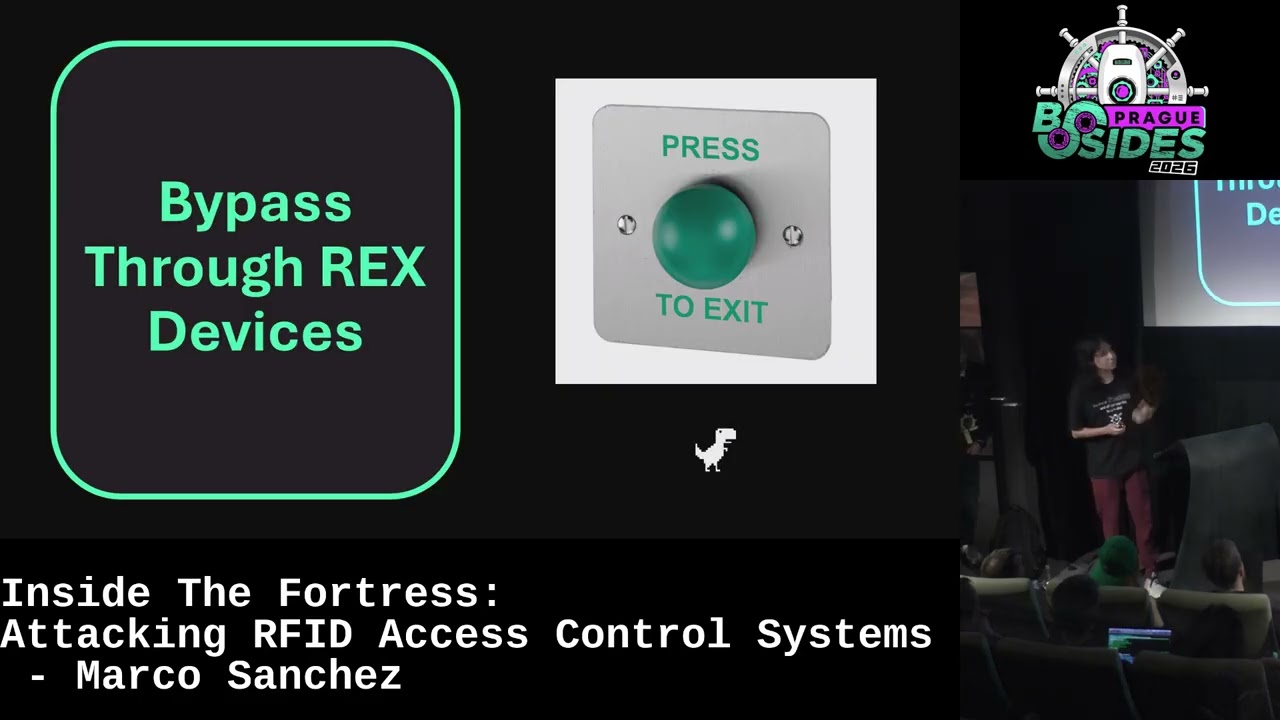
Show transcript [en]
Thank you so much. Thank you everyone for coming and thank you besides Prague for having me right here. It's the first time in Europe and in Prague, so beautiful city, beautiful continent in general, beautiful countries. Uh but yeah, so we're going to talk about right now about a topic that is not as uh it's not as new as you think, but it's became a common attack vector inside many uh facilities around the world. So we're going to talk about uh attacking RFID access control systems and probably you may also came across some of these systems in the your day-to-day life. So let's going to get started. My name is Marco Sanchez as you may know and I'm a security consultant
at Bishop Fox. So I'm really focused on penetration side in the application and the external, internal sometimes, mobile applications and also well as part of my free time things, I spend a lot of time in researching some access control things and also well other hardware hacking and hardware things. So let's going to get started a little bit. And why is important to uh well known about this uh all the all the attack vectors and all the theory behind RFID access control systems? Well, as you can see, there's not uh there's a lot of access control system out there. For example, this one in the left for you is like uh access control system that we came across in Buenos
Aires, Argentina all over the world. And also the other one is the one that we came uh before coming to Prague in Budapest, Hungary. We we we see a lot of that in all the uh buildings. So yeah, and and it's not like a corporate building, it's like a normal building where persons live. So yeah, it's really interesting to see that there are coming uh a lot of these. And there's also like corporate buildings, industrial sites. If you came across in the airport line, also there gates for the airplanes has these access control systems. Hotels, if you stay at a hotel, you know that you sometimes they give you a card that got access to your room. In museums, we also
notice that. And many other things are all around the world. So, this is important to know it because there's everywhere and it's going to be everywhere in the following years. So, let's going to first start by talking about what is an access control system and specifically, what is an RFID access control system because there are many access control systems. But, in physical security, it is basically a mechanism that uses the RFID technology to control physical access to rooms, for example, to a complete building, to a small room, or a particular server server sites, for example, for whatever, no? And we are going to cover in the RFID later. So, yeah, just keep in mind that these mechanisms are
to protect some, for example, assets like server sites or to to deny or grant access to people to particular sites. And it is really [clears throat] convenient because in the past, you going to have like a key to enter a door and it's going to be a simple mechanism that probably all of us use in our day-to-day to enter our homes. But, in a real big scale, when you are talking about like hundreds of employees for our same company, giving a key to each of them is going to be really difficult and also because there's not only one door in the building. You have multiple doors. So, having an access control system that one key grants you access to whatever site
you want is really is really convenient for sysadmins and all the all that stuff. So, yeah. We can look at some of the basic components that we going to have in this high resolution drawing. So, yeah. We can find many other components in a really more advanced scenarios, but the basic one's going to be we're going to have a some type of reader. In this case, RFID readers, but it could be also like keypads or any biometric readers like facial recognition, fingerprint, or whatever. You can also have like the controller, which is like the brain of the all the operation, which is which one of the site if a user has access or has no
access, if the badge is registered or it's not registered in the system. So, yeah. And we have also another auxiliary components like the lock because if we don't have the lock, the door is going to be open anyway. And you could find two types of lock primarily, a magnetic lock, which is like a real big magnet that when it close, it closes. You cannot open by brute forcing because it can generate like a 100 lbs of force. So, yeah. No normal human can actually break that. But also, you can find another one which is better, which is an electric strike, which is basically installed in the same way as the door, which is with some this
part. And yeah, it closes [snorts] electrically and same in the same principle, but the difference is like the magnetic locks when it closes, it closes and you cannot open it. The electric strike is designed to fail safe. So, if there's for example, an emergency, you can open it without the need of the RFID key or pressing any additional button. So, it's like more of a more safe lock. And you can also have like these devices which are really interesting called request to exit devices or simply like push buttons that you're going to press to open the door or to actually exit the building. Sometimes, also you can find instead of having these buttons, you go you're
going to have another reader. So, in a solution called anti-passback, so you have two readers, one in one in and one out, but it's not really common to see. And obviously, the most important part for us, like the RFID badge or tag, whatever you want to call it. Badge is referred more like the the credential, the actual credential, and tag is a general term for all the RFID components like to implement this technology. So, while we know all the components, we can see that there's like a really the attack surface, so we can have like attacks to the request to exit devices, to the badge RFID tags, to the reader, to the controller, and also to the
communication from the reader to the controller. But basically, we are going to focus on the reader, on the controller, on the request to exit devices, and on the badge because attacking the lock is basically destroying the door or the system completely, so it's not the point to make this. But yeah. Let's start with the bypass through Rex devices, which is really interesting. So, sometimes you will see that there are some doors on some installation that has these motion sensors that automatically trigger the door to open or there are some buttons that you need to press in order to exit a building. What's the purpose of these devices is to actually exit, and there's always a need of them. But, the problem
is that sometimes some doors, for example, these crystal ones have a little gap between the door and the wall, and also the door and this other glass wall, so you can actually insert something like a metal rod long enough to reach these buttons. And the problem is that these buttons actually are located near the door, so it's really close to the door, so you can actually trigger. And also, in the other side, you can see that sometimes motion detector sensors are placed incorrectly because you need to be really right under the sensor instead of close to the sensor, which also enables you to insert some sort of metallic road or whatever other thing. Sometimes also
like vaping smoke that you you vape through the sensor and the sensor triggers if the smoke is really heavy. So, yeah. You can trigger the sensors and basically you can go in by triggering the exit function of the access control system. And yeah, as you can see there's not like the There's not like a tool or a method for doing this. It's going to depend in what situation you find the sensors and the devices, but also, yeah. If you want to protect your system for this, you need to only to put a little not really close the button or whatever device you are using and also to use doors that actually don't have like these gaps to the outer to the outside.
Which you can see there's like the big problem of all of these bypasses that you can have. And this this basically all of the things that you can come out with the request access devices. It's not really we have the surface not a really huge thing, but we're going to enter some really cool and interesting things that are not commonly covered on any attack on any physical assessment, but they're really cool. And it's like the protocol sniffing. Protocol sniffing is really it's really mean what what it means. Basically, we're going to try to hear what is happening in the communication between the reader and the controller and try to see try to capture the data that is
traveling from one point to another. And the reader and controller communicates over different over a different protocols. You can use OSTP, Wiegand, and clock data. It's going to depends on the vendor. Also, there are some vendors that implements its own like proprietary versions, which is different for all of that, but normally they are like Wiegand or some protocol that is running over the RS-485 interface. And what Why is important this for us is because the data that is traveled from the reader to the controller is the actual data that is being used to make the system that involves in the decision of the system to make to grant access or to deny the access. So, that's the reason
why we need to hear of these devices. And well, the most used protocol that you can find out there is the Wiegand protocol. Wiegand is a simply old protocol. It came from the late '90s and you can see that it uses two different data lines for the data transmission, D0 and D1. As the name suggests, D0 is used for the bytes the zero bytes and D1 is for the zero bits. So, yeah. You normally have these transmission lines. And well, we can also find some readers that actually have another data lines like buzzer, LED for change of indication of different components that the the reader used to indicate the user if they have access or
not. And also like power and ground. Power normally comes in the 12-V range, but you can see that there are many readers that ranges from 5 to 34 37 V. It depends on the application that you are using. But the important part to understand is like the transmission in Wiegand occurs in a plain in plain text. It's not like encrypted channel. You know, it came from the late '90s. Security was not a thing back there. So, you have this open format and it's also important that Wiegand means a lot of things. You're going to If you Google Wiegand, you're going to find that the interface, protocol, the format, the effect, person named Wiegand. So, yeah. It's really
crazy that, but for this hack you only need to know how the interface looks and how the actual format of many of the cards that we use today looks, which is this one, the 26-bit format. As you can see, there we have something called like facility code and other code card number. Uh why? Because facility code in the beginning of Wiegand is like you're going to have the uh the same facility code for all the cards for the same building, for example. You have a company A, all the company A, for example, going to have the facility code one. And the and all the cards that belongs to this company going to have the uh card number that
begins with one. That's the original idea. Today, nowadays, depending on where you buy the cards, probably you're going to want you going to have random facility codes and random card codes, but the idea the original idea is still present, so. Um during the transmission of these data uh of these data, you're going to have two parity bits. Bits are not uh part of the actual data, but are used for error detection and error correction. Nothing really important, but yeah, it's like all the 26-bits that we are going to use for uh transmitting all the data. And yeah, if you can see, here is a simple reader connected to a logic analyzer and a simple uh
EM 4100, I think it's the card. So, yeah, you can see here the facility code, but all the card data. So, when we actually present this to the reader, uh we hit like play in the logic analyzer, we are going to see that all the packets are transmitted are effectively in plain text, so we can see all the the one and zero bits, so uh let's see the moment and uh yeah, you can see. There are all the bits that the actual card transmits from one place to another, so. uh because of that, we can invent a device that actually can make uh this that can capture this data. And it's called the ESP key. There are
multiple versions of the ESP key. This is the one that we uh This is the one that I use for the uh research, but there is another version that is smaller, compact, and more uh useful when you are deployed on a real assessment. But yeah, basically is a is a is a ESP device which actually captures the Wiegand data with that you connect the reader to that data in that data lines in that way. So, as you can see, there are like punch hole cables, the ones like for example, if you make some RJ45 cables, you got to notice that there are some these insertions that actually cuts the cable a little bit and creates a contact. So, you need to
connect this device to these two lines and also to the power. It's important that uh to understand that this device does not come with an external battery, at least yet. So, you need to connect it to the power of the actual reader. And it's not necessary to be the reader. You can actually connect in any part of the connection between the reader and the controller, but the reader is the one uh that is closer enough to actually reach it because some of the cables run through the ceiling or they run through uh to walls, so we cannot access it as easily as the reader itself. So, yeah, here's the connection. And this is a This is a quick demo of an installation.
This is a another video, and you can see like there are uh this reader, this is the cable. You can pull it the cable, and they are using another version of the ESP key that is smaller. So, yeah. That's the the other version that I'm talking about. Uh unfortunately, I don't I wasn't able to get there in time, but yeah. You make the function on this thing, and well, just wait until they uh finish. Uh yeah, it's like hiding it in the same place and yeah, you're ready to go. And what we can do with this device, so the reader is like normal, but uh some considerations before seeing what the actual ESP key can do is that there are
some readers that actually have tamper uh protections. So, if you actually remove the reader from the wall or from the uh mounting bracket, you're going to trigger some alerts in the in the system that could alert that there was moving without any authorization or things like that. So, yeah, it's going to also depend on the actual uh installation. If you connect the cables, but doesn't set it up anything in the controller, not going to do anything. But yeah, just keep in mind that you're going to do that, probably there's some tamper protection in there. And yeah, once we connected the device, we can start like creating some of the sniffing part, which is simply capturing the same
data as we saw before with the logical analyzer. So, this is like a small setup that I put on with some ESP key. In this case, the ESP key is like jammed here, put it inside all the cables exposed because it's like a proof of concept. But in a real assessment, you don't want to make the ESP key look like a mess like in that place. But yeah, you can see that there's like different ESP key different cards that are being locked. And yeah, that's the point. When you actually present a new card, all the Wigan data that you that this card have going to be logged into this device. And you can access it through the uh through the
Wi-Fi uh network that the same device created. And what also What other thing we can do with this is like once we capture some of these uh Wigan data with facility codes and things like that, we can actually use the ESP key to be a replay device. So, we can send also the data that is being captured to the controller and the controller going to accept it as normal because we are sending the raw data. So, as you can see, the door at the beginning is closed and this ESP key in particular has a transmission function. And when you can actually grab the piece, put it in there, and hit transmit, it's going to open the door
without any interaction of the of a card or something else. So, you can open the door as as that. So, yeah, keep in mind that this only works when you have uh the the ESP key installed in some uh reader, in some controller, and in some data lines because if you don't if you only have it like that, well, it's not connected to anyone, so not going to do anything, but yeah. And also, an important thing to keep in mind is that uh the ESP key and many of the devices that are out there uh works for specific uh formats. There are Wiegand 26-bit format, which is the open uh standard, but there are other uh
proprietary formats that are that manufacturers use like 34-bit or even 96-bit and something like that. So, it's going to be depending on what type of cards you're going to target, you'll need to actually use the right tool. Uh but yeah. Now we see that uh Wiegand is not secure, so people created a secure uh alternative, a secure solution called OSDP. OSDP basically is a protocol that that implements encryption during the transmission of all these uh data. And it makes it like using uh And also, it changes like the Wiegand interface for an RS-485 interface, which is this industrial interface you see for any uh industrial control. So, yeah. And uh the encryption is really secure. It's a [clears throat]
180-bit AES encryption, so yeah, not probably going to break it any soon. But the problem is that it's not secure by default. So, yeah, you can see uh all the work of my colleagues, Jonathan Vargas and David in his talk of Def Con, where he talked about different attacks that you can perform against OSDP installation, which is really cool because yeah, OSDP is as secure as you can as you set it up, so yeah. Take a look at that talk, it's really interesting. So yeah. Now, we're going to talk about a little more of RFID. We now see like all the parts of the other components of the RFID control system, like the reader and the
controller, the access the requested exit devices, but we don't talk about RFID actually. So, now we're going to talk about RFID. RFID basically is a wireless technology and I want to inform that this is like a definition that I get for RFID. It's like a way to actually give a physical object and a digital identity. Why? Because basically the information that you're going to store in an RFID tag probably going to identify a person, an object, or whatever you want. So, yeah, it's it's a way that I like to think. And there are some components, important components that we need to take in consider when talking about these devices, but basically there are four of
them. This is like the tag, which is an IC that has like some information in a in a specific memory. It can have a power supply or cannot have a power supply, but the important part is that it has an antenna. And this antenna is tuned to a specific frequency, which is the same it needs to be the same frequency as the reader. The reader also has an antenna and this is like a wireless channel. The all the communication going to occur in a wireless thing and you have actually also a wired channel normally, which is like from the reader to the controller. This controller has two main components, the software that actually make the
decisions and a database that stores all the data necessary to actually make like all the Well, all the register the users that are being authorized or unauthorized to make any changes. So, this is like all the systems all systems that you're going to see for RFID have these components because RFID is not only for access control, you can also find it for tracking, logistics, and many other things. Also, credit cards use NFC which is another form of RFID. Uh but, yeah. Other than that, tags have small classification for you can have different frequencies of operation which means you can have more or less information transmitted, more or less range, and things that you can Yeah, define. But, then we have like
three main categories like low frequency, high frequency, and ultra high frequency. Ultra high frequency is normally used for like parking lots and things are and cars because, yeah, we have a greater range than high frequency and low frequency. But, yeah. Uh high frequency is normally known as NFC because it's the the one frequency that is used for all the communications between, for example, credit cards and terminals. Also, like I don't see right here in Europe, but in some parts of South America and in generally in America, you can find public transport cards that work with NFC that are really attacked a lot. And also, like these low frequency tags which are well, the most used tags in that you can
find in in the world. Like, they are cheap, they are easy to implement, and they have not a lot of complexity added to it. So, yeah, it's really they're good they're good to go solution for many of the of us. So, and yeah, there are another way to categorize these tags uh which is like how they actually function. We have like the passive tags and active tags. The important part of here is like passive tags doesn't have an external battery, so you don't need to worry about charging it or anything else but the limitation with this is that data can only be transmitted during the during when they are powered on or that means closer to a reader or
closer to a power source. And also we have like these active tags which is I don't I don't come across these ones in in any sense, but it's like they have a battery, so they can transmit longer range and also at any moment. But yeah, out there we are going to focus on the passive tags because these are the ones that are actually used in access control systems, which are basically the fact how this works basically the reader is always power on or at least it's power on and it has an antenna and this antenna is at the same frequency as we mentioned before as the antenna that the tag has. So when you get it when it get closer,
it's a physical phenomenon that actually induces a current from the reader antenna to the actual tag antenna that actually generates enough current to make the tag transmit some of the data or initiate the communication in the case of NFC. And yeah, so we once we know like the basics of everything about we need to know for this talk of RFID, we can start with the batch plan. Batch planning is a really it going to depends a lot of the type of tags that we come across because you know, there's not a universal tag for every RFID system. There are many many different brands, many different tags and also not only the tag, but the IC that compounds
this tag is also different, different layout, different ways of transmitting data. So yeah, it's going to depend totally in what tag you can you are using. It's not a universal way that you can actually clone every tag, but the cloning is cloning attack is in principle it works the same for every tag. So, yeah. And duplicating attack basically or cloning attack basically means that you want to copy some of the data or all of the data of one tag to a secondary tag, which is making a complete full copy and there's also some caveats right here. There are some cards and some tags that are not able to copy all the data from one card
to another, but there are some data that you can copy from these cards to actually make it functional or at least functional in some edge cases for this purpose. But, yeah. And we have a a plenty of tools if you if you came across some of these tools and probably you want to hear you already hear some of these like Proxmark is the good to go for uh research purposes. And now uh it's also became like a popular solution to be on the field because you can have like a battery powered as the the first versions of the Proxmark was a USB thing connected to the computer so you cannot make a lot without a
computer, but right now uh this is this function as a standalone unit. So, yeah, you can put a model that actually has Bluetooth and operate it from your phone, which is really cool. Uh also the Flipper Zero is like the good to go sometimes for like cloning tags in the field because, you know, this is a smaller version, but sometimes you need to attach something to this device to capture. So, uh approaching a people uh someone with a huge computer or something else going to be really strange. So, yeah. >> [clears throat] >> And the other one is the iCopy-X. This is not like a security tool only, it's like tool used by many locksmiths around
the world to actually make copies of cards in a legitimate way. But, yeah, you can also use it to clone any card that you came across. And it it is really interesting to use that device because uh a difference because because the difference between the Proxmark is like you can use this device and the more possible way than the than the Proxmark. But yeah, if you want to make some research, go to with the Proxmark. It's a better tool for actually interacting with everything of that. And yeah, we're going to talk about for in this talk for two different type of cards. One low frequency card, which is probably the most used card in the world
because if you came across if you work on a company and probably you are using one of these which is a HID proximity card. It's a low frequency tag. But the interesting part of this is like it makes like a really interesting modifications to this IC that you can see right here the EM4205. But yeah, it's a low frequency tag which means many of the low frequency tags or all low frequency tags doesn't implement any secure way to transmit data from the tag to the reader. So yeah, it's always like the same data as you can see like before in the in the EMV example, we have like some data written in the card. We also have the same data is the same
data that is transmitted to the to the reader and the control. And yeah, so there are two main ways to go when you cloning tag. The first one is the simpler using the super seal. You just need to put the card and you going to see like it gives you like the facility code and the card code. But also you can have like more data from from this card. Also you can see that this is a Proxmark. It's a really flat Proxmark. Don't use that. Use the other one. At least I messed up with a little bit with this. But yeah, you can you as you can see you need for the Proxmark like a client
which is in this case installed on a Linux computer. It's a Windows computer, but it's like Linux system. Uh so yeah, you can see like it's the same. You put the card, it acts as as the reader. You put it in inside the antenna, the low frequency antenna. You hit the LS command, which is the command that is used for uh interacting with low frequency tags in the Proxmark client. And you can get all the data. As you can see, it's really an easy and straightforward way to clone uh low frequency tags, which is not the same for high frequency tags, which we're going to see in a moment. But the important part also is that we need to
use a T5577 card, which is a special type of card in the meaning of it's a card that you can write data to it. There are some tags that are only read-only tags, which means that at the moment of uh of manufacturing, the data that the tag going to hold is like permanent during this assembly line, and you cannot overwrite it or change it in any moment. So yeah, these tags doesn't work for like cloning a card. But uh this this card, which is T5577, is actually writable, so you can write different uh types and formats of cards to these to these to these tags. And it's also interesting because the HID card, the proximity card, is the second
most used card because it's also writable, but it has like a password protecting. So yeah, sometimes you need to actually find the password in order to rewrite it. Um for that, we're going to see an example in the Mifare Classic one. Mifare Classic one is uh the waffle from 1 kilobyte. It's a probably the most oldest and most known uh NFC tag NFC and high frequency tags, because yeah, it's a really really old one. It's not really secure at all. Nowadays, but the idea behind the security of these tags is like you're going to have a big chunk of memory compared to the low frequency ones, and in each memory sector, you're going to have different keys. These keys
going to protect from writing or from reading, and you need to present the key before making any of the operations that you want to make. And that was a really a really interesting and really cool solution if you think that the key's going to be secure and not going to be like a default key for every card in the world, which is going to be the case for this. As you can see in this in this little animation, you can have the again the Proxmark client with the HF function, and we are going to use like the function which is force check basically, which is a dictionary attack against the keys from for the for the NFC tag. And as you can see,
there's this like really weird F all F keys that you're going to find. And the worst thing about this is like this is the default key for all these these tags. So, when you ever buy an NFC and MIFARE Classic 1 kilobit card, you're going to find that all of these have these weird key all F keys, which is the first one in the on in all word list that you will find. And yeah. So, cloning all the data and dumping all the data with the default keys is really really easy and really quick comparing to other keys. Uh yeah. And well, you mean the problem is like oh, it's a known key, so how
See, if we change the key, we are safe, right? Well, the problem is like the key is really small compared to the power the computational power that we have today. So, brute-forcing the key is not taking to more than a day. So, yeah, if you got a card, you're going to have the actual keys for everything. And yeah. And it's important that we need to have the keys because it's the way that we actually could fully clone all the card data from one card to another. And for this one, for example, if you can see also the the Flipper Zero makes the same function. Try to brute force the key. If they don't find it, you need to provide it
actually the key. But yeah, as you can see, you get also again all the all the things and it takes less than 2 seconds. So, if you are using the default key, it's not really as secure as they thought. Uh but yeah, once you have this uh secure key, you only you can use whatever uh card that actually can change the UID uh to to to create a clone. So, same again with the Proxmark client, you can use the HF function. You need to dump all the information, save the information in a file, and then after doing that, you can specify the UID of the tag, add the file that actually contains all the other data and all the keys, and put
it on a new card, and that's it. You are going to have a full clone of this Mifare Classic 1 kilobit card, which is really cool. And yeah, so nowadays this is not really most nowadays this card is changes a lot and many hotels start to using another alternative to this because yeah, it's not really as secure as you thought. And there are other standards and protocols that are being implemented to actually make it this secure. There are some other high frequency tags that are actually using the same technology as credit cards or similar concept as credit cards. So, using like a Siemens SAM. So, yeah, makes it a little bit secure, but also there are some really
clever people out there that I that managed to break or downgrade some of these cards to actually make uh some data uh recoverable. So, yeah. But, uh copying all of these things with the Proxmark or the Flipper Zero is not the good to go way when you are in uh physical assessment. You need that way to actually be stealthier, and this is when long-range fast cloning comes in, which is basically uh similar idea. We are going to clone the badges. We're trying to duplicate the data, but instead of like being like closer to the people or like this, we can be like that, and it's more stealthier for us to clone the data from a uh greater distance than being
uh uh closer to people, right? So, again, >> [clears throat] >> for this, we are going to use sometimes Well, if you are clever enough and have all the knowledge, you can actually build your own antenna, your own reader uh with power enough to read from a greater distance, but I'm not a uh RF wizard, so you are going to use like these commercial readers that are target as long-range readers, and you are going to modify it. Same concepts as before. You are going to use an ESP key or these other device. I cannot pronounce the name, so yeah. Just read it. >> [laughter] >> And it's added and yeah, the purpose of these devices is to capture the Wiegand
data that is passing from the card to the reader. It's not like capturing uh last as saw before that we don't want to capture all the data from the tag. We only need to capture this Wiegand data, which is the one sent to the reader, and then we can use the Proxmark on other tool to actually create a copy of the card. And there are two main uh readers that you can use to for this. This is the Tastic RFID UHF created at some point by Bishop Fox. Uh this is the one that Well, it's a battery-powered device. You know that it's a little bit old because they use like AAA batteries instead of lithium
batteries, but yeah. Basically, you have like uh powered device with a we got intercepts the interception tool and you make some adjustments with these deep switches that are in the top of the reader and yeah, you you're good to go. Basically, you can clone some low frequency tags specially from the from HID HID proximity cards and this is an important thing to mention that well, you can actually clone low tags but the since this is reader is specially target to some of the of the tags like HID ones, probably you are not going to be able to clone every low frequency tag with this one. So, yeah, just to keep in mind that and the other one which is the one that
I also have and my at home is really fun to have these devices but yeah, it's a long range high frequency tag which is based on an HID iCLASS SE R90 really long name reader but yeah, as you can see, it's the same. It's an ESP key in this case, a much modern version with a lithium battery, a really big lithium battery inside of it and with some connections to the data pins as before with the ESP key and yeah, what is the idea behind of this and this is like the fun part. You are going to have like a backpack, a suitcase, this a really big backpack but not as huge because you don't need to be
like stealthier but when you have this, you need to put the reader inside like like that in that backpack. You close the backpack and you walk to the store, to whatever your target is and you can carry out the backpack like this, put it on the on your side, put it up and down in order to scan the the badge if it's closer enough. And as you can see, same as before, you have like this uh ESP key interface and after getting the first key, you're going to see like reloading the page, you you're going to see like the second one. If you see the same the same ID for every entry, it's because I only have one card at the time
during that video. So, yeah. But, yeah, you can see that there's like That's the That's the way that to go when you are on a real world engagement and a real world operation. You need to actually be stealthier and not cut attention for from anyone. Which is uh and I I I think this is a really cool way to go. You like putting in a backpack and go like There's no more hacky way to do it. Uh but, yeah, as I as I mentioned before, this is not a capture the It's not a cloning device but itself is requires the use of another tools like a Proxmark, like a Chameleon for emulation, or if you already deployed an
ESPKey in somewhere in a building, you can use it also the ESPKey. But, yeah, the idea is this device is to capture the Wiegand data and you can actually carry many other attacks after you captured this data. And yeah. This is like another interesting one, which is the decoy readers. And this is really really new. It came the decoy reader that I'm going to show you came out in last year, I think. It was presented in Def Con by Practical Physical Exploitation. So, yeah, it's a really cool device. And the idea is simply if you hear of a card skimmer, like credit card skimmers, basically it's the same. You're going to have like a real reader, a functional reader that
you can find on a store. You're going to modify it and connect it these devices to actually make it uh to actually make the the reader uh a capture device. So, what you have right here is you're going to you're going to have this uh board. Um the difference between an ESPKey is that you're going going not only like the ESP chair too and the wig and capture data too, but you're going to have also some secret tree that allows you to use lithium battery, which is really nice because you need to be do you need to be as compact as possible because readers are not really big readers or are really small readers. So you need to
actually make things to fit in a in a single place. So yeah, you have like right here all these things that are connected to the reader, which is the D1 and D0 for Wiegand. You have the a battery thing and you have all the secret that can also provide the 12 volt required for the uh for the reader. So yeah. And you can see this is the wiring for all the things in the in the reader. You're going to connect your reader for to the 12 volts and ground and also to the D0 and D1. And yeah. Once you connect this, you're going to end up with something more beautiful like this. This is a complete mess
probably uh uh I'll explain why in a second, but as you can see you have like the battery, the reader and the reader is totally connected to this platform which is the device. And yeah, the reason why I have it like this is because I don't have like a 3D printed case and the magnetic thing that the practical physical exploitation actually sells in his stores, but yeah. Uh I think it's like I it's not affordable to buy a separate kit and try to play with it, but rather to have a complete solution. But yeah, it's also a nicer interface like the ESP key. And as you can see it's well I'm not a good to record videos, but
yeah. You can see it. But [clears throat] yeah, at the end you can have this the same thing. You have the actual Wiegand data capture from the reader and one important thing and aspect of these readers is that you need to to be creative in where you deploy it because since this a functional reader needs to make sense to put it in like closer to a door or closer to a place that actually have a purpose to enter because if I put it like right in the middle right here I mean going to be someone that is going to out of curiosity going to put it right right here but it doesn't make sense at all to deploy like in a
random place. You need to deploy it in a specific point and in a specific location and that makes it like little less to notice. And yeah, the solution of this is really interesting, really creative and you can use it for as I mean it's like a credit card skimmer. You going to read the data and that's it. But there's also the same the same as before, no? You need to actually use another tool, another DESP key, the chameleon ultra, proxmark to create the a copy of the key because you are only capturing this weekend day, not all the data from the card. And you also need to the copy of this is also you need to know what type of card
you are reading because not all the readers that you have going to read every card that the organization can have. So you need to have multiple readers with multiple configurations and also you need to have probably there are some >> [cough] >> uh prox to physical exploits sells another version from Paxton Paxton readers but these readers doesn't use like weekend day, use another protocol. So yeah, you need to study a little bit the organization, what systems do they use and if probably what type of readers they use, what type of batches do they use before like deploying anything of these because if doesn't if you don't have uh the actual knowledge of these, you probably going
to pick the wrong reader when you the users try to read, probably the reader doesn't want to work at all or doesn't want to capture anything at all. Uh yeah. And there's another one another version of this which is called the RFID goose neck which is when I get the inspiration to create like the modern layout for the long range RFID cloner. Uh but yeah, it's like a small uh uh similar as before, you have like long range uh readers long range but uh battery powered readers like the HID MaxiProx 30 5375 or the other one that we already saw. Uh and yeah, it has like an ESP32 or whatever other device that you can
use for capturing Wigan data. And the idea behind this is like as you can see in the image is putting closer to a real actually function reader because when people going to people doesn't going to uh notice well, they're going to notice the reader because it's huge but it doesn't going to suspect at all because yeah, it's like well, it's another reader closer to a reader, nothing really bad going to happen. And the idea is when the user presents his card to the actual reader, he doesn't going to have the chance to read the read the card from the other from the other reader. But again as before, if there are you need to actually understand what
type of readers the organization has because for example, this is the the small reader is like a multiclass reader and this one is also a multiclass reader from HID. But if you have like low frequency ones, this reader doesn't going to work because it's a high frequency one. And yeah, if they are using another type of for example solutions that are not commonly available in a long range reader but you need to be creative in order to read some of these data because, yeah, the bad thing about cloning RFID tags in this way is that you need to have a bunch of readers to actually make the work and the job done because, yeah, it's not as easy as pick one and you're
ready to go with other ones. Uh yeah. So, there are some other useful resources if you want to learn more about like RFID hacking because there's a huge community out there and there are huge uh resources and useful resources. So, the first one is like this RFID attack map matrix. So, it's probably the best resource that I ever found for like see what types of attacks works for for what readers, for what protocols, and for what uh cards, and what tools you can use. So, you can have like uh categories, uh for example, cloning, replay, crypto because there are some cryptographic attacks to the tags. Uh and also like what tools that you can use like Iceman, Proxmark, uh Proxmark
3, Flipper Zero, Chameleon. And there are other tools that I don't cover because I think the Chameleon there and all the other ones already do it. But, yeah, you can see that there's a huge uh huge range of tools and attacks, which is a really cool resource and it's all in a nice uh web interface. So, yeah, if you want to check it out, it's really cool. Uh the other one is like the RFID research group Proxmark 3. This is the uh Iceman fork for the Proxmark client, but it's actually uh not only like the the fork, it also have some guidance on how to use some of the tags that are used for cloning and also some guidance
and any many other useful things like attacks, how to perform some sort of some types of attacks, and things like that. So, yeah, it's really cool and probably the best resource, the best way to find and connect to other people that have uh a really really really high knowledge on on all the RFID topics inside the RFID lock by Iceman Discord server. It's running by the same guy as the one that actually makes the Proxmark 3 firmware and client. And if you you can find a lot of information not only about these tags that we covered today, but also for the most advanced tags that are out there in the market like the CO's class
from HID which has like a sum instead of only like a simple tag similar to a credit card. And also there are some other really cool and interesting things like right there that you can actually actually find. So yeah, if you go if you if you like RFID, you can join it and they are really really cool community. So yeah, thanks to everyone. And if you HAVE ANY QUESTIONS >> [applause]
>> YEAH. >> UH WE'RE GOING TO HAVE A BASIC QUESTION THAT I THINK YOU COVERED AT ALL. So you mentioned that like they are basically all running on electricity. So if electricity is out, does it mean that you can enter any door? >> Yeah, that's correct. In this case also it depends in the configuration that you have because there are some devices that are called like normally closed or normally open. So if you have a normally closed or normally open, it's going to depend what happens when you cut electricity. Sometimes if you cut electricity, the door is actually closed which is not the best way to do because safety of people, but yeah, it it can happen. So also
yeah, that's the reason why many of these systems when you buy it are selling it in a company with a acid acid battery or or a lithium battery for backup because yeah, if you cut the power for the system, if the system is actually not going to work and you can enter any. But yeah. Yeah. >> Oh. >> Is there any easier way how I can recognize what kind of integrated chip is within the RFID tags? >> Yeah, it's a really good question and it going to depends all in the brand primarily because the most known brand out there is like HID. So, you going to recognize this as readers because it has like this blue mark on the
on the bottom of the reader. And you basically this reader have like a specific way of like I don't know I can only read this type this type and this type. But, then you also need to like take a look at what the card says of a of a employee or of some of the targets because it's not like a direct way to actually know that oh, this is the card that I want to know. But, if you for example have the luck to approach a target with a prox mark or with a number of the these devices. These devices are capable of identifying some of the chips out there. So, probably if you get closer with one of
these because also the prox mark has a long range antenna and if you get closer and get the read from there, you can actually identify the tag without the need of like looking at the reader or looking at the card direct. But, yeah there's not like a a real way to actually do that. I think I Okay, I think that's all for If you want, we can >> My question goes maybe a bit more like to back end. So, is there some kind of restrictions how many times or in which period the same card can be can be used? I mean, if I have a duplicate of a card and if it can be used simultaneously at
the at the same time or within within some period or >> It depends on the reader. Axis readers actually let you configure what how many times a user can pass their card, if you have both cards, or or also in which time zone. For example, if a person is out of office, you can set it up like they cannot badge in in any of these times. And if they badge in, it's probably a security concern. >> Okay. >> Uh I think it's over our time, but you can ask me the question. Right.
Related talks
 27:50
27:50 14:53
14:53 44:04
44:04 23:19
23:19 50:05
50:05 24:15
24:15