Hyma Pandyaram: Keeping children safe online
Show transcript [en]
[Music]
[Music] hello everybody welcome to today's session keeping children safe online my name is haima pandyaram um and before jumping into the session i would like to give a brief introduction about myself i'm a parent and a cissp i currently work as a senior identity specialist at newly identity management based out of calgary and i have more than 15 years of experience providing identity and access management solutions i also worked in various consulting projects in canada and also in the united states so that's about my day job i also volunteer as a director at large at isc squared alberta chapter and i lead the chapter safe and secure online program as part of that program i conduct
various workshops and presentations about online safety to children parents seniors and also conduct cyber cyber safety um or maybe cyber awareness sessions to small companies in alberta i'm humbled to say that in recognition to my efforts to promote cyber safety in alberta isc squad has recognized me with their global achievement award called the james harvey service award in 2020 so that's about me and here's the information about what you will get out of this session so first we are going to discuss about why we need to teach cyber safety to children whether they are whether the children are interacting with an app or a website or a game or they're trying to chat with a
stranger online and also we'll discuss about five specific strategies that make the children stay safe online um in this process in this process i'm also going to discuss about a few practical steps that help me to establish communication channels with my son um to this and discuss about his online experiences um finally i'm going to share information about local organizations that are promoting cyber safety in alberta so first let's start with this question do parents need cyber safety excuse me do kids need cyber safety as you all know the answer is yes a big bold yes and parents who think or believe that their children can never get into trouble online or either dreaming or living in a fantasy island
why because children today are born into technology as you can see in the picture there are two babies they they're not even toddlers they have an ipad or some similar tablet trying to tap and scroll so babies can scroll before they can crawl while having access to internet can provide or can bring new learning avenues it also brings a few risks with it risks such as exposing the children to online predators cyber bullying and child unsafe platforms so um we are going to discuss about these risks and how to keep children safe online so as i mentioned uh earlier we are going to talk about five simple strategies to make the children to make our children cyber safe so let's start
with strategy number one experience the internet with your child so as you can see in the picture a child probably with his his or her father our uncle is trying to ride an airplane at a carnival um who do you think is having the most joy in this occasion it's hard to say right because there are different reasons why these two individuals are having fun and joy the child is have experiencing that right probably for the first time and is is awesome by um by the uh the speed and the enjoyment he's getting out of the ride whereas the parent is looking at the child enjoying the tried and deriving happiness out of that so let's apply the
same strategy to the internet let's make time to access each website app game or um any other platform uh our children interact with including the chat platforms that are embedded in in each of these technologies so as we all know when we play a favorite game with our with our child like if you're a parent you must have experienced already when you play your child's favorite game your child is very enthusiastic to play with you to tell about his or her experiences in the game uh try to try to teach you different strategies and also beat you at the game they get they get great fun by beating you out of the game right so similarly when you are
reading their favorite book with them or watching their favorite show they they they are very happy and uh they they try to share their experience with you um and thereby you can you can have quality time and also establish a very healthy and good communication channel with your child so similarly when you are interacting with a website let's say a games website try to create an account for yourself along with your child challenge your child for an online game and if it has a chat platform chat with your child that way you are trying to teach your child first hand about how to interact with technology and how to also uh be comfortable chatting with probably
a stranger or some other or another participant or another uh person who is trying to play that game with your child um i have given an example here so i used to play my son i still play with my son chess board game and he i wanted to teach him strategies but um there were some limitations using board game i could teach only a few basic strategies so i went online and saw if there is a fun and interactive way to teach my son chess and i found a website called chesskit.com so um i and i created an account for myself a parent account and then added a child account to my son um and our accounts are linked um as parent
and child so uh he tried to take their free lessons that website offered he liked the game he liked the strategies and he wanted an advanced or a subscription to to go through advanced lessons then um i brought him up i bought him a subscription so to my surprise chess kid also offered me subscription level access to my parent account so i could log in i could take the chess lessons see what content is there how the lessons are framed and also explore um various um various um features that are offered in that website so in this process i learned a few chess tricks and also i could play with my son have good time with him um
and chat with him using the chat facility in that in that website so um we can apply similar strategies for while while going through an app say like you are your child came up with a request to download an app because his his or her best friend said like it's the coolest app in the world then go download the app by yourself explore the app and see what information they are collecting together with your child discuss about like what how this information could be used and also talk about privacy settings like how different settings can be enabled or disabled and uh um teach kindness so this is very important we are going to talk in detail about why
we need to teach kindness to children um so teach kindness by reviewing their favorite book or game apps website or app whatever it is on online and try to leave some positive feedback and encouraging comments about the work the author or the creator has done this way you can raise a kind kid so strategy that's about strategy number one and let's go into strategy number two which is to educate and empower okay you have experienced the internet with your child you know all the apps your your child is going to access or the websites that your child is going to browse let's say and then how what what other things can you teach your child
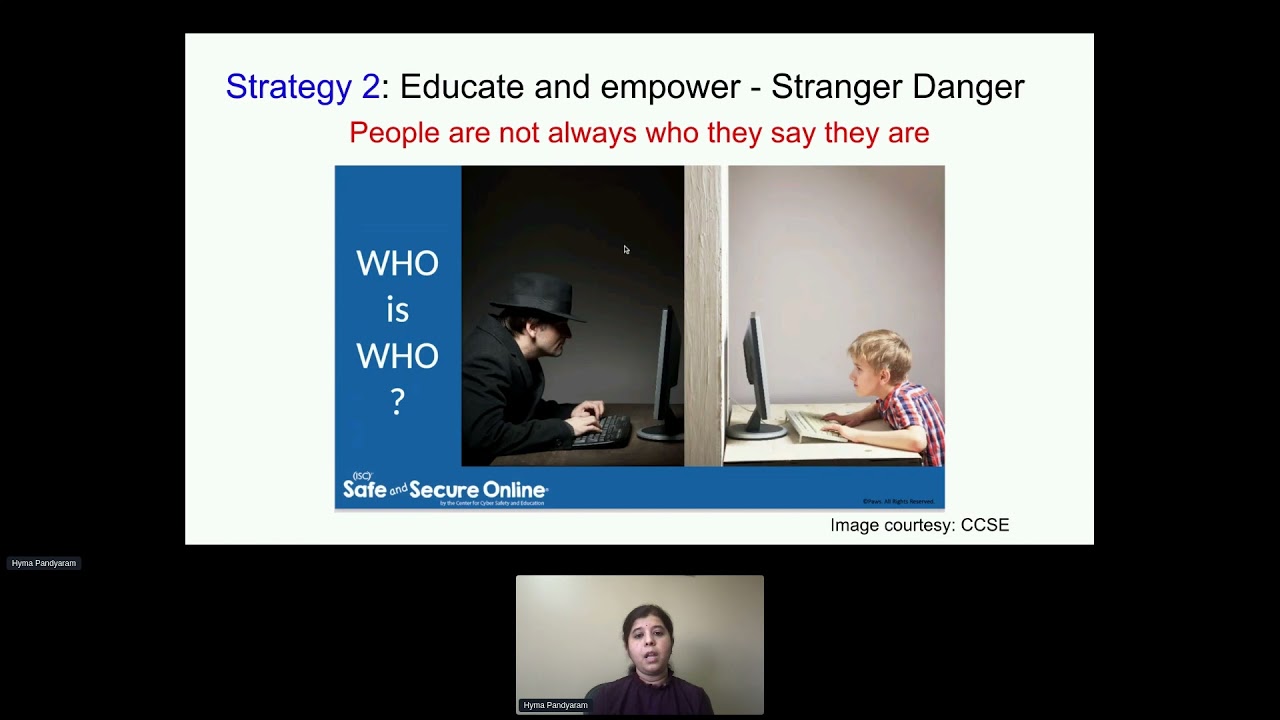
about the internet the first thing that you have to teach is if you haven't already is the stranger danger so this is a slide i normally use when i conduct presentations at elementary schools and this is the slide that captivates the children a lot why because they can see it obviously that there is a child probably a fourth grade or fifth grade uh kid trying to chat with a stranger an adult and a very creepy looking adult online so this makes them think that think about the scenarios um or about the chat conversations they might have already made or they are going to make online so i asked them these simple questions do you guys think that this
kid knows that he's chatting with this suspicious looking adult the answer is always no would this kid interact with that kind of adult in real world no way then why is that kid chatting with this adult online it's simple because he cannot see that person that child only has the information this adult must have put in his profile or the picture he might have posted on as his avatar on his profile so tell the kids that people are not always who they say they are online people hide behind their screens they can pose as whoever they want to be and that's the stranger danger you have to educate your children about um a survey was conducted by this
organization called ccse center for cyber safety and education it's a non-profit organization associated with isc square and they conducted an internet usage study for children in grades four to eight and they came up with some key findings so i'm just posting findings they um they have come up related to stranger danger there are many more findings about the patterns the internet the time how much time these children tried to access um internet like on an average how much time they spend on spent on the internet and also uh how many times they tried to um violate the rules that were set by their parents and uh till what time in the night they could browse the
internet or what were the impacts of this late night browsing such as being inattentive in school or skipping the school so there are many more findings i'm going to post a link at the end where you can download this um study if you are interested so two things which i'm interested here are 40 of the children who were surveyed either connected or chatted with a stranger online and eleven percent of these children who connected or chatted with stranger met that stranger in real life so if that stranger is an adult and and with bad intentions that is that that is going to bring dire consequences to the child and the child's family so there is a very good reason that we have
to educate our children about um stranger danger and uh continuing the same strategy teach your children about privacy what information is private what information can be shared with a stranger online even if a child is talking with a with an adult online let's say like the child is not does not know that he's he or she is talking to an adult um as long as the conversation is limited to that platform they are interacting upon maybe let's say they are playing a game like in in my child's case a chess game if they are talking about strategy or something related to chess then that's not a problem but often um people with malicious intentions they want to
extract as much information as possible from the child like social engineering the child to get information they want so you have to teach your children what information can be shared and what information cannot be shared and is called personal or private information so you know all of this the first name the last name address phone number school school name credit card number and importantly birthdays of the child and also of the parents should not be revealed any information that can identify an individual can never be shared with a stranger online and also talk to them about how bad guys make use of this information um you can talk at a high level about identity theft or
physical or psychological harm revealing such information to a stranger can bring to the child and his or her family um keeping with the flow the private information should also include password password should never be shared not only with strangers but with friends whether they are online friends or real life friends because the friend of your child might not have bad intentions but somebody else can manipulate that friend and extract the password or kids can get into trouble by sharing password like it can be as simple as this like when i was when i was giving a presentation at an elementary school um two fifth grade uh two two fifth grade boys they shared an interesting um
[Music] scenario so they said like one of them shared password with another one and that that friend by accident deleted the assignments that were supposed to be submitted so that child lost the word the teacher was good enough to understand but they got a good lecture about not sharing passwords so unintentional stuff can happen so you can share similar stories with your child like what the level of stories um sorry um high level in a at a high level that the child can understand and in that process you can also teach them about how to set a complex password you all know how to set a complex password um i had to put this information because
i wanted to talk about complex password okay next one so we we are educating the child about privacy what information can be revealed and what cannot be revealed in a chat session how about posting children should always for that matter even adults should always stop and think before posting why because again private information posted online can be made available to bad actors and uh can be used against that person so talk to your child about the about the effects of posting unwanted information online and teach them how it's always recommended to take a parent's permission or an adult's permission before any information personal information can be posted online if you look at the screen chart there is normal there is a reason
why there is normal here our children's presentation um is based on garfield theme and we have we get a lot of help from garfield and his friends to teach children about cyber safety so again this screenshot was taken out of that presentation so normal here is innocently posing uh for camera and he did not realize that behind him is a mailbox containing his house number probably and a street name so information like this when shared online it's a it's a picture but it has a lot of information that can help to identify the location where normal lives are the location that normally normal probably frequently visits so talk to your child about sharing pictures and posting information
online so the next one is cyber bullying cyber bullying happens online discuss with your child about what cyber bullying is any bullying that can happen on an electronic device can be considered as is considered as cyber bullying so talk to your child about um how how strangers can bully children online and um if at all somebody bullies your child online um what should they what should your child do should they get even with the bully is that the right strategy will that stop the bully from bullying your kid or should your kid come and talk to you if you are present in that location or if this happens at the school with the teacher or a
caregiver so talk to them about these options and if cyberbullying happens try to understand your child assure them that you are with them and you are going to support them no matter what and tell them that cyber bullying can be a punishable offense in canada and police can also be involved so here's a helpline for kids to interact with a counselor if if cyber bullying happens to that kid and also as a parent you have to watch out for the signs of cyber bullying what are the signs of cyberbullying so um the child has become very angry after using an electronic device so that could be a red flag or a child who normally loves to browse and
spend time online is not touching his or her device at all that's another red flag or is withdrawing from family and friends so these are all the red flags with of cyber bullying of potential cyber bullying so talk to your child be there for your child and there is help available and if needed the police can be involved also avoid help your child to avoid becoming a cyber bully by accident so unintentionally kids can sometimes post uh jokes or some information that they think is funny but could hurt another kid or another person online so teach your child to be kind online the the strategy one that we discussed where um we want parents to interact with a
website or an app and leave some kind comments um will help your child to understand the etiquette of of posting messages online and will teach your child to be to be kind so if if your child has nothing has no kind of feedback to give then then tell your child to just not give it so again together leave reviews about abs website so teach your child about how to be kind online this will help your child from becoming a cyber bully by accident okay next challenge your child with some tricky online situation so um i often present my son with some puzzles about a difficult online situation and ask him how he would react in that situation so i have given some
examples here so he let's say he's chatting with his best friend and his best friend uh popped in the chat window some uh link to a new games website where these fabulous games are free and uh can be downloaded and can be played for hours or maybe can be played online for hours and the kid also went on uh saying that his dad approved this website then what should my son do in that situation i'll give this scenario and i'll ask i'll wait for his reaction if he has trouble coming coming up with a solution i try to give him some choices such as clicking on that link right away or stop pause and then click on that link
or just do nothing with that link say no to his friend uh tell his friend that he will discuss with his parents and then take a decision and then come to his parents and check if it's a safe website to access um another scenario would be like he's playing a game online and he's not doing well then a stranger or his opponent approached offered help saying um give me your password i can i can log in and you know do better than you and help you gain more points so what should he do in that in that situation so these are some of the scenarios i often give to my ch my son and he loves he
wants more and more scenarios so that way i eat this is like um doing uh um vulnerability analysis at home right like we we do this kind of stuff in our workplace but if we can bring the same strategy to home it will it will again help us to spend quality time with our children and also teach cyber safety to them uh through these playful scenarios uh by the way this picture was taken by my son and he used the scrabble tiles to make the word scenario and he intentionally spelled the e backwards because that looks like a three there is no three in scrabble tiles so he came up with this one and that to him is a complex
password and would fit to this uh um to to the concept of b sites and an id uh cyber security conference so um i'm proud of his work okay the next one is set up your defenses so you have taught your child about private information uh how to safeguard it and then you have talked to your child about cyber bullying what to post what not to post and you have given them some scenarios so your child has enough information to take care of uh or to to to understand the threats that he or she can face online it's also your duty to set up your defenses to help your child um not fall into any of these online tricky
situations so let's discuss two types of defenses one is physical defenses like as simple as installing webcam covers on all devices your child uses as we all know snooping using built-in webcams um it has become very common and it's recommended to have a webcam cover on all the devices your child uses and teach your child to make sure that that webcam cover is uh closing the camera the moment your child tries to access that device it's like when before you start the car you check the mirrors and make sure that everything is good and then you get gold so it's this is similar to that and uh also discourage stranger interaction by requesting your child or limiting the
internet usage to public areas like um encourage your child to browse in the kitchen or in the living room where there is some traffic so this way your child is discouraged to make any unwanted interaction with a stranger and if it's not possible if it's not possible because you have a big desktop and you cannot carry it all the way uh to your living room or kitchen arrange the computer screen in a base so that if the screen is facing the door the moment somebody enters the room or somebody is moving in the hallway they can look at the screen it's not like you're going to look at the screen constantly it's the thought in your child's
head that anybody can have a peep at the screen will discourage your child from making any um uncomfortable interaction with a stranger so similarly you can make use of software defenses such as parental controls that come up with all popular uh operating systems like windows macbooks and that are installed in windows machines macbooks or chromebooks um by use using which you can limit the time uh the browsing time uh um and also you can limit the websites or applications that can be accessible by your child there are commercial parental control or monitoring softwares like custodio or k-persky safe safe kits which have many more features uh they can send you some real-time alerts and much more so it please take some time to
browse through the parental controls if you haven't done already um and also install so these are more this presentation is more geared for parents of elementaries elementary school children because uh having kids safe search engines is essential for those kids as you all know google is not recommended for kids because it can bring all sorts of recommendations when when your kid does a search and there is no guarantee that they are all kid safe so try to use kiddo or kidtopia that can filter inappropriate content out there and can only display friendly results um another one is to use whitey kids so as you saw in one of the slides the two little guy is trying to access it's
better to install ytkets there if they accidentally click on that first of all nothing will display because you can set the time limit and even if the time limit is not set only kid friendly results are displayed um another one is to make use of the esrb ratings so if you remember about the internet survey we discussed a few slides earlier um 50 percent of the children surveyed said that they played violent video games that are not up that are not appropriate for their age as you know video games can contain a lot of violence and also mature content that's not recommended not at all recommended for a child to access so make use of the
esrb ratings explore the esrb ratings for the apps and these ratings are similar to the movie ratings which are based on age and the content that is being offered by that app and set restrictions in your app store if you have android or play store if you have ios to prevent downloading pass certain ratings so e on the left most side everyone is the safest rating and very strict rating um so you can choose whatever reading you think is okay for your child um to to to um for your child um to download an app with so um i'm going to share a link to the esrb ratings guide um at the end of the presentation
next strategy number four build a partnership so make your child your partner in making your home cyber safe um create a cyber safety contract together with your child this contract is not like something that you can sue your child or your child can sue you right obviously no it's a bad joke i know so it's a simple contract that gives your child some sense of responsibility um and encouragement to to exhibit good behavior online so create a safety contract sign it with your child and paste a copy of the contract in your child's room next to his or her computer if possible or in a place where your child um sits often to browse the internet so
this signing such contract and uh making your child a partner will help to develop mutual respect and obviously to make them um feel the responsibility that they are also playing a big part in making their whole internet safe and if your child has a younger sibling it's a very good way for him or her to become a role model for um for the younger siblings so a sample of this contract is here um it has a lot of information i'm going to share the link to this contract again at the end of my presentation um so this contract talks about all the topics that we have discussed so far so do not give any personal information and
also to contact parents if any uncomfortable situation um is faced by them online and also to never ever agree to meet um the stranger they met online in real life and also to think and to think about posting a picture or even worse sending a picture to stranger and also to not responding to cyborg trying to get even with a cyber bully if they become victims of cyber bullying cyber bullying unfortunate the unfortunate events of um cyber bullying so also it will um it's talking about how they should approach parents and also to adhere to the rules that are there in in this contract and um and importantly another one that's do not download or
install any software that can possibly hurt the computer or jeopardize the family's privacy so a contract like this will help your child remember the rules they have they need to follow and they can sign and you as a parent can sign um so together you have some good understanding about what is possible what what can be done um or what cannot be done while they are using the internet strategy number five so you taught your child about how to be safe and how to show the best behavior online and now it's time for you to be the good a good role model so walk the talk be a responsible parent so you have to your kids don't become what
you want them to become they become like they become you they see you they try to become like you so if you are a good role model then there are very good chances that your kid is also going to become like you so very simple when your kids are at home avoid browsing inappropriate content yes and do not hide your screen so if there is something that it need not be inappropriate probably is a news item um that's that's probably not the headline might not be appropriate for the child then instead of hiding your screen do that browsing in privacy when your kid is not around and also limit your browsing time if you want to set
browsing time limits to your to your child then you should also adhere to the screen time limits then next um stop posting statuses about your ongoing vacation unfortunately i see many grown-ups many adults parents posting on facebook um about where they are their ongoing vacation so family taking in my picture in front of eiffel tower they are living in canada but they now are in paris taking a nice picture in front of eiffel tower saying hey look at look at us basking in the parisian sun so what information is are they trying to convey they are probably trying to send this um a nice remi or a nice souvenir to their friends saying that they're having a good time
in paris but but if you if they post such information on facebook there is no guarantee that it will just that information can be um will stop circulating within their friends circle right um there can be again bad actors who can exploit this information hey these guys are at least 10 hours away if they magically catch a flight uh from paris to canada and that gives them a nice idea to sweep up the house right so be careful when you are posting statuses online because your children are watching you and they are trying to learn from you and also it's not recommended to check to post the uh location that you checked in recently so geo tagging if possible just uh
disables your geotagging on your devices and sending automatic check-ins um of your location to your social media accounts also set a rules chart and uh follow that rules chart and when you follow that rule chart there is a good chance that your child will follow the rules chart and when you see your child following the rules chart reward your child uh child's good behavior for for adhering to the rules um other standard stuff like installing antivirus and not downloading software um content from illegitimate sources so this will good set a good precedence to your children to only use uh legitimate sources for downloading software or any other content from online um and update the operating systems and applications
regularly on the devices that your child is using and you are using as well and respect the age restrictions so this is another thing um i see with most parents they create facebook accounts for their children that's a big that that's not really good and what is even worse is the child has access to those facebook accounts so or even gmail these platforms are not made keeping in mind child safety and security there is a reason why they they ask for a confirmation of age before signing up so respect the age restrictions and make sure that you your child can have an account on uh platforms on on social media platforms at the right age
don't circumvent the rules so yeah that's that's those are all the five strategies i wanted to discuss with you today um and as promised uh here's some information about some awesome local organizations that are promoting cyber safety calgary police service and edmonton police service um they were doing um in-person presentations in junior high and high schools as well as i know but now looks like they have shifted to virtual presentations um and uh there are some very good resources so these presentations are free you can request them um by through your school um your school has a resource administrator that's what i was told by calgary police service so you can talk to that resource
administrator and get a presentation scheduled for your children if they are in junior high or high schools and the websites of cps and eps have excellent documents and tips for parents and even videos about cyber bullying and also cyber safety in general um there is youth link calgary that conducts free virtual presentations to parents and caregivers and i think they do these presentations in association with the calgary police service so finally i'm going to talk about i is squared alberta chapter some self-promotion here the chapter that i volunteer um this chapter is run hundred percent by volunteers and we have a program called safe and secure online and this was developed by the same ccsc
uh that has done the internet okay um study for children um that i have used in various slides of my presentation so um the safe and secure online program has um they have developed free presentations um and isc squared all but the chapter volunteers conduct workshops and presentations to elementary school children aged between 5 and 10 and youth um 11 to 14 and ages 11 to 14 and also to parents about how to keep their children safe online and also to seniors um about safeguarding their privacy and not following scams for um on the internet um i want to talk specifically about elementary school presentations um as part of the safe and secure online program that we offer as you can see
there is um garfield and his friends and two new characters um so these presentations are fun and interactive because they are geared toward elementary school children and they are all themed around garfield um this the presentations contain a lot of puzzles um and videos and also tips um for children um to to keep themselves safe online so normal or garfield get into tricky online situation then there is this female cyber security specialist called sabrina who is a cissp and with the help of her internet safety bot she tries to teach what is the right way of dealing with that situation to either normal or garfield so children get very intrigued by these presentations and there are quizzes at the end of
presentation to help them or to cement the knowledge that they have gained through the presentation um in a fun and interactive way uh these presentations are conducted either virtually or in person and um currently we have team members the safe and secure online team has members in calgary edmonton and medicine hat so if you are interested in free presentations at your child's school or in a library a parent organization um or a senior center or even at a non-profit you can contact iss squadron alberta at this email which i'm going to give again as uh towards the end of my presentation so um if on the other hand if you are interested if you are a cyber safety um enthusiast
and if you have passion to promote cyber safety among the vulnerable sections of our society please join our program we are always looking for volunteer we provide all the presentation materials that you need to conduct these presentations and they are very good and we also train the trainers if you want training we train you um isc squared alberta chapter covers all the costs of the presentation materials such as the ebooks that come out with the presentation if it's a virtual presentation or handouts and garfield comic books that are again written by jim davis specifically around the cyber safety scenarios uh the three scenarios which are privacy posting and cyber bullying they will be given to the
children um and if you are a cissp or if you are already having a cyber security certification you can earn one cpe per presentation that you have conducted for children or parents or seniors or for non-profits again you can contact isc squared alberta chapter at sso at iss square or with the chapter dash is quite chapter dash all but dot org um the link to which um i'm going to give at the end of my presentation so i hope you had a good time um watching this presentation so so far i'm just going to give a conclusion a roundup of all the topics that we have discussed too far so far that children have accessibility to technology right
from a very early stage um and there are dangers that children can face online and it's the duty of us parents to our caregivers to make sure that the children are equipped to act in the right way when they face a tricky situation online we have discussed the five specific strategies that can make your child safe online and we have also discussed about the local organizations that are promoting cyber safety in alberta so now it's all up to you and i wish you good luck with becoming your child's cyber safety superhero um these are the free resources i have discussed and i'm going to post a link to a google doc that can that's ever
that can be available to anyone on the internet and these links will uh um will be there in the term in the document so it's again the free online presentations if you if you don't want to associate with isc squid alberta that's okay too you can download these free presentations and conduct them wherever you want or you can teach your child about cyber safety through these presentations so they are all powerpoint presentations not interactive if you want an ebook please contact us we'll be happy to provide that ebook ebook or ebooks to you um and also i'll post the links to the online cyber safety agreement or contract a couple of uh samples and the internet usage usage
study by ccsc uh will be shared with the audience um i want to extend my thanks to the following for the images used in the presentation i have used a couple of images from um ccsc which is again associated with isc square so thanks to iss square and cybersafe and um my my thanks to these photographers on unsplash who were kind enough to share their pictures um to and and i could download them for free online now the time for questions if you have any questions for me i'll be very happy to answer those questions
based on the keynotes presentation what are your thoughts about children using technology now unfortunately i have missed the keynotes so if you would be kind enough to give me some information um i can i will try my best to give an answer to that question
thank you sheriff for your kind comments um sure yes um eugene that's a great question yes um so going back to one of the slides that i have discussed so all applications that um that are uploaded or that are available in app store or play store um have these ratings called esrp ratings so let me share those links with you first give me one minute please
that's the document i was talking about with the helpful links um let me go back to that slide as well
okay so um any app that you can find in the app store will have one of these ratings so a link is given in in the again in the link that i shared you have a link to the esrb ratings guide you can see that it's they are very intuitive so you can look at that e means for everyone depending on the age of your child you can look at the rating so e for everyone is is the safest option but mind you these ratings um sometimes might not be strictly enforced so it's always recommended if you are a parent to first download the app by yourself go through the content and also experience the content see if it's okay
for your child to use and then agree for downloading or if your child is not in that age to take your permission then set the app store restrictions to an age limit that's appropriate for your child if it's a really little kid then sorry if if your kid is less than 10 years age then everyone e would be the right option so if they are 10 plus then probably this rating and teens tm so depending on the age of your child you can look at the app you can set the restrictions in the app store um you can google probably and there are many videos on youtube that can help you to understand how to set the parental
controls if needed i hope i answered your question in an okay sort of way eugene okay basically the permission security mechanisms in phones are usually bypassed by bad apps yes unfortunately that can happen so um there is only there is only so much you can do if an app is doing that you have to report that app and um um and to the authorities so you can visit the um you can visit calgary police website or edmonton police website or even um there is one more link um just okay probably you can you can again google is your best friend you can google online and uh there is a cyber safety canada or some uh
or a website by the government of canada where you can report um a suspicious app or a website so you can make use of that if you really want to report that app or if if you if you think that app is um or if you want to make sure whether an app is suitable for your child or not the best way is to download it for your by yourself and go through that app and make a judgment call depending on your experience with that
you're welcome kenneth thank you sridevi nice to see you here um do you know any recent security experience of our alberta children uh you mean any um any cyber bullying or any um what do you mean by security experience like a bad experience well um i can't say anything um i don't know if i saw anything in the news but i keep hearing from parents from my son's friend's parents about how theirs their kids accidentally landed up in a in a very um in a mature website um when they tried to click when they tried to do a google search or when they tried to use siri or some other voice enabled um voice assistant how the language was
misinterpreted and you know like um china child inappropriate content was displayed so these are some of the some of the incidents i keep hearing um so it's better to be safe than to regret so if if your child is in elementary school always install don't give google access to them don't don't encourage them to go to google um just try the search engines like kitten or kitopia which are safe for kids which will limit their uh their um which will limit the results to kid safe resources i hope i answered your question um in a way in the right way sri devi
any other questions
so finally i would like to share with you my linkedin information in case you are interested to know more about cyber safety or the presentations that we give to children in alberta or parents or seniors in alberta with that said a big thank you to besides organizing committee for giving me this opportunity to speak at this wonderful wonderful platform and uh my huge shout out to all the attendees volunteers and the sponsors who made this event possible this year thank you so much
Related talks
 26:57
26:57 19:48
19:48 58:06
58:06 15:20
15:20 33:31
33:31 38:10
38:10