Phosphorus
Show transcript [en]
foreign
[Music] thanks everyone uh appreciate you guys uh attending just going to give you guys a quick overview of the phosphorus cyber security pro uh platform when you uh first log in you're going to be greeted with a snapshot of your xiot environment so we've done um you know Discovery we've identified what you have uh right now I'm actually showing our lab in Nashville so you can see one side of the lab here uh our Founders uh are you know old school hackers so you can see they've got their uh pay phone over here you've got some crock pots uh and then I actually have a close-in video here of a phone so I'll show you tell you more about that a
little later as I do the demonstration because that's probably not the most exciting uh thing that you'll see oh now I'm oh okay sorry it looks like we're not uh
yeah sorry about this
all right how's that look foreign
sorry about that so this was that snapshot screen that I was referring to giving you kind of a view into what you have um this is our lab here which is in Nashville so just giving you a quick show here there's the PayPal and everything that I mentioned and then this is a close-up on one of the phones here so we're going to be actually doing a firmware update on this phone a little bit later just to kind of show you how this works in action so going back to the snapshot screen here you can see we've got everything we've discovered we identify new devices we'll show you devices at risk and this is one active site so it's that site
that I showed you we actually support multiple sites you can you know based on geography or tenancies you can set that up as well here's a highlight into credential management so we act as a Gateway into your privileged access management platform whether it's cyber Arc or Beyond trust or hashicorp or bicotic you name it we can integrate with those platforms and allow you to manage passwords on your X iot devices here's your most vulnerable devices so we'll do Discovery we'll identify the devices that you have based on the firmware that we're running we cross reference cdes and other information to identify the vulnerabilities and the severity of those vulnerabilities we'll also highlight end of life devices
so we'll help you understand what devices are on your network that are no longer supported by the vendor which means no more new firmware and which means obviously you can't RMA or do other things like that and you know you're hitting eBay so there's that Disaster Recovery risk will give you views into vulnerable firmware and also risky configurations so identifying things like telnet being enabled and so on overall inventory being shown here as well breaking it down by device types and everything is clickable so you can go down and drill in and find out more information about the things that we discover and then going down here you've got the different alerts based on criticality
overall kind of response remediation elements you know your homework list so to speak as you evaluate kind of what your stance looks like from an X iot perspective but yeah let's get into the device view so after we've done the discovery we've identified everything here we're going to sort of all the devices that we've discovered by alerts and these alerts are going to identify uh you know kind of the most vulnerable or the devices that have the most issues so you can see that list here you've got manufacturer model type we've got alert severities you can filter on that like if you just want to see the high severity you can do that really quickly
um you've got tags so you can actually tag devices by their type so if I just want to look at my cameras for example I can do that tags are also utilized within the product for role-based Access Control so a lot of our clients right they've got different teams you might have a physical security team so they're focused on cameras and door controls and building controls things like that those people should have a different level of access to devices than perhaps your OT folks or other people that are involved within the environment you can also go by type manufacture even so this is a great one we start looking at you know for example the US Banning Huawei and ZTE uh
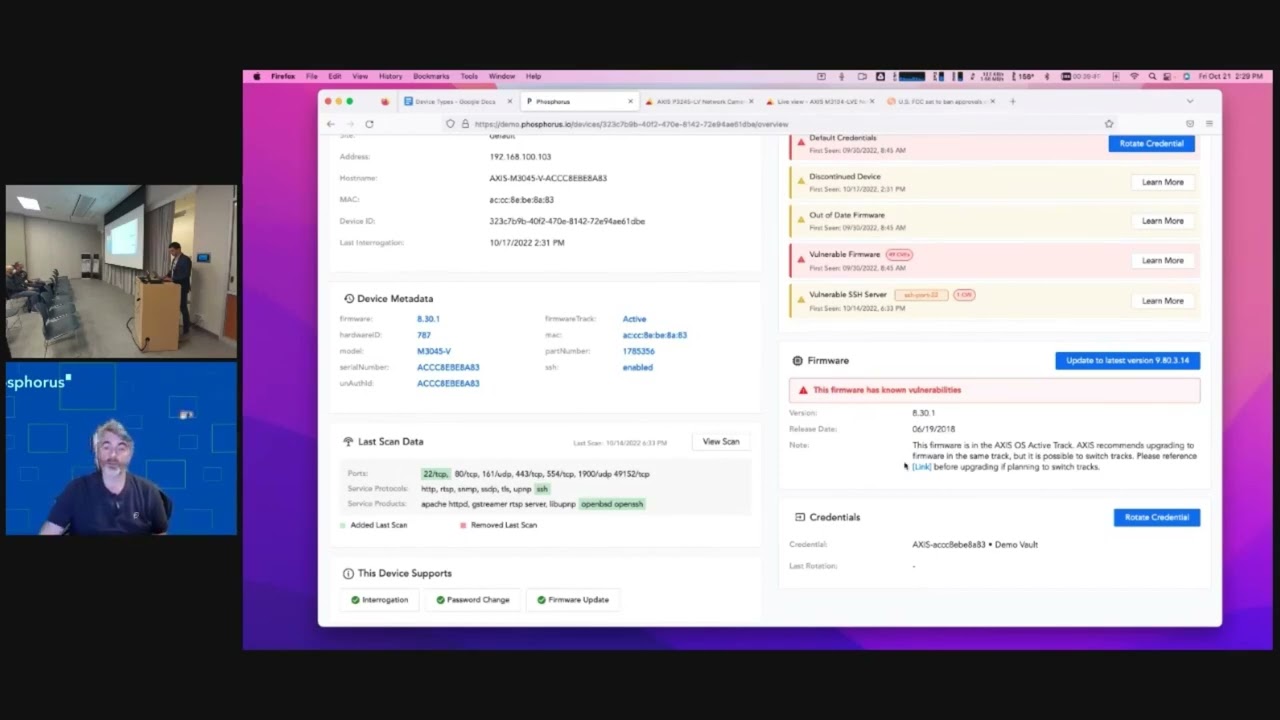
certainly a big concern for for organizations uh understanding if those types of devices are in the network uh and so on so if I click on one of these devices here like this is one of the cameras you can see the type of information that we pull with our discovery basic Network information host name information but also detailed metadata so this is extremely important because accuracy and Fidelity is where we have to be you know top-notch and so when you come down here and you look at what we support with this device we support interrogation which is our term for querying a device after we've already discovered it talking to it in its native language making sure it's up
and it's healthy password change and firmware update for this particular device we also identify based on our previous scans what has been added what's been changed or what has been identified from a protocol from reports and also a service perspective and then as you go down here you can see the active alerts that are existing for this particular device so it's got default credentials it's a discontinued device it's got automated firmware it's got vulnerable firmware and it's got a vulnerable SSH server so all of those uh elements have been identified I'm actually going to go back to my uh camera here which is 105. it's the one that I was just showing right here and before I get into doing a firmware
update I want to click on this device and I want to show you real quickly what it looks looks like when we do a credential rotation so basically the credential rotation I've already integrated into my privilege access management Vault and if you guys end up wanting to take a look at the product within our proof of value we'll bundle the platform it's just a single Appliance either virtual or physical then it'll actually have a vault in there that you can use because most folks you know don't use their corporate Vault within a POV just to make it easy and clean but it's very easy right I'm I want to rotate the credential I go ahead
and do that it's going to be very quick we're API integrated in I've gone ahead and I've changed the password on this camera now I'm showing you one device we can actually do hundreds of devices at a time we can do dozens we can do two you've got that flexibility I'll show you that briefly but I'm focusing on one device at a time password has been rotated so I go back to my camera I now have to sign in I don't actually know the password anymore because I just rotated it so I can go into actions show device password this is actually going to connect into that Pam because we have the integration and query that password we don't store any
passwords we only grab it from the Pam based on these types of queries and as you can see here's the new password really nice complex password and that's another part of what our platform does for X iot devices is we know the recipe for the complexity of passwords that these devices can handle because as you may or may not be aware some of these xiot devices or embedded devices can only support certain components right they might not support special characters or maybe they only support lower case characters we will make sure that the most complex password possible is applied to that device so I've gone ahead and re-logged in here I'm in I'm gonna go ahead and close this
and now we're back in and something I'm going to do here quickly is I'm going to actually reset the password again and I'm going to set it back to default which in this for this particular device is pass and I do that for two reasons number one uh I got to do this demo again later so there's that so I can show the credential rotation another time so I've logged back in here I'm going to go back to our video just so you guys can get back to seeing the stream that we were watching earlier now I'm going to go ahead and query this device just to uh simulate what it would be like if I uh
did another uh Discovery and what you'll see here is we've identified that the password has been reset Now by me resetting that password back to the default you know out of the box brand new uh configuration that's a simulation of what we call the paper clip attack so you know I don't know about you guys but in my home network I'm guilty of a time or two having to reset my router or something like that right and you know the drill you take the device you pull the power you hold down a paper clip into the pinhole and then you power it up and you wait about 10 seconds or whatever it may be and it resets the
configuration and the password and because I enroll this into our privilege access manager we've identified now oh wait that password is no longer what we set it to so I'm going to go ahead and update the credential now we've got that now we've we've communicated that we've validated that with the device and now it's back into that Pam now the other layer of that is that's one of the metrics from an alert perspective that you can see here so we can integrate with your sim your analytics platform your ticketing platform and you can see here alert passwords are set it's got default credentials and that assigned credentials invalid so that's an indicator it could be an admin doing
something but it also could be somebody attempting to gain access which you know is pretty easy from that perspective when you're talking about a device like that another thing I'm going to do here and prior to doing that I want to show you firmware so this camera is another one of those cameras that I was looking at you guys have probably had the same story right in my home network I use I have a NETGEAR switch it's a 24 port and I think it's been around for a while because every time I go to netgear.com go to their support area check for new firmware I then have to know whether I'm a REV one a rev2 A rev3 or a REV 4 of that
switch right uh and I don't always remember I remember the model but I don't necessarily remember the hardware revision number so sometimes I have to go under you know underneath my desk find the switch take a picture or use a flashlight and figure out what brev I have so all of that is just work that I have to do and that's just in my home right for one switch when you talk about organizations that have hundreds of cameras hundreds of printers hundreds of plcs hundreds of door controls whatever it may be that's an X iot device you've got to do that throughout all of those vendors and understand that and so what we do here at phosphorus for those
types of situations number one it's Fidelity we understand exactly what the device is 100 from the hardware to the model everything number two we're a CDN content delivery Network for all firmware so we scrape the internet with all of these authorized manufacturers we download all the firmware and you can see this this access camera has 44 different firmware versions and where kind of towards the start of that Journey right it started with the seven series we're now in the middle on the 8 series you can see for each one of these you've got all the cves identified and if I for example wanted to go all the way to the latest one I can do that we handle everything
the pre-flight checks to make sure the device is healthy will validate okay you got to get to version you know 9.2 before you can go to 9.8 we'll go through all of that you can see the shot 256 the md5 all that information is there and it's one ACL on your firewall for supporting all the vendors in your environment instead of having it allow access to nethere.com to Cisco to whatever it might be for all the files so that's one of the big differentiators there and now I'm going to go back and I'm going to do a firmware update on my polycom phone now this is the one that we've been looking at with the camera
it's probably like the least sexy thing you've probably ever seen on film you know we're watching a phone which is you know number one who has a desk phone these days but this is actually very regular in a corporate environment for sure and the polycom is actually really really nice because these are very graphical when they do firmware updates so that's one of the reasons we chose this for our demonstration and don't worry I'm not going to make you watch a full 10 minute upgrade of a phone but I want to at least show you kind of that kicking off and so with the polycom phone similar to the camera you know you've got the the firmware it is
the hardware we've identified all that the camera this one's a little more simple there's only a few options here I'm actually going to use this middle one because it's about half the size uh of the latest and so I go in here I hit install firmware I hit confirm and away we go right I can go do other things like look at reports and other things like that and I'll do that shortly now first I want you guys to see this kicking off uh and I'll go back here periodically and in fact later on I need to downgrade this before the next demo so I'll downgrade as well so we do upgrade we do downgrade and
that's an important thing to recognize because there are scenarios especially in corporate environments new features may cause issues and all of that and so you want to roll back you can do that very quickly as well so you may have caught that it was contacting the provisioning server that's us now it's it's doing a reboot uh after it's downloaded the file and then it'll go proceed through its you know 10 minute update process so that's for more updates and while that's going on I'm going to show you guys uh some of the reports that we have um and kind of help you identify that now actually one thing prior to that you can see here now it shows that this
device is updating meanwhile I can continue to look at all the devices in the environment um if I pick um you know uh pick another device here one that has a certificate now that one doesn't I'll just choose this camera so we also identify certificates on X iot devices now I'm going to preview this because this is an important feature that we're going to be releasing in Q4 this year right now we'll identify what certificate a device has and as you may or may not be aware X iot devices embedded devices you know any device that has an IP address but can't take an agent you know it's purpose built very low resource and it's focused on usually
about one or maybe a handful of things nine times out of ten these devices has a they have a self-signed cert so we'll identify that we'll help you see that within your platform coming next quarter we'll integrate with your certificate Authority and allow you to deploy your own signed certificates to all of your X iot devices so you can get rid of all of those self-signed certificates so another cool feature and also prior to showing the reports I just want to show you how you can select all devices if you wish perform actions and you can do things like enroll in the privilege access management rotate the passwords install firmware so you can do that in Mass very very easily and in
fact you can schedule it so as you're going through the process of you know crawl walk and run the important part do the discovery get your arms around what you have now and what you have today and as you're maturing down the line what will ultimately happen is you'll get to a point where you feel pretty good you've got all your X iot devices enrolled and you're doing password management you've changed the default password which is a huge win initially and now for compliance and Regulatory reasons you can change that password every 90 days you can schedule that you don't even have to come back to the platform let's check on our phone it's uh getting the network up so it's
actually getting close to being done here so let's go back to reports here so number one this is a report on alert history pretty simple and straightforward I call this you know the why we bought phosphorus and the Justice justification report which you know you start with this many alerts and you get down really low right easy another one down here I like to hit is this is really my favorite uh is discontinued devices so with discontinued devices this could really be a very simple product in of itself because when you talk about X iot because they're purpose-built devices what usually happens is an organization or an individual or some party comes in to that environment and says okay I'm
going to install cameras I'm going to install temperature sensors I'm going to install door controllers they do that task and they leave and oftentimes it may be managed in the sense that like with printers right someone comes and refills the ink and and you know fixes things once in a while but it's not managed in the sense that from a cyber security perspective people like you and I we want to make sure that we address issues with our attack service right and so this helps you see discontinued devices which are devices that are no longer going to get new firmware which means vulnerabilities will continue to exist and not be patched and it means you have no long you're no
longer going to get any support if there's a hardware issue so for both of those there are serious problems especially when you look here there's three APC devices which are UPS's that are out of date so number one that's not good and if I go back to my firmware overview which I haven't showed you yet I like this one I can show you just how old the firmware is I've got one of those UPS's that's got an 11 year old firmware so if it's on your network with an 11 year old firmware do you think that the battery has been rotated out every three years probably not so those are the types of scenarios where you start uncovering
layers and layers of debt which could lead to you know next time you have a power outage you might have a UPS that instead of giving you you know 45 minutes of power to get through you know a really small outage you might be talking about only a couple minutes because the battery is sold so this is pretty important helping you identify what's discontinued and then hear from a firmware overview helping you see how many versions behind you are is there a critical CDE that type of information to help you with your punch list because that is one thing we do certainly give you homework you know the visibility into what's happening in your environment but we
make it easy because we actually can remediate unlike other platforms out there that tell you stuff and it's only detect and respond will help you get through this you and I together other area here is a security overview so this used to be kind of my favorite place to land uh before we added this really nice dashboard because this really is the overall view of why xiot can really be an attack surface problem so just in my lab here which you can see I've got uh 54 devices with default credentials that's 35 percent of all devices and I've got 11 of those with a critical CDE now a vulnerability like that is not just you know a big vulnerability it's
also exploitable meaning it's out there someone can go and use it uh which is fine right but when I'm thinking next iot my Approach is always I'm going to use Google and a model name because look at all these default credentials right why use an exotic downloadable exploit which isn't exotic at all right but I can just use admin admin or whatever password right so this is the type of thing that happens and we break it out you know by device and criticality and all that good stuff uh similarly for alerts same thing you know you've got red you've got orange you've got uh beige for low uh and so on so it kind of gives you a
view and where you are and how you're doing so let's check on our phone here it's starting up here so it's uh getting there uh and uh I'm pretty much wrapping up here now another thing that I like to cover quickly here is sites so what you're seeing uh with this screen is the phosphorus uh cyber security kind of site manager so this is a an appliance it can be virtual it can be physical uh it can be your singular Discovery platform uh if you have a flat Network or a smaller Network or if you deploy this onto a laptop and you know just use it for Discovery no problem but most environments as you can see
here you've got multiple sites now in our lab we've got some of these down at this moment but these are remote uh Discovery essentially drones or appliances and all it is is a Linux executable that can be deployed on an existing Appliance or an or server or you can use one of our appliances and you can use that so you don't have to you know update all kinds of ACLS on your firewall or you know maybe you have a geographic concern you've got you know presence in Germany or some other place where there's different types of concerns you can make sure that the discovery is done there locally and then it's just a singular TCP 443 connection
back to this console and we can do all the remediation that we do from here and then as you can see if you have those multiple sites you can then sort on that site which allows you to report and all that as you can see here this just popped up um that we went ahead and we got that uh firmware updated so I'm gonna find this the lazy way and now it is uh still out of date firmware because I updated it to the middle one as you can see not to the biggest so I'm just going to go ahead and do a downgrade here just to close that Loop and let that go and at this point I'm
open for questions uh and I can you know certainly go on but uh I thank you for for attending
foreign
okay I have uh some questions coming in this is thank you guys for patience this is kind of unique I'm getting them via a slack um is there a way to find out if any device is tampered with physically um so I mean there's kind of an asterisk there with this with this answer so a couple things right if that device and a lot of them do when they're embed embedded kind of purpose uh built devices if that device has a methodology to to essentially alert or change its state uh to let us know that it has been tampered with then yes so if there's a log or some other you know change that's identified as part of that device
changing it's very likely that we could change that we could understand that now if you're going you know usually when people are asking those types of questions with those types of devices like it could be you know fire monitoring or fire controls things like that at least in the US we actually are not allowed to make changes to those devices at all so it would really be uh to detect and respond only for that type of device because of uh legality
um yeah so do do we scrape uh more than just miter so yeah we actually uh look at multiple Avenues so actually we're not necessarily looking at you know we're getting the cves from miter as that Source but we also are getting our data from vendors as well so as you can imagine right it's kind of a multi-phase process in order to understand that there's a vulnerability that exists within a device our scraping which happens consistently you know we're looking at these uh vendors uh websites we're looking for new firmware to not only download but also to analyze and so part of that is we see the new firmware we'll identify the challenges or the vulnerabilities
that are addressed and that's also what we'll we'll show within the platform so um all of our identification of vulnerabilities is done 100 passively based on our threat intelligence and CDE and other components the vendor itself uh because we're doing Discovery very very lightly and essentially looking at banners and other characteristics of devices because as you may or may not know these embedded devices these xiot devices they're chatty they're very chatty they're happy if you query them and they'll say hello I'm this and I'm running that and I've been up for this long you know so it's it's very easy to get that information
any other questions
I can't hear you guys I'm just and I can't see you guys so I'm just picturing a standing ovation with thunders of flaws hahaha
okay I have another question here our uh most of the supported devices in partnership with the manufacturers do you guys sniff mqt so uh first question related to partnership um it can be yes and no so we're able to actually grab a lot of this information publicly and we do so however uh as we're now my background is OT I actually come from a organization called nozomi networks um as we're getting more into that area um that's where Partnerships are really important because if you're familiar with updating like plcs and things like that you know you're gonna be in the realm of you know you have to have proprietary software to update them you have to have a subscription to get the
files and so in those cases we're definitely going kind of the official route um we do uh sniff mqtt I'm trying to think I don't know if I have any examples here um I may not have anything offhand but that's something that is uh yeah not not a problem we can we can communicate with that and and pull data from that okay so I got a question what kind of useful information for devices that don't have a nice API for changing passwords and upgrades great question so uh an API is actually not necessary we have devices where we don't like doing this but that we have to communicate with over telnet to do password changes now
you you know we are a security platform so we're going to tell you that that's an insecure configuration but if a device only supports that there's only so much we can do so um let me find a I think I've got a here's a good example right so this is a Rockwell Automation PLC uh very near and dear to my heart from my past it's a micro logic's 1400 um we are able to understand what it is and you can see it's based on uh the protocols the ports because again it's very communicative you can see we don't support firmware updates now when I talked about the crawl walk and run modality and when I talk to my
friends from the OT industry based on my past I'm not coming in telling people hey we're going to update the firmware on all of your plcs day one right absolutely not that's not something we want to do you know safety and reliability is Paramount in OT and so from that perspective where we really come into play is we do Discovery quickly and safely without the need for a span or a mirror or any other kind of heavy lift on the network side right so what I've always found with my experience with passive tools that use span and mirror is it takes a long time to get that configured and get that going and even if you're able to get it
done quickly that's really only one site or one switch you have to have a ton of different switches to get the right data with our platform you can literally install us on an end user's workstation using VMware Player or you know whatever it may be connect to the VPN and do Discovery and find everything and you'll get this level of fidelity with devices whether we can do the fun stuff or not we can actually do password change here which is really cool but you know it's not always that we can support a device fully but we are able to add full support for devices in most cases in a week or two we have a incredible team
um one thing that I actually didn't mention during the demonstration because usually there's interactivity um oh there's my downgrade that went successfully but we support the reason that you know we we actually came up as stealth last year we took four years uh developing what we call the genus and species model and that model is important because what we found when you you know look at a printer for example like HP up here um one vendor their support for X iot devices is very similar across their entire line so what we found is their distribution is similar the way that you communicate them is is similar Etc so a consumer printer a corporate printer you know a whatever else HP
makes which and there was a lot I just can't think of anything HP can be at the top there and there can be six subspecies that apply to all of HP which then translates to us supporting another 10 000 devices so it's very powerful that methodology that we use and so that's one reason why I like you know you might see devices in here like a Cisco switch we know a lot about it but you can see all we support is password change there right our Discovery is is actually incredibly uh High Fidelity and it beats probably most other platforms out there and it's quick and it's easy so you don't have to jump right into kind of the you know let
me change passwords let me do all that you certainly can evolve and mature into it
all right thank you very much appreciate you guys all coming I wish I could uh have a beer with you I'm in uh Minnesota so you guys have a have a great time there in Calgary tonight or if you're heading home be safe appreciate the time
Related talks
 37:55
37:55 30:55
30:55 18:17
18:17 25:14
25:14 40:53
40:53 58:25
58:25