BSidesAtlanta 2019 - Ryan Wilson - Continuous Monitoring
Show original YouTube description
Show transcript [en]
welcome to the I work part-time and for spotlight cybersecurity my full-time thing is somewhere else but I've been doing this work come across and trying to implement a bunch of different security things for a couple of clients that we service no I really just do a couple but I enjoy sharing about what I've learned that's all I'm going to share this with you see what you've seen share the ideas and kind of get some feedback about it so I'd love to kind of continue in the discussion with you after the talk is done you're welcome to ask me questions along the way but since I have one half hour and I wanted to convey a lot it might just kind of cut
question short you know - if we could talk I love to chat her at lunch a little bit more about this something along the way but I frequently find myself and working on this and wanting to deliver this sort of enterprise experience to my customers the give them like all the crazy features and give them this fantastic time but I only have this kind of your budget like said this is a sort of part-time gig for a small company and trying to figure out how do we do that so I've always been looking for ways to use open source products to try to help us out and to use sort of free things or to do food cheap things
that are easy to integrate all together and so I kind of can't wanted to share with you sort of the concept I have for how to do that like I'll tell you what we've been doing what I'm gonna try to do still and have it but I want to just kind of caveat my whole talk here and then typically when you're trying to save money the trade-off is tough you know not always as you'll see there's a few pics but if you look for some of the more free options like the trade-off is that you know you're the integration point like you're gonna want end up spending some of your time all the way now I
frequently find myself at the point where I have more time than I have like disposable money to spend on cool technology stuff so this works out all right for me but but just be aware that like you know if you if you do this you grab some open source products and try to put them together like you're the one integrating it you're not paying somebody else to and if it breaks like you have to figure out how to fix it you don't have somebody else to go to so just keep that caveat in mind like I said it's not that it just applies generally not to every little specific part but I wanted to kind of show that
so why have I been doing this why was i interested in continuously monitoring well I have a couple of clients that are telling me like they're things they've trouble sleeping at night you know like they're worried that somebody's going to be in their network primarily deal with some health care providers so they have to worry about like HIPAA compliance and as I used to tell my students when I would teach in Augusta University you know the odds are against you as a defender you know as a good get the defender you have to plug every single hole the bad guy only needs one to get in and it's the matter you know when they're gonna get like you just have to
sort of operate under that assumption but the interestingly the odds flip once they get in and we'd like to keep them out but if they get in the odds flip like they have to cover every single one of their pieces of trail you only have to find one to kind of be able to pull thread on that so can we be looking for them so that was sort of like where my interest was in this and I also just doesn't aside I'm more than kind of liking the sort of new buzzword I've seen continuous assurance instead of sustained continuous and monitoring because I as the provider I'm doing continuous monitoring for them but what they're getting is continuous assurance
like that's what they care about they want to feel good all the time that their business operations are going well and so I kind of like that buzzword I'll use continuous a minor at the top but I just want to kind of could apply it words matter and the continuous assurance helps me think about it from my clients perspective as to what they want to get out of it they want to just feel confident that business operations are going and that their data is safe along the way so where do you start if you are new in this field or your students want to get started and it's a couple of you had sort of said to me
asking questions up here in the lobby there's a bunch of - that can help you out unfortunately some of them are funded by our taxpayer dollars so there are free downloads on the Internet there's a couple of good frameworks that I've liked the NIST cybersecurity framework was at version 1.1 last I checked and the CIS top 20 security controls was at version 7.1 the last one I grabbed which I think was last week so the these are really good places to kind of start when just sort of thinking about like what should I be watching on my home network or does this network or any kind of network and I really liked haven't read through the entire release
since it was pretty new and it's a long document the CIS controls I like the way they redid it lately to say hey if you're a small provider worried about these sets of things and as you get to be a bigger company like they haven't these implementation groups now kind of help you think about where should you start but it's not enough to just grab some framework go and do it like you know you can't just grab somebody else's stuff and make this work like you've got to figure out what's important for you to protect so step number one really in any of these things is like figure out what do I care about like you know see
as controls as quote from the paper they said you see it's still important for you to understand what's critical to your business or home what David you care about what systems what network you've got to consider is kind of thread but they give you the questions to ask yourself so they're a good place to start along the way also if you're working in a business situation look to the regulations that apply to you like I'm dealing with some health care providers so I care about HIPAA and I'm almost everybody thinks a credit card now so there's usually some form of like PCI compliance that you concern yourself with and well I haven't seen it effect
technical rule a couple of my clients have to deal with OSHA type stuff and it's like you can look to those to kind of help you out and if you're a column like just worrying about your home network you know these guys would be like said some of the questions to kind of get started with particularly like you said I'm going to reference the NIST cybersecurity framework so it's just to kind of give a little context they break it up into these sort of five functions and then a bunch of different categories and so these give you questions to sort of ask yourself and kind of walk through about what should I be answering for my
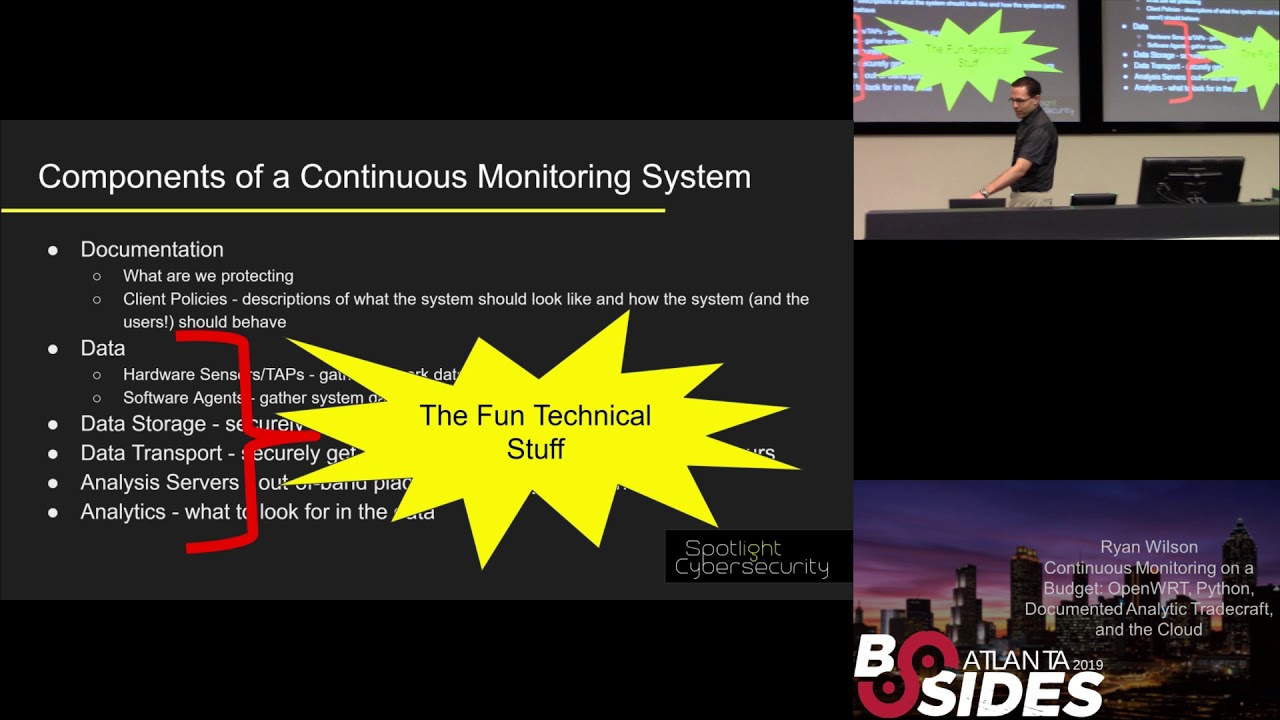
network based on kind of best practices the other great thing about the NIST cybersecurity and serious controls us there already threat informed you know the people who've generated them we're looking at a lot of threat intelligence and said hey these are the things that will matter network so in thinking about this I came up with sort of there's six things that are essential for you to have for a continuous monitoring system number one is you need documentation you got to write down like what are we protecting and how should work so for my clients that I deal with like they need to tell me what should the system look like how should it be working how should it be
behaviorally they gotta communicate that to me I can't answer it for them I'm not the expert in their business domain they've got to answer some of that and we've got to kind of cap that is that that helps me know like what should we be watching on the network so step number one step number two you know you've got to have some better collect some data you know you'll see in other talks here generally data falls into two categories you've got to endpoint stuff which is like where you got like a software agent you know maybe like a McAfee or os query running on a box giving you some data about that system then you'll usually
typically have some network agents like a hardware sensor or a network tap that's going to gather network stuff like David Shackleford was talking just this morning about you know got that utility you're pulling it off a spam port or something the you need a place to store that data safely once you've pulled it off of those sensors you need a way to transport that data get it from the client systems back to yours you need a server where you can run analysis on and it's recommended that you do that out of the head like don't do it on the network you're protecting pull it off and run it someplace else and then you need some
analytics like what on earth am I looking for you know you got to know what about should I be looking for watching in the network and all those are kind of informed by what you document now what I've seen and practice though when I've worked with both my clients and just watched others do this is that these bottom five here these are the fun technical stuff yeah this is why we've come to be sizes to hear about like all the cool technical stuff and that talk one the documentation it's the boring part yeah we don't want to write it down and if you if we do write it down almost always do we never go back
and update it and it ends up following mostly out of date with what is actually happening on the network and all the way and it's but it's sort of ironic because like every framework every sort of sybers best practices thing that I've ever read like the CIA's controls the NIST cybersecurity framework and NSA's manageable Network plan like all of them say the first thing you should do is write stuff down you know so they all say you should write documentation and yet we tend not to do it you know just a couple of things feel like all of these parts of the NIST cybersecurity framework talk about documenting stuff you know I just pulled one part of the
CIA's controls talks about make sure you document the security configuration standards so they're saying this is really important and yet we don't do it so you know one of the things that informed my idea was like how could I make keeping the documentation more fun you know so that we actually would do it while accomplishing all these other things along the way so from this point on is the work in progress so this is sort of the current state of what I'm working on and I'll kind of give you some pointers to where I'm trying to go with it but like I said I really would value your feedback from this so let's say if you'd like to
continue the conversation I'm here for lunch and I got my you know feel free to reach out to me on Twitter or email I'd love to chat with you some more about this and kind of continue discussion as we move this along a little bit so my goals in the short term were my clients for telling me they wanted regulatory compliance they were really concerned about HIPAA and interestingly what the Health and Human Services puts out on their website says that they seems to suggest that they care more about that you document that you're not doing something then do it and not have documentation it's sort of funny you know but like said they really want it
to be written down and what I found was that two of my clients they had bought stuff from lawyers to cut documentation to cover the Privacy Rule like when you go to the doctor and they give you that thing to sign they have bought some package for that but they hadn't done anything for the technical rule like how their systems were operating I had another client that was telling me like you know I know HIPAA says we need to do all the stuff but like I personally just really care about Windows updates and making sure my head of iris is working and I was like well it's a place to start we'll start there I really wanted to come in and at least
start going through the CIS controls with them you know these are prioritised likes let's start by inventory what you've got both hardware and like what's running on your systems and then let's make sure that you're like your systems are keeping the patch levels up-to-date let's just watch those things at a minimum and make sure and because I'm also providing a little bit of IT service to these guys I also just wanted to sort of what you know a managed service provider does like a remote management and remote monitoring and management system I just want to make sure I care of the system's up are they running so these are sort of the questions I was starting out to ask now
I'll show you how I'm doing it today so the architecture that I'm working with here is I've got my office here and I have just just showing just to like to to sort of examine examples of clients that I work with but they've got some systems on the network and I drop a router at their location and in one client like I am the router for them so I can control everything going in and out of their network the other client they already had this sort of fancy firewall in place that they didn't want to replace and so I dropped my router and made it just act like a host next to it I'll tell you why I did that in a
minute but essentially each of these by devices has a little VPN Open VPN client on it and it calls home to an open VPN server which my you know office calls into to I just run the open VPN server on Google cloud I'll give you some more details about that in a minute but these routers are real powerful tool for home to get inside so I started with the documentation and this is some setup I've been working on this tool that I call surety where I wanted to make it easy for me to code it so I actually write the code the documentation in markdown and this is a screenshot from Visual Studio code I've been a dark
diehard the dev editor person for years Visual Studio code is almost making me want to make me give up some of that because it's just so handy now I'm getting bought into a surprise that Microsoft product would do that to me but I really liked it but in when you're coding it markdown you know the same stuff that you're using when you go to like Wikipedia like it will render it for you right away so you can kind of see what it looks like then I run it through the tool and it'll pop out a nice pretty wet that I can give to my client that I can host and so I can see like here's some
details about the system here's what the system looks like and then we've got some you know details that the client gave me about the system I'll kind of show you why this was helpful in a little bit later example here we started with the documentation that I started with okay well where am I going to get the data from well I wanted to use these these open wrt routers now I'm not going to have time to kind of get into all the cool stuff that you can do with these I spoke at besides Augusta back in the fall about these so I got 30 minutes if you want to learn more as the QR code to the YouTube video of the talk
the but essentially these a lot of these sort of Soho routers that you can pick up on Amazon they are really full fledged Linux systems under the hood and they have all this functionality and the stock firmware you get like this is a cisco Linksys device the stock Linksys firmware for example will water it down and just give you the user a few options to choose from but you can replace the firmware on these things with open wrt I've been using open wrt for over a decade now it just gives you such flexibility so you can like you get the full iptables firewalls Linux so you can control like every little thing then you get the firewall logs from it because
it's capturing them the same way any Linux system would they there's a bunch of other neat things you can do I think like the not everyone supports the same features but for example like if it has like a certain wireless chipset you can actually do what put them in monitor mode so I can configure these things remotely to start watching what's all happening in the Wi-Fi space at my clients capture that data ever get back for analysis and doing all remotely most of them allow doing open VPN which is one of the reasons I used it to kind of have an active access to my clients networks in a secure way set all this great functionality that you can tap
into by just replacing the firmware on there lately I said that when I gave my live talk back and if he says gust I was liking that particularly links this model I showed I like I've been really liking this one from GL I'm at the this one's awesome it's only $45 on Amazon I checked earlier this week Amazon has offered me a coupon on it but this company actually builds this for open wrt like it comes with open wrt already on it so you don't have to mess with any of the firmware flashings it's a lot safer and you can see it's really small it was designed to be a travel router but it actually works really great for a
lot of different situations so I said full like you know Linux operating status tell you a few things that I collect off of this so remember how this sort of fits into the picture like this guy's sitting here so you can see all the traffic now this guy's not all the traffic's not flowing through it but because of where it's cents on the host it still sees most of what's happening on the network so I get a good insight into what's going on so on this device at my clients I have them configured to capture sort of NetFlow data using the soft floaty package you know it just captures it's continually capturing the like what flows are happening so it just
this is like the tcp/ip to bolt you know a source destination IP address protocol and then if it's your UDP source and destination port how much traffic was exchanged back and forth and so on and I also you know where I am the router for one of my clients I'm able to there's a DNS resolver on it so I'm able to capture all the DNS queries going on the network I sort of forced them to come through my device so that I can see like okay what hosts are we hitting on the network capture those logs you can capture full peak out using these things I am NOT doing that right now because of space concerns it fills up the hard
drive really fast the but you can do it I've tested it there's a great package that comes built in to open wrt called daemon logger which makes this really easy to do you also get everything you know everything that will be captured in the sort of syslog and the system logs and so in and on the client where I am the router it's great because I get DHCP logs alright coming off of this device I also get wireless logs like when a when a clients you know laptop comes in the office and associates with the access point that shows up in the logs and so I can get logs up but exactly what's happening on the net
work that I can capture I also typically will peer that do a cron job they'll show you a second that grabs the ARP table which just allows me to match IP addresses and max really clearly even on that client where I don't have where I'm not the router I'm just hanging off of it like there's so much our traffic broadcasting it helps me to build see what that gets this how I find out the inventory of what's on his network you know I can see all that traffic going back and forth I mentioned before I've not actually done this with the client yet but I've sort of tested at home but I can activate the monitor mode on these
things remotely and be able to just do a survey so I can do robot ap detection yeah I can see hey did somebody turn on a wireless device and hear that wasn't before we're more practical one that happens it's like hey my Wireless is running slow I can look and see like oh it's because your office neighbor turned on their access point on the same Channel and it looks like you're having some errors happen let's just change the channel but so this is some stuff that I can all do remotely now because this device is so capable and if you didn't catch the arrow here I highlight there's a USB stick sticking in here this thing
has some some one has a small bit of flash on it where I can store data but I usually supplement that by adding some store USB storage so that I can save this data off locally while it's waiting to get pulled back for my analysis which I'll show you how I do in a minute this device in particular is really nice because it's not only got the USB port but it's actually got a micro SD slot on it you can actually easily add extend the storage on it so that you can store a lot of stuff locally on the device itself so I just have a couple of simple scripts that run on the devices you know
basically this runs in a cron job like every five to ten minutes you know just grabs the contents of what's in the ARP table outputs into a temporary directory just tag it with the current date time stamp and then I move it from the temp directory into the pickup directory I do that in two steps because while it's writing the file to disk if my pickup software comes in and tries to grab it it would get a partial file so the move operation is atomic like it'll move the file all in one step as long as it's the same file system via but essentially that's why we do it in two steps and I grabbed like DHCP leases as well and
this is just a simple and get some easy data off of the device periodically that I can pull back so I mentioned how am I going to get the data back we gotta have a way to transport it well I told you I had this VPN server I run out on Google cloud I hosted in Google's compute engine it's just an easy way to have a place where my like I know all the systems can connect to I run it it's a docker container for Open VPN it's hosted on docker hub and you can link to it off of our website in spotlight cyber security comm the way I run it on the Google cloud platform is I
use Google's container optimized OS like that's the image it's a like Dan was mentioning about the move towards immutable infrastructure this is sort of semi immutable Linux image if you can't really change it like you can't add software to it it's got everything it needs already built in to run a docker and so I get load the image and then I just run my OpenVPN container on it and it spins up the VPN server for me to be able to work I thought I would take just a moment to sort of for those look like they've kind of covered a lot of this already in this talk but for those of you who haven't done much with the
Google cloud platform or either like AWS or I'm sure you know the whole idea here is just a rent storage and computer and pay for what you use so the real savings are as if you don't need it running 24/7 like if you can just spin up part you know compute engine do the analysis and shut it down like that's where you could maybe save some for me it was a little bit more about the time I found when I kept trying to save money by just grabbing an old computer out of the office and using it like I was spending so much time dealing with Hardware anomalies getting the image install my whole hard drives
would maybe go dead periodically and I was constantly having to deal with hardware stuff like the nice thing about having Google or AWS do this for you is essentially you obscure outsourcing all the hardware maintenance now you don't have to worry about like the heart of tracking with hard drive performance they took care of that too now they depending on which option you go with they might do some of the software maintenance like the server list stuff he was talking about there now both AWS and and they offer you free trials you get about twelve months and if you give them a credit card you have to if you have a credit card even though
it's free for the time period they'll give you about three hundred dollars to get started and just pay attention to your usage along the way but they have a few always free services so for example Google compute engine they give you one micro VM with 30 gigabyte hard drive for free every month and so my VPN server is doesn't need much memory or CPU I run it in that and it's essentially free for me to have a VPN server running 24/7 from the helps this network work out like this also the documentation I mentioned you know if Google gives you free private git repos there's a bunch of sources that do that but like if you
want to use Google Cloud source like as long as you're less than five users and less than fifty gigabytes you can post your sort of source there for free in that way it's not just sitting on like my laptop office system so how do I get the data back well I'm using Apache knife buy right now this is a just right hands this is part of Apache knife I this is a really cool data flow manager I run it on a server just using using it in a docker container they officially provided one and what's really neat about it is that you basically sort of drag and drop your data flow you know you you say hey I want to set up this
processor and then like you literally just like drag the processors together to say hey run that data from there over here and then you can see it all in a nice picture so you can see like this one just processed uniform you know 400 files in the last five minutes and send it through and if you ever need to get a backup like some kind of hang up in the data flow you'll see these queue numbers start to go up so you can kind of see here where's my data stuck as well along the way um now what you can't see at the top here is where the where I reach out via secure shell there's a processor
that says do a secure copy it logs into the router at the client pulls the data off of it and then you'll see a little funnel point at the top then it funnels down like this one says hey is that pcap data okay come over here because I got to change the file name on it before I go on and then they pull out the data and then then this saves it on the local hard drive in a special directory layout so this is a knife I as a free open-source tool that helps sort of do enterprise data flow management it was really designed for getting data set up to go into the cloud but it's a really handy thing that
you can use even sort of smaller setups like I've been doing now I'd like to try to use my custom tool here in a minute to do some of this work but right now a knife I an easy way to get started in doing this all right so I've talked to you about everything about like getting the data like some of the data I want to grab about bringing it back and storing it locally what do we do with it well I this is the custom tool I've been trying to build this called surety so this is a screenshot of something called Jupiter notebook and I was using Jupiter notebook for something else and I was
really inspired by it I said hey you know what if I could do that concept for my security analytics you know Jupiter notebook was really designed for data scientists and do data exploration and it's all about like where you keep sort of like the documentation and the code in the same document together data scientists use this to say like hey we're going to go explore this thing they write about like how they did it and then they put the code the Python code to do it right in the page itself and I thought it's a really cool concept now did Jupiter was really designed for you to do it live like you basically run it one time and or you keep fixing it up
as you're working on it I wanted something that would help me with my continuous monitoring and so I took this concept that have been putting it into that Shirdi tool that I mentioned so I wrote this markdown here you can see I've got like a little excerpt of python code here for doing that c is control number one I want to be able to reach out to the customers system to like in this case one of my routers at a customer network and I want to pull back like what does the arc table look like so I can see what's running on the network right now you know what systems do I see on it and
so you can kind of see I have this collect step and all it really does is run as a sage to go out to the router and pull back the arc table and then a par step here where I parse out what the router told me and then I test it to see hey do I see is it working it was through you no BS code rendered it for me here but the idea here is then that it outputs a really nice little HTML page I'm going to switch over and try to show it live here so I've got this is the documentation I have I have a network map that I made up for the customer from
buy everything that we went and laid eyes on on our network this is just done using draw dot IO so sorry it's not real fancy looking but in order to make sure it stays up-to-date like I have a little test here that actually looks at the map file it says hey do you see all the right nodes in it and if not tell me so apparently there's a phone that's supposed to be able to network that we didn't document right now down here I have that visible systems one I said it reaches out does that are and that you can see the results that came back from it here let's it hears from running SSH command
here's the raw output that came right off the router and then that's used in this test here to say hey are these all systems we know about and it told me like hey there's three systems on the network that we don't know what they are you know well maybe you should go check that out and then this little bit of this little piece of Python code here just you know just about 18 lines of code is what generates this output along the way and lets me know like hey something is something you know you want to go investigate these three systems so I gotta go to call my client up and say hey check this out now you'll notice i
sanitized a little bit of the stuff here this is actually real data from one of my clients but I tried to obscure a little bit of from what they had there and then I do all this I include some tags to say why are we doing this you see there's a little hashtag here this goes back to the NIST cybersecurity framework so I can see you know that like I I need am - one said said we should be infants wearing all the devices on our network well here's the test that says if we've got an inventory so now if an auditor shows up at one of my clients networks and says hey show me that you've got
your network protected we can give them this page and say here we went through each of these steps you can see we haven't done all nearly all of them we've done a few to get started here but we got a lot that we've still got a walkthrough together to help make him feel like there's complete I picked the NIST cybersecurity framework because there's a mapping to HIPAA for this particular client I was dealing with but it's it was an easy but it's not designed to be healthcare specific it works with just any case and you can document it here and say hey we're not going to do this one for these reasons but at least then it could be written
down and then up here I can know like say I can keep track of like hey did you know it's something off you know they said turn red what it was wrong I wanted to show a couple other quick analytics that I'm doing with this data one was - Percy is control number two keeping an inventory of software I mentioned like we use PowerShell kind of whole Windows data so we've got like this short little PowerShell script here that just runs a couple of commands to just look very very simply for what software was officially installed on this system and then we quickly run that out on the client and pull that back and I have an
in the Python here I have a list of the authorized software what like in conversations with the client said hey this is the software that should be on our system so far and then it renders that nicely here so for one of this one of his servers here you can see all the software that was installed with Sam Kay this is all authorized but we had this other server here that was used for some development has got a whole bunch of extra things that were installed in it that we need go through and figure out hey is this allowed or should we check vamp on or something else so like I said this was one of the allowed software but all this
other stuff that he had installed for doing some company work sometimes advertising actually you know was it was not one of the things that we talked about being allowed on his network and then we link that also back to the sign group to the cyber this a cybersecurity framework and then the last one was the Windows updates you know we've got I said I've got my you know short little PowerShell script here that basically says hey do you have any updates that are waiting to be install you know so I asked Microsoft the individual desktops about it and then we look through that list and basically we're looking for hey is there a critical or security update
those pending on the system that we should alert about and then for example we have here we have like this system like it's got a security update that hasn't been installed yet and so it gives me a quick little red thing saying hey I need to go call him and say hey something you need to make sure you go manually have to go but they're supposed to install automatically but it's been an experience that sometimes they don't they require a little manual intervention this lets us feel confident like said that continuous assurance that hey the updates are installed everything is working alright on the system so the my half hours up I want to just kind of
walk you through the like said some of the analytics I was running and how to do that I hope to kind of turn this into a little make this an online web app right now it just renders the HTML files for me offline instead of me reaching out to the client and running this the Python the PowerShell scripts is something that I've actually like to just put a little small Python agent on the box to pull the results and I'm also not storing the history right now the right now I when I pull new data over right in that pool but and I'd like to keep it in ultimate like to kind of move away
from the knife I case but knife fight is just so nice to have that picture for looking at I found that really handy so before I can I do my quick summary though I just like to take any questions anything I've talked about so far please before so maybe choose I guess super notebook over something maybe that require lot less like customization like Belk or something yeah so elf like you still gotta create the analytics and I'm a what I'm actually like to do is use an elk in the background because it's really cool for processing a lot of data in real fast but it's the documentation part like like what should we look for
now like that's what I wanted to capture in my shirt t Jupiter notebook like tool is to write down like why are we look at this thing like with elk you can set up the dashboards but you need to know what you're looking for I wanted to have a place where I could write down like the playbook like he was like shocker for his new mention this morning like what's the what's the playbook that we should be going through to look for when we want to know are the systems up-to-date and that's why I was looking at these tools what I kind of like to do is like if there's a if there's something that's
going to need a lot more data is have like for example looking through NetFlow stuff for all the DNS queries like have it spin up a cloud server have run the processing which might mean spending up elf loading the data into it doing the processing and then just throw in the whole thing away when I'm done with it I sell at least what I've tried to run it at home there's a beast maintained so I just wanted to throw it and stand it up it'll quick put the data in and do the answer I want and then toss the whole thing away and move on that's what I'm gonna try to do next but like I said the
real reason I was looking for it was to try to get answers around the document like why I did stuff and haven't captured in a place that would just run it continually yeah yeah essentially especially what's happening it's using the Python library win RM which is what you what's ansible uses so it's the same underlying infrastructure the ansible uses to reach out and i'd like to kind of use the python end point rather than have to enable win RM on the client network just because that introduces some potential like said.you increases your risk sort of risk area but when RM was pretty easily supported and it was already like said one customer had he had it in his group
policy just to switch he had to click to make it make it so I could see all his devices right but that's how I get the PowerShell to the system remotely right now all right well just kind of closing I said I walked you through this sort of six things I thought were necessary you have documentation or write down what we're doing we need to collect the data we got to have a place to store it we got to be able to pull it back we've got to have a place to analyze it we need to have like what do we look for and I kind of showed you how I'm doing it if you
thought anything was interesting or we'd like to share in helping me build or release any of this stuff I'd really love to chat with you after we're done here so thank you
Related talks
 46:08
46:08 45:14
45:14 31:40
31:40 29:54
29:54 30:34
30:34 50:44
50:44