PG - Back Dooring the Digital Home - David Lister
Show transcript [en]
please welcome david lister he is going to be talking about the digital home back during the digital thanks everyone how's it going and this is back dooring digital home it's the mic the mic is actually not working for purposes of the PA but it does work for purposes of video later so audio will be recorded but it doesn't the speakers in here I'll speak loud okay so just a brief introduction whom i'm david clustered my background is a security consultant that's what i do currently for my day job penetration testing and occasionally do research on the things that I find interesting my credentials you know of nsit nandra structure assurance it's a fancy way of saying it really like
security so I went back to school to study even more and got my masters I'm also got some service like the offensive security certified professional see eh yes it's easy stuff like that um I'm really interested in I like to find vulnerabilities and holes and sister it's always been an interest of mine now its my primary job so other interest of mine are groans and scada systems-- I did state of training at black hat it was actually really good I recommend it for anyone the next year looking for learn some more about those from control systems there's my contact info and can give it to you later detail if you're interested so a topic background and
everybody let me know if you can't hear me okay and so what is digital home think of a house where everything is connected so you've got thermostats utility meters like smart meters that I provide power to your house cameras security systems electrical outlets there's all kinds of apps and all kinds of products you can buy that either come you know from the utility or that you can buy at best buy and plug in and so it's kind of like everybody's talking about the Internet of Things who dis kind of think of it like an intranet of thing so there's a bunch of things in your house that are all connected together and so similar to an industrial control system
when something happens like temperature crops in your house the thermostat is going to automatically adjust for that and so the difference between a normal thermostat and a smart thermostat like a nest or something else usually is that they have in half that goes along with it other connected wirelessly through you know to some other system and so another example if a motion sensor is triggered capture video send an email or contact the monitoring today I'm going to talk about my experience so far with this type of system and there's a few things I found in addition to that I'm going to go over an attack scenario that i think is you know it's something to
definitely worried about with this home system so my motivations why why did I look at this system you know what I what was I doing so I had a security system like this one you know a lot of you might have one in your house it's got the old-school keypad you know I wanted to you know be able to check on things remotely I wanted to drive it to my house and you know arm or disarm the alarm and you know do all those cool things in you know I looked at adding on to this system and there was people that could come and they could add on to the old-school alarm motherboard and it
would do some stuff but I thought you know well I want to try this like all in one integrated system and you know but I was curious you know how easy would be to subvert the new system with all these new features I'm supposed to be more secure right but what I be less secure because of the new system so going from the old system for these new controls having a touch screen and a mobile app and a web app and all this kind of stuff so my approach you know first thing get my hands on one of these I actually ended up getting my hands on two of them so I could compare and I'm not going to
say the vendor today just in fairness to the vendor process of finding things and notifying them responsibly break everything down into components and test each component individually and then of course look at the communications in between and just kind of at a high level say you know what would an attacker do what are the entry points you know how would somebody if they wanted to get into my house and they saw it was this type of system what would they do so this systems overview this digital health system which is an alarm system right so it has several components I called the vendor the vendor also sells internet access and TV they showed up in
my house and they brought all these things and had new toys to play and so um it was an android-based touchscreen with GPS name 211 wireless router 802 11 wireless IP cameras hardwired sensors which they actually ripped out the old motherboard from the existing alarm leaving the hardwired sensors but replace the motherboard and I'll show you that in more detail in a second um zigbee wireless sensors they added some wireless sensors they also added cellular connectivity and Internet connectivity is a component of it it's needed for the system to work properly also the mobile and web apps and you can have optional things like people have door locks connecting to this day you have other sensors you can connect your
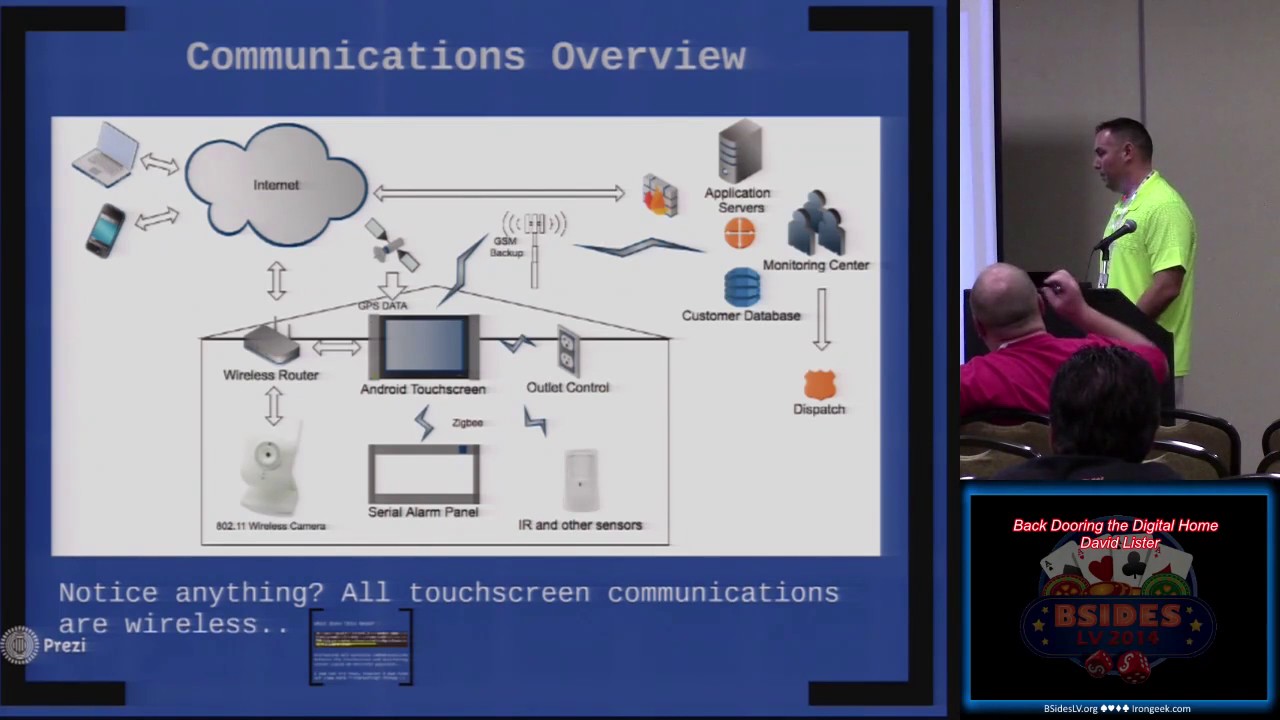
thermostat you can do things like that um so here's an overview of the communications um you know so so I'm Android touchscreen it pretty much communicates with everything in the system and everything goes through it the white did talk to the rest of the world is it fall Sydney to the seer alarm panel which is the old school online they updated the higher sensors can detect lower of course here you can control outlets with their thermostats it does all these time sleeping things of the world and so campers as part of the kitchen absolute level over the powder to the study is GPS data from satellites yes and becca embedded into intestine and then the vendors
application servers you know of course your your laptop home wherever getting from top see you there back in and their customers near days inn send out a dispatcher necessary so that's kind of how it all ties together and communications and also yet so notice anything about the brains of the system all of its communications so this everything depends on every convention to it is entirely wireless so that kind of gave me cause for concern there is an optional ethernet module for it but most people aren't going to go and they don't deploy it that way they everything is Wireless so what does that mean it must accept any interference received part 15 sec rules so it's possible I didn't try
this to disrupt all the wireless communications to that brain but that wasn't really the goal of what I wanted to do with this although it's entirely possible so I compared to installations of the same vendor system other vendors exist they implement certain parts of the system themselves but there's other parts of it that are kind of off the shelf like the touch screen um I found that each one is it's got you know potential and actual vulnerabilities in it so we'll take a look at a few of these the first one is the wireless router you know everyone's like okay you know it's a wireless router that's great not a big deal except for the fact that
they give everyone a vulnerable wireless router so you know thanks bender and you know they might say well you know the only way to get to that router you know or do anything with with it is um you know to have physical access to it and so that might be true however I'm kind of the premise of this whole attack is if somebody sees that I have this system and they come into my house and they want to take control of it later they can basically backdoor the system and so then they can come back without even being there later and interact with the system i do all that stuff and so i was just very curious first of all about the
wireless key that that used for this network because you know i thought well if it's something really weak or simple and they don't provide you with the the pre-shared key and i was looking online in forms and stuff like that and a lot of people had kind of the same question they're like hey I have this vendor XYZ system it uses wireless they provide me a wireless router but they don't get me the key does anyone know how to find the key and so i'm looking through all the stuff and you know i was like well let me just pop it open till I popped it open and uses jtag serial adapter to was able to get a serial console cells like
okay cool so I'm looking at it I guess the key out and I'm able to you know become part of the network and I do some more research and I found that there was a much easier way and so I don't need to open the router at all I could just use this thing called telnet and maple and for those of you who are familiar with telnet enabled and it's just it's a tool there's different versions of it there's a Python version there version compiled and basically what telnet enabled those as you can see here is you gon the network if you plug into the to the router you get its MAC address and then you create this packet
and then you run the talent enabled and it's kind of hard to see here but you want to tell any naval command it creates this packet and then you use net cap to send the packet to the router and so apparently it's some kind of like backdoor that's in most Netgear routers in the password is like your guy gear dog you create this packet you can see that I this I try to tell that to the router at first I haven't set the pack yet created it and so I'm using that hat here to send the packet and try to telnet to the router again and boom open wrt and so now i have full access to the
netgear wireless router and so kind of that made me think well you know if somebody had access to my house and knew about this and you about the system they could backdoor my house security system you know they could perform this attack to take over the router and so
over the ethernet yeah but it could be done you know if you were able to associate to like the network it to the wireless network if you were to become part of that also you could do it over the wireless network too and so you know any any Netgear routers out there within a certain list of them are vulnerable to the same back door it's not something that I found is something that I found online that there was already a tool for so telnet with no password so once inside was able to determine the key I didn't need to do all that after all and then I was able to clone the wireless network and so with wpa psk networks you
know you can't just sniff everyone's traffic youth you know you've got two min emit man the middle attack in directly or if you are the access point you can see everyone's traffic and so what I wanted to do was become the access point that I can see all the traffic coming in and out from all those different devices over wireless so the next step was a wireless camera did kind of the same thing I couldn't get access to it I can get a read only console it didn't take input over the jtag adapters it didn't the default passwords didn't work I wanted to intercept the password set by the vendor to see if they were
static or to see it does my neighbor he has the same system does he have the same passwords you know can he you know view my stuff or vice versa um and so it turns out these are dynamically created by the touch screen on set however it is possible to sniff the passwords and clear text because you become the access point the android touch screen the one commonality is there's a touchscreen manufactured by I control you know I have not found any identified any vulnerabilities in this particular touch screen itself it's more like the implementation of the system several vendors use it again it's the brains of the system everything goes to it and threw it to the rest of the system it
runs Android on you know some of the things I've thought doing I haven't had time yet is to try to put it in debug mode try to somehow get access to that to see kind of like you know what about you because you can install apps on it right and so now that I'm minna mean the traffic wirelessly it's going through my rogue access point to download apps you can add so if it doesn't check you know the validity of the the apps to see if they're signed maybe I can install an app on it that's malicious and take over the whole system that one so it's just more you know more things like I said I haven't identified
anything specifically yet I'm just planning to look at that more so again you can install apps um the system has a 24-hour battery curve attacks that installed it and so again if you went in and you unplug that battery and you wait a day you can go back and they have no alarm your alarm is there's no alarm there simply by removing the battery but again it's different sort of attack um it's got USB SD card connexions 802 11 Ziggy connectivity built-in um so here's the hard wired controller and so this is the alarm motherboard and there's like a CV little antenna module of the economy and this is how it talks to you the
sensors that were already wired into the house over Ziggy um it's basically serial over wireless again you can disrupt that and so if you were to basically interfere with that wireless connection and it never received the signal that doors are open door windows or motion sensors then it would never know you know so there's a mobile app so it's got several different components you know you can control everything through the mobile app you can see the cameras you can arm and disarm the system you can see just 3 status 1 people are home when they're not home so it's kind of scary you know that if someone were to be able to take control of that app they could you know
definitely cos of 2 and so hopefully I took all the personal information out of here but use the using Burt proxy um it was possible to minimum the applications traffic to see the API calls that were being made and you know I would see things like you could call a logout function and get a session ID which could then be used to do other things but you know I I didn't deep you know dig too far and the mobile app but it's definitely yeah and you know it's you can you know there's a lot of potential for abuse there so it's kind of Concerned me that you know it was just kind of out there this is the
API that can talk to your to your system and view your cameras and expose every all of those sensors over the Internet you know again similar to a SCADA system it seems like they would want that traffic to you know maybe be handled differently i'm not sure exactly how bit maybe a different way so you just send this request to the logout function and it says okay here's a session ID and yeah like okay thanks all right and so exactly you can use that session idea to do other stuff it doesn't appear to work anymore just good very concerning there's the web application interface you know you login through web browser through all the same stuff so putting it
all together this is kind of like the attack that you know if I was trying to break into my own house and you know bypass the security system what would I do and so using the Raspberry Pi along with physical access and I went with the pie because i don't know if i put i didn't think i put the picture in here of the Raspberry Pi that i put together for this so base Raspberry Pi running kali linux and it had a battery on it bluetooth adapter for the keyboard and which he didn't really need for this if you had it pre set up but i was just doing that for my research and so that battery would
probably last you know a week or so easily running that system and it had a wireless card a tp-link wireless adapter and so using that you know it's possible to plug it in and I could I could automate this you know given more time right because all it's doing is its plugging in it's getting the mac address of the gateway that is plugged into the netgear and it's saying okay i'm going to create this packet specific to that mac address sends it over layer 2 and then it gets access to the router / telnet telnet sin grabs a key yeah so it mate by this attack basically enables telnet on the router without authentication and so once it once you
get access to the neck here you can basically take its place and then all the wireless communication goes through you so you control it so you could stop packets from ever leaving the network if you wanted to like maybe a packet that said hey there's an alarm going on you know or whatever else you wanted to UM and so now that we have a back door into the system additional tax could be launched so you can also add a zigbee you know adapter to it and attack the zigbee from this thing you know you could you know just attack the zigbee or you could attack the Wi-Fi mid them all that traffic and an attack the zigbee to
you know you could you know just like anything that you could plant physically in a building you could do what the thing is um you know usually with a couple of minutes of access you're not going to be able to get full control of the main access point that all the traffic goes through which is what's happening here and so you can see here so basically to kind of demonstrate how much time I have left um here you can see basically once you become the access point you can step all the traffic and also what what i did was i basically forwarded the administration interface for the camera out to just a cloud server on AWS and i can access the
internal you know i can access the internal administration page for that camera and view the video without even going through their portal so i'm going through my raspberry pi and i can show you that here in a second it's kind of hard to see what's going on there but basically i was sniffing the traffic I grabbed a base64 basic authentication request that the Android touchscreen was sending to the wireless camera over HTTP unencrypted clear text basic authentication a base64 decode the string and now I have the admin password for the camera so I'm able to not only configure it maybe I could turn it off whenever I wanted to or you know like I said just view the video see when I um
cool so that's what's going on there decoding key just from sniffing the traffic going through the wireless you can see there where I can actually do is that's the camera interface what I can go into a demo of that in a second I can actually show you guys out here why um so again it's possible to sniff any traffic and block the traffic occurring on that wireless network any anytime a sensors trigger the monitoring center must receive a disarm signal within 30 seconds on our alarm would trigger you know you could catch a disarm event and replay it you could block the zigbee like us talking about or block any communication between the touchscreen and monitoring center at all
you want it to during a certain period of time so demo time so i can do is this really show you this over here so what i've done here is i've logged in from my laptop here i'm logged in to my cloud server and all my cloud server is doing [Music] if it's listening on some ports you can see bigger
[Music]
yeah I don't know it's okay yeah ah [Music] basically you can't see it here in the output of their process listing but like i said the you can see that basically you know portrait being forwarded out of my home network to the cloud server i am then forwarding those ports to my laptop will one port in particular port 80 and if i go to you can see that i can access by network cameron from here so you can do video you know whatever you want to do type that password in and you good to go so let's see you okay so conclusions right and if you don't want to see the video i can bring that back up here in a
second go through the conclusions so protect the access point it's a central hub the vendor shouldn't be handing out a security system with known vulnerabilities and each vendor implements its own API web portal and mobile app and so it's a large attack surface for a sensitive system and so this is just one way in which you could attack it there's other ways and again you know yes it's just you know it's protecting a house but it's a security system and you know with a high value enough target it's something that somebody might want to go after you know so that's pretty much it further research next steps I'm going to look further into the mobile
web app examine zigni communications see if I can you know intercept or hinder the GSM signal and potentially gain access to the alarm network with their permission of course and that's pretty much it any questions right right yeah so you know before you know I had a closed-circuit video and a closed-circuit alarm system I mean there was no wireless component of it at all now there's wireless components there's you know different types of wireless components there's application components there's hardware security components there's all kinds of moving pieces that have now really exposed you know me using their system to a lot a lot more tax yeah so the touch screen has GPS built in i'm not sure like
actually come on take it I like I'm just going to move the touchscreen like around town to see what happens see if I can still beat Hillary Rosen yeah I don't know i don't get out know if it's like for the responders maybe you know like so they can even though they have an address maybe they know
so the touchscreen actually took the sim out and I put it in a phone that was just unlocked to see if I could access the Internet it doesn't seem to also couldn't pull the AP and information off of it I was going to see if I could get on that mobile network but it doesn't appear to have internet access it's it's like the equivalent of like what they call a dry pair but a wireless one so apparently it's pretty common these alarm companies use gsm monitoring and so they have like their own gsm network through other providers that the it only connects to them using some other protocol like some cereal protocol or sends some packet or something to their
system only but just go through the internet on the gsm side yeah you could um well the touch screen will only associate with that particular access point and you have to clone the mac address too but it'll still work you just won't be able to access any of the internet enabled things like um if you if you completely pull out the wireless router you can still like disarm and arm the system and view the status of that but you cannot view the status of the cameras you can't obviously download any apps to it you can't do that kind of thing so there's certain features that are disabled when the wireless is mostly the cameras that's pretty much it thanks
everyone you
Related talks
 51:51
51:51 32:48
32:48 33:48
33:48 54:33
54:33 31:06
31:06 20:51
20:51