BSidesSF 2026 - Hunting Malicious IDE Extensions: Building Detection at Scale... (Vinod Tiwari)
Show transcript [en]
Now, our fantastic presenter for this afternoon is Vinod Tiwari. He is here with a talk called hunting malicious ID extensions, building detection at scale across developer workstations. Please make him welcome.
Hello everyone. So, I'll be talking about hunting malicious ID extensions because I come from web3 company. We have had this first hand problem where from last two three years we are seeing like a lot of supply chain attacks and a lot of the web3 developers actually deploy from their own machine. They're on like different IDs. They keep installing extensions. We have had like tools to find out like you know what packages are being installed on server side, but what's happening on developer machines, what extensions they are they are using. Every time there is a new extension, developers like you know love to jump on that whether it's for a theme or making their job easier. So, these
extensions sometimes are probably type squatted or they they are like you know because these extensions have like a lot of permissions on developer machine. In web3, a lot of extensions were found to steal the web the private keys for wallets that were deploying smart contracts. So, whether it was for liquidity pool or like deploying certain other smart contracts for like the vaults and we as soon as we we saw like you know all these threat advisories advisories coming up, we actually started looking into it. So, I'll actually walk you through what I did and this this thing happened like six seven months ago. Probably there's a better way to do it right now, but what I did to to hunt
down like you know a lot of extensions in our own company. Luckily we didn't find any, but there were certain extensions that were like kind of had a lot of permissions which were not required to be used. So, we worked with the developers to get it off of their machine. A little bit about me. So, I'm the staff security engineer at Story Protocol. Story Protocol is a layer one blockchain company. We have built the blockchain to register your intellectual properties. We have some D5 D5 protocols as well, but it's it's mostly for intellectual properties. I worked at Amazon before Zapier and then I was also the HackerOne up and tester and Cobalt pen tester. I'm passionate about developer tooling
security right now, but I started my career as a web sec engineer then got into cloud security later on and then kind of I'm I'm kind of a generalist right now, but this is so this is this is my first time speaking at any conference to be honest not not just besides.
So, before I get started I just wanted to get a show of hands if you know how many ID extensions are on your dev's machines. Oh, just one? And uh do you have any approval process for ID extensions? No, not at all, right? And do you actively monitor extensions with EDR or MDM? Okay, so two people. That that's pretty cool. I I didn't expect to see even like you know one hand, so that's that's nice. So, developer workstations are blind spot. I I mean like we we all use MDMs and EDRs and it's it's for like managing developer not not just developer machine like all company machines. With MDM you install uniform security controls around all the
machines. You encrypt hard drives. You want to like you know have remote wipe off capabilities, but you sometimes you overlook like you know what other capabilities that that tool has and I didn't have a lot of specialized tool at my hands. Just the MDM that I used to like you know hunt down these these extensions. So, as you know like developer machines have a lot of a lot of the times developers are writing code. They have like .env files or like secrets tokens just stored on the local machine and whenever they install any any ID extension, it has full access to it. So, like we'll we'll actually dissect like you know how these extensions look like whether it's open
VSX extension or like you know maybe a JetBrains extension. So, all these extensions kind of like you know work in a similar manner. And most most orgs have like zero visibility into what's going on. So, like we we did a show of hands and we just saw like two people raising their hands that they they know like you know what extensions are installed. And since there is no approval process, no inventory, no monitoring and then that's the the blind blind spot we have in in our software development life cycle as well. So, this is this is not theoretical as I said. These are just cherry picked events, but like there are a lot of other extensions
malicious extensions that are available on the the market and the problem with these extensions are like you know sometimes you would install a correct extension, but the the maintainer's account gets hacked. Like you saw like a lot of NPM supply chain attacks. So, whenever someone can like you know hack the the maintainer's account or probably like you know just type squat another extension and it gets installed on your machine. These extensions actually update silently. Like you you sometimes would not know whether or not the extension is updating. So, maybe you installed a legitimate extension, but later on the the the attacker actually put in some like you know malware on that and you open your ID next time and
then it just updates and you you never know what's what's what's that extension doing. So, we had a we had an event like that was that that happened for like two years. This malicious VS VS code extension was stealing SSH keys and we didn't know like for for two years. This is not at my company. I'm talking about the incidents happening outside. They were like type squatted NPM packages. They were like bundled with malwares and they were like targeting crypto devs. I'm highlighting just like mostly crypto incidents, but like there are other other incidents as well where these extensions were mostly trying to steal like secrets and API keys. Sometimes like running RCs and there
there have been incidents where these extensions were trying to like mine run crypto miners as well. Sometimes extensions with like you know 1 million installations have found like you know doing data exfiltration. And then so if you if you want to like build a detection system, you you probably need to understand like what these extensions do and like what I found is when I had to find out like you know what extensions we are using internally, it took me at least a few days to like you know find out what's going on and that's why I had to like you know look into what what tools I had at my hands. Yeah, VS code marketplace has more than
60,000 extensions. Every day there is like new extension coming up and then JetBrains actually has like similar scale challenges. So, if you if you have noticed like whenever you install an app on your phone whether it's iOS or Android like you see a permission request like modal or a block coming up to like you know allow that app to access like you know those acquire those permissions on your device, but on on like IDs you you would never see that. So, these extensions sometimes say they don't disclose like you know what permissions they acquire, but you would have to like analyze their their manifest file to find out. So, whenever you install any extension, you would
never see a request to like acquire those permissions on your device and as soon as you you like install any any extension, you just give it full permission. You never know unless like you know you look into it.
So, why why this is like very important for web3 is as I was talking about like you know the the the web3 developer whoever deploys like smart contracts, these smart contracts sometimes like you know hold millions of dollars and if if these these developer keys actually the private keys the wallet keys if if it gets hacked, you can just look the the wallet getting drained. So, this is a big challenge in in web3 right now and and like there there are the tools that you use for like deploying these smart contracts. The the default is to have like everything in plain text, but like you know the the tool maintainers later on release some features such a
something called Hardhat and Foundry. These are like two two known SDKs for like deploying smart contracts and by default it just like you know acquires the private key from the the environment variables as you can see that line number eight, but but later on these maintainers actually released something called um a cask wallet thing like where you actually assign an alias to a private key and then next time you're you're deploying your contract, you can just give that alias and it will pick up the the the the private key from your keychain. You don't have to like you know put that into a into a plain text in your environment variables. So, we'll look into like you know how an ID
extension looks like, but this is these are like you know the the documentation on VS code as well as JetBrains. These so their web page says like these extensions actually have full access to your system. So, there is no sandbox for running these extensions. Whenever you're running an ID and you install an extension, it actually gets full access to your file system user space. It can do anything that that it likes and they they have documented it on their website. So, VS code packages I mean the open VSX packages, those are actually nothing but node.js application package which has a manifest file that has like a list of permissions it requires and then like you know what is the entry
point. As soon as your your ID opens up, it actually dictates like you know how would that that extension start running. And these extensions actually run into a Node.js runtime. So, that's why it has access to like, you know, this the system files and like child processes. It can run like, you know, all your CLI commands as well as like exfiltrate data. And it's the same story for JetBrains as well. So, like we have packaged on JSON for like the open VSX extensions, same is for for JetBrains extensions like this plugin.xml file. It has the same kind of like manifest and these these JetBrains extensions actually run into a JVM. So, it has access to JNI, so it can
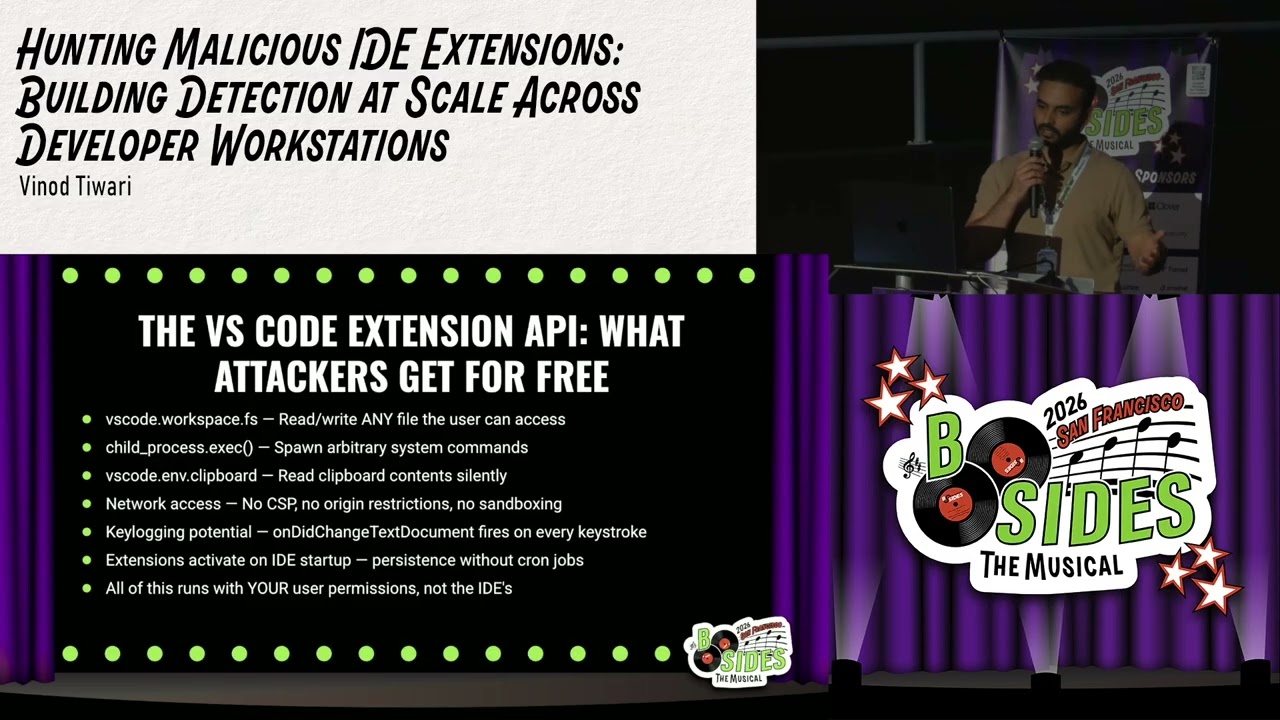
load like Java class files and the the libraries. And if if like the the developer wants, I mean, the malicious user wants, they can actually have some some malware inside that and then it will start running into your JVM. It goes without saying, yeah, both both ecosystems have like minimum sandboxing. I mean, actually there is no sandboxing and like, you know, these extensions have full full user level access by default. So, this is how I mean, there is a there is a documentation on VS Code website for like, you know, the APIs that the extensions have access to, but I've just highlighted quite a few that that have like, you know, that actually can give you an idea
what what all it can do. So, there is an API called VS Code Workspace FS which actually can read like all all user files. So, when you when you dissect the extension, you can find these these permissions inside. Child process exact it actually can spawn like arbitrary system commands like curl or wget like wget for like, you know, downloading something, curl for like, you know, just making a request to to an external site. And then there is a .env clipboard API which is quite scary because this is something that's used in keyloggers. So, there is actually a keylogger on on VS Code marketplace which is for learning purposes that like these extensions have quite a lot of permissions and it can
actually look into what is available on the clipboard of a developer machine. So, you can imagine like developers are copy pasting code or like API keys and if if the extension has .env clipboard permission, it can actually read those those secrets from like, you know, the available clipboard at the current time.
So the red flags for extension metadata is when I was when I was looking into for like extensions that we are using at company, I wanted to understand how like the developers decide which extensions to install. And surprisingly, there there is no there is no assessment criteria like developers just just want to like hop onto any new extension that can make their job easier or like, you know, make look their ID prettier. So, if even if you go to the marketplace and like, you know, look for any extension for your use case, maybe a Dracula theme extension, you might see something that is like verified would probably be listed somewhere down below, but like, you
know, an extension that is installed by like 10 people or downloaded 10 times or could probably come come up there. So, there there is there is no proper I would say policy around like, you know, what extensions will show up show up to your result and you you can get confused around like, you know, whether or not you're installing the the right extension. So, one of the one of the extensions were actually like here I have exa- an example for Glass Worm. So, this this VS Code extension was actually installing the invisible Unicode characters like it was a malware written into invisible Unicode characters and installed in the on the on the IDEs and it it could
actually it was what it was doing is it was siphoning all the crypto wallet keys. Yeah, the the last thing is Prettier VS Code Plus Deploying. So, that's actually a known incident. The Prettier VS Code Plus it's it's a known extension that was actually downloading a Trojan on on the developer machine.
And as I was talking about like, you know, how these extensions actually update silently. So, you you you would never know like, you know, the the extension is updating. The the developers' account probably is hacked like the maintenance account is hacked and the the hacker would like, you know, in the next version the hacker can just push in a malware and then once you open your ID, it will just like, you know, update by itself. So, there there is a control like you can you can actually open your ID, you can control whether or not you you want to allow auto update, but people just tend to like, you know, stick to the default settings right?
So, from visibility to detection, this is this is the like a guide like what I followed what I did back at my company. So, since we had Jamf and I didn't have like any specialized tools to look into what what extensions are installed, I actually wrote a script a bash script that that I was running periodically on on developer machines and then that would actually enumerate all different IDEs that is running on the the user machine, the extensions that are like installed installed on these IDEs and then the the output was actually saved into a cache file on the developer machine. And then there was a different policy that was actually reading those cache files periodically
to check against the allow list of extensions. So, what I found we had like 32 developers, we had around like 30 hosts that were active and then there were 556 unique extensions. But like there were total more than like 1,000 extensions and one of the users had like 157 extensions. I could not believe that like, you know, why would you need like more than hundreds of extensions on your machine? So, when I when I chatted with like, you know, a couple of developers who were curious about security, they gave me a list of extensions that like the smart contract developers would need and then I I I found those domains for extensions and then put it into an allow list and
created a second policy that would actually run it run the bash script against these extensions matching with the cache file and make sure like, you know, if if there is if there is an extension that is not part of the allow list, it actually sends an alert to Slack. So, this this like these are the two policies that I was running. One was periodically just creating a cache like updating the cache if there is a new extension and then the second would just find it out like, you know, if if there is a new extension installed and it's not not in the allow list. This is just the the output of like the the policy execution on the the user
machine from Jamf and this is the Slack alert that was coming into for triage. So um yeah, I mean, like if you have an EDR, you can you can definitely look into digging deep into it. EDRs have have more more control on on your user machine. We did not have an EDR back then and then I was doing some research around like, you know, how how an EDR would help you like, you know, finding it out the the malicious extensions. So, EDR does not categorize the the IDE or like, you know, an extension as a as a different process. It actually because the IDE is running in Electron app and then there are like child
processes executing underneath. So, it it just creates a process tree and looks into node node process tree to like, you know, find out what commands are being executed. So, if if there is a known extension, probably the EDRs will have some IOAs created and like, you know, IOCs and and and alert you. But if if if if if there if there is no like, you know, known extension that that is doing malicious activities, probably your your EDRs won't be helpful as well. So, like we we actually saw like couple of cases. I mean, I just cherry-picked like some incidents, but like there were extensions that were doing malicious activities for like 2 years. So, it's not like, you know, a lot of
companies won't have EDRs. They they had, but like people didn't know like these extensions are doing malicious activities unless people target these extensions and find it out.
So, if you want to build a complete detection pipeline, you could use if you if you So, we use Jamf, that's why like I'm mentioning Jamf here, but any MDM tool that you use, you can actually create a custom bash script to like inventory all the extensions being run and then build build a detection capability around making sure the the the available extensions on developer machines is matched with what you allow and what you're not and then get a alert into Slack. So, CrowdStrike I was looking into CrowdStrike EDR for like hunting and that's when I found like, you know, you can actually create create process trees and and find it out. So, since since I found a gap like, you
know, there was no IDE extension scanner available, I actually built a scanner. I've not open sourced it yet. I'll actually put it into GitHub and like put it on my LinkedIn as well, but yeah, I built this this scanner that actually scans the the IDEs and the extensions, the permissions it it acquires on your on the user machine. And as you can see like, you know, there were some some this is just an example running on my machine but but like, you know, there are a lot of extensions running on developer machines that have different permissions that that scores applies a score and and scoring mechanism and gives you an idea whether or not that's a risky extension to look
into. So since I have that tool, I actually can follow this triage playbook wherein like you know this is this is a complex task to actually like you know find it out what extensions are actually legitimate or what are doing malicious activities. As I said like even if you have a legitimate extension you never know like you know what kind of supply chain attack gets gets executed and where there there is gap. So you you can analyze source code if you have some time otherwise you could build something like what I did with the allow list of extensions and I'll open source this this tool that is called ID viewer and it actually scans and also gives output
in JSON so that you can ingest it into like you know your right in API wrapper around it if you want. So yeah when you go tomorrow just look into your ID extensions if you have an MDM tool that that's fine otherwise you could just create a bash script and give it to all your developers to run it so that they can they can they can give you a list of the extensions they have installed and review this the source code of suspicious extensions. The extensions might have like you know a lot of permissions so you can decide on like you know which one to to look into and then yeah like check marketplace listing for reviews.
A lot of the extensions are actually like you know very collaborated effort wherein like you know the the the attacker probably has worked with a lot of people to like just start it and and and put good reviews on it. So you you never know and then create an allow list of trusted extensions that that you can check against and then disable auto update on like suspicious extensions. I mean you can you can let your developers know to like you know disable auto update for everything and only only like you know update whenever they need it. That's it. So the the takeaways from this talk should be like all the ID extensions are very powerful and dangerous.
Yeah like we we know there are there are tick marks on all these marketplaces like you know these are verified extensions but as I said like supply chain risk is is pretty big and the maintainers accounts also get hacked and you never know who who can like you know turn into a bad guy. So you just have to build a system around it so that you can keep getting alerted around whether or not here there is a malicious extension in your environment. That's it.
All right. I I think that deserves another round of applause for Vinod's first ever conference presentation. That was fantastic. We do have some time for Q&A. Please submit your questions through the Slido web portal that's at slido. That's the URL and then the event code is BSidesSF2026. Again that's BSidesSF2026 and then make sure you select theater 13. We are in theater 13. Please do not send your questions to another theater. And if you also want to navigate to that page and upvote other questions maybe somebody else is asking the same question you have you can upvote it. So we'll give folks just a moment to type those in and then these will appear on screen.
We'll read them out and we'll get some answers.
I'll let someone come on the mic just for the first one while everybody else is typing. Appreciate it. You mentioned how you would look over the number of stars ratings to get a baseline trust. However let's say there is a a trusted extension in the marketplace and it needs a bunch of permissions. There's a distinction between overly permissive extension and a malicious extension. How do you determine that something is malicious? I saw the the piece of you discovering IDs using MDM policies grabbing that metadata going over the count building an allow list but how would you actually determine that something is malicious? So it's it's it's always about like permissions and then I look into a few different things
whether that extension has some like community support if the code is open source like it's on GitHub and then it can be looked into whether or not like the the developer is actually looking into active issues fixing it and if if the the pull request submitted to that extension is also like you know looked upon. Those are the things that that I look into to make sure like you know we can trust it and have it running. Then there there are certain other things like you know to to be taken care of. You don't want an extension to read your SSH keys and like you know secrets unless it needs that access. So that's why like a theme extension why
would it read like you know your your SSH keys and stuff. So that's that's how we we decide like whether or not we need to have it on the development machine. Sorry okay. Does it answer your question?
So there is another question in CrowdStrike there is now an ID tab in the vulnerability near application tab that would show hundreds of thousands of IDs. How would we prioritize them? Do you mean IDs or extensions? I'm sorry. Again like the the playbook is same to if it's about extension I don't know like it shows IDs but like if it's about extensions it would again be about like you know what permissions it's acquiring. As I said the use case and then the the permissions the extension is asking about and then I actually have an internal tool to like also scan the run the static scan of like these extensions. I do it for like my
own my own sake like to make sure these extensions even if it's like trusted by community if there is vulnerability like at least I can submit an issue on GitHub but again like it's it's the same playbook to to find it out why would a theme theme extension require like you know permissions to read my SSH keys.
So there is another question aren't there vendors like Socket that already have some detection and blocking capability? From my interaction with them yesterday I I understand that they are doing um the the supply chain analysis on the the developer machine like what packages are being installed but I didn't I didn't get to know about like extensions like so probably I need to ask them again but they they they do look into like you know the packages that are installed. I think there is a gap for like an extension analysis. There is another company that that I forgot the name but they also have an extension to analyze other extensions. So I don't know. The the other question is can you show your
link again? What was the name of the repo script that you plan on posting for searching for extension? The tool name is ID viewer. I'll I'll post it on on GitHub. Actually um Yeah um is is there a place I'll put it on on LinkedIn actually. Sorry. Do you also maintain top 100 or 200 extensions for approval list per ID? So for for us most of us are using Cursor and Cursor is also based on Open VSX. So we have last minute so just 30 seconds. So we we have the list of extensions that we use and we actually like when when we were going through this this process we cleaned up a lot of
extensions from developer machines so like I could use MDM to just mess around with the dot directory of like all these extensions and like get rid of it. So that like I announced it I let developers know like you know we don't need those extensions and cleaned it up. So yeah we do we do maintain a list of extensions for for our environment for our company. All right. Those are all the questions we have time for this afternoon. Thank you so much for coming out to this talk today in theater 13. Another round of applause for Vinod Tiwari. Did a great job.
Related talks
 28:29
28:29 29:24
29:24 32:13
32:13 30:17
30:17 38:53
38:53 32:39
32:39