Ghost in the Kernel: Hunting BYOVD After Microsoft’s 2026 Driver Trust Shift - Richard Dosumu
Show transcript [en]
Hello everyone. My name is Richard. Um I'm the founder and product lead at Oct. Um today my talk will be called my talk is called Ghost in the Kennel. Um hunting bd after Microsoft 2026 driver trust shift. That's quite a mouthful to say. Um, so you might know the reference phrase ghost in the kennel from Ghost in the Machine or for people that watch anime, ghost in the show. Um, but anyways, my talk today is a bit more practical. Uh, it's it's leaning more towards blue teaming and the ghost in this talk is much more practical. It's um it's talking about the driver that lives in your cano after your security policy says it should not be there.
Um so with this talk I'm not going to dive into all the technicalities straight up uh because um the way I like to do my talks I know there are some people with not as much as um I would say technical advancement as some others. So I try to keep it balanced and softly introduce everybody through the talk. So um I will be explaining basically what a Windows driver is. Some people would roll their eyes and be like, okay, why do you have to tell us what a Windows driver is? But for those who don't know, I'll be explaining that. Um, I'll be explaining why the Kel mode matters. Um, and especially what bring your own vulnerable device means and
that's the full meaning of B vd. Um I'll also be talking about what change what Microsoft changed in their 2026 policy and how defenders can use this new audits and block signals to hunt for threats rather than simply opening the policies working on its own. Um so before we get into the technicalities like I said I would like to start with the easy part which is basically um yes let's start with what a driver is. So um h basically a windows machine is is full of software that helps the operating system talk to the hardware uh and low-level services. Basically your graphics card needs a driver to work. Your network adapter needs a driver to
work. Your VPN client might might also need a driver to work most likely. Um, your endpoint security devices, your endpoint security products mostly also need drivers to work. U well, this could range on and on from specialist engineering, medical, industrial, diagnostic hardware and uh depending on what you do, your driver might have been written years ago. Your product or your software might be running on a driver that was written like years ago. Um, so most of the time we don't actually get to see like these components. They sit in the background and they make our devices work. Um, sometimes you might see the quick command prompts that just flashes across your your screen and you're wondering
what exactly that was. Probably it might have been some of your drivers just running and executing in the background. Um, so that makes them quite easy to ignore because we don't get to see them. We don't get to interact with them on a daily basis. But um even while they might be in the background, some drivers run with really high privileges and get to access parts of your system that you necessarily would wouldn't want anyone having just some random level of access to. Um and that's where the security story begins. So um now let's place that in the operating system. Most applications run in the user mode. Um for example if Microsoft world crashes it doesn't necessarily take down the
whole windows with it. Um so user mode intentionally limits applications but for kennel mode that's a big difference because in the kennel is where operating is where the operating system manages the memory devices processes and basically the core system behavior. Um so for Ken mode drivers they have more access to your system to the hidden parts that a normal application wouldn't and that privilege is necessary because for example your security driver might need deep visibility basically to get into your logs get into events and all that. Your storage driver might need to interact directly with disk. uh but the same privilege that makes these drivers also useful can also make them vulnerable and attractive to attackers.
So the security question we would have to ask is um what code or what programs do we grant access through to the kennel mode. So um now we can move on to explaining what B Y OD is. Still quite a mouthful I strugg to say that. Um so basically BY OVD means bring your own vulnerable device and you might be wondering why anyone would bring a vulnerable device. The your in this situation is basically the attacker. It doesn't [clears throat] mean you you do not have to bring your own vulnerable device. I guess if you wanted to do that, you probably use Kali Linux or whatnot. Um so the um the attacker in this situation is the Y the
admon bring in the vulnerable device. Um so the attacker brings the driver and that is that is what I would call the vulnerable device or um most likely they would abuse a driver that is already in place that has several vulnerabilities. Um typically the attacker would already have some level of privilege. Um so for an attacker to access your drivers to access your canel that means they were already in your system. So this is not starting from oh they got into my system through my canel. Um so basically they would need to to already have some level of privilege most likely admin rights. Um then from there they introduce or they invoke a legitimate signed driver
that might have a known vulnerability. Um also Windows might trust this driver because it looks legitimate. It's probably signed and all that. So um it won't seem like anything suspicious is going on. Then the attacker will typically abuse this driver um inside your canel and probably use that to gain more access and to um what's it called to move up in um gaining more access or being able to access more resources on your system. Um so the important part of this is that the driver itself is not necessarily a malware. it's not necessarily the um the entry point into your system in the traditional sense of it. Uh because most times these drivers tend to be actual drivers that um some
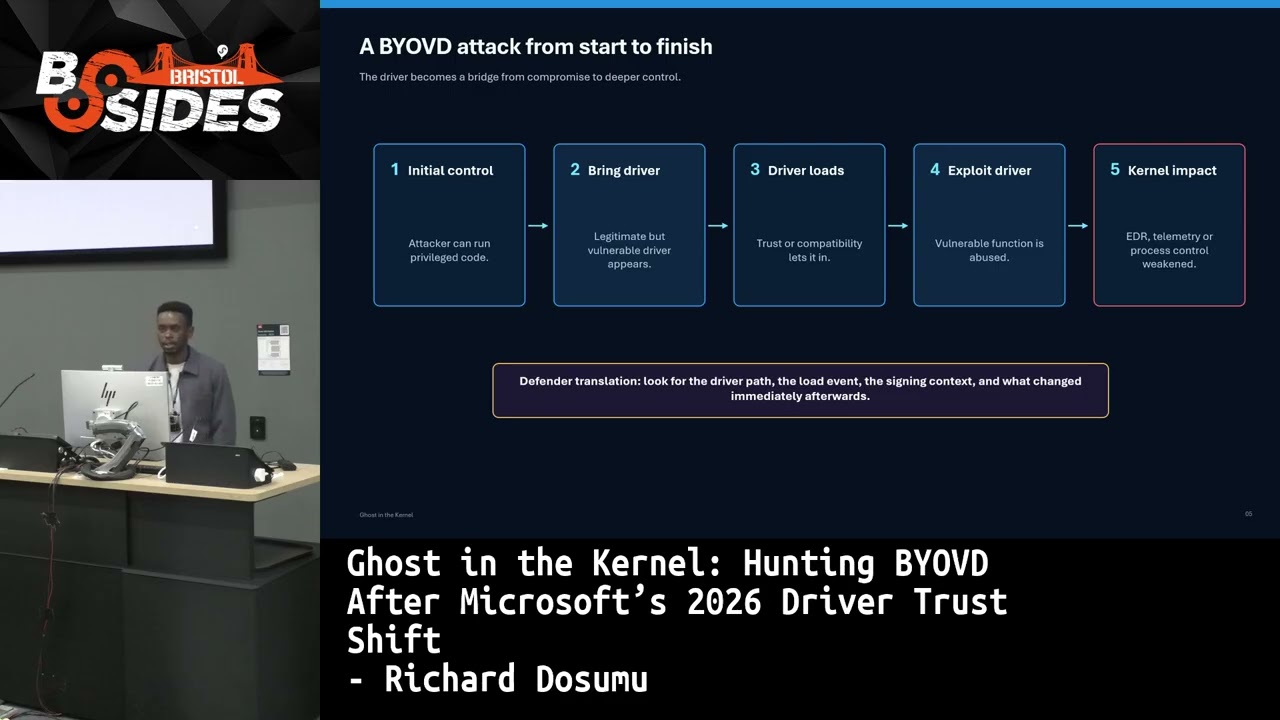
software or some program on your system actually depends on and needs to work. So the danger here is that this um exposes privilege functionality that an attacker can actually misuse. Um here we see what a simple attack flow might be like. Um like I said, as you can see, it's not it's not starting from um gaining access because for them to be at this level, we would assume that they already have some sort of access to your system already. So basically um step one will be that they have like initial enough control to um to take actions probably an account with administrator privileges or something like that. Step two would be either they install their
own driver or they go through your they go through your own list of drivers to identify a driver with a known vulnerability. Step three would be that um they will load this driver because you know Windows sees it as a trusted driver and because of that it just goes through. Step four, the attacker would most likely abuse the driver's exposed functionality to gain access. Um and it depends on whatever malicious um intent they might have. They might use that to tamper with your security tools. They might use that to interfere with your telemetry. Um or they might even use that to gain level capabilities and that is why this is actually a blue team related talk. Um so defenders have to be
defenders have to keep an eye out for this. Um so B OVD is not necessarily just about um a bad driver existing because uh like I said a trusted driver might actually be the vulnerability. Um so before we continue I would like to highlight a few examples of um drivers that have been known to be vulnerable and that in the past these have been exploited you know but like I said the important thing is these drivers are not necessarily malicious code or malicious drivers that were installed on your system. Most times the actual drivers that your system needs to get things done. Um in some enterprises these are actually critical drivers critical drivers that day-to-day business
functionalities rely on. Um so like I [snorts and clears throat] said uh we'll look at a few examples here and we can see in 2021 Del's DB 2.3 was affected. You can see the CD is right there. Um in 2022 we see um Avast no Avast is supposed to help us keep our system secure supposed to help us keep our system safe. But in 2022, one of their drivers um was abused and um an anti-rot, excuse me, an anti-rokit driver demonstrated the slightly uncomfortable reality that even security software can be part of our um can be part of our attack surfaces. Um in 2022 um we see that RT call 64 was also exploited and
for RT call 64. I'd like to point out that the vulnerability was actually discovered in 2019. So um but it wasn't exploited until 2022. So, which means that drivers that have been on your system for way longer can actually still be presently exploited. Um, in um yeah, and actually core 64 was actually exploited by I think black bites uh in 2022. I would have to be sure about that. um in 2025 so we see to stop we see and recently in 2026 we see PS mount and also the vulnerability was identified in 2023 also but expected in 2026 just this year so basically this um this shows us that there's a reason for Microsoft's shifts in the trust policy
and it's not simply just to block every old driver because like I Some drivers are critical and we rely on them for dayto-day vital functions. So um and this is where the hunting part begins because um now we start to wonder what drivers are vulnerable, how do we mitigate this and um how do we ensure we maintain um business functions while keeping our system safe. So um yeah yeah I was right about that. So um like I said black bite um exploited the article 64 in 2022 through ransomware um and sus actually reported this um it's affected about 1,000 drivers that relied on this security product. Um so that is a classic example of how to use a vulnerable device to
regain um an endpoint defense. Um in 2022 again there was portray and stone stop. Um these were examples that even though the drivers were properly signed and they were um authenticated and they were supposedly trusted, the code itself had vulnerabilities that were exploited. And um which brings us to the lesson that even a signed driver is not necessarily a guarantee of safe behavior. Um in 2024 we see Lazarus exploiting um a zero day attack um a day vulnerability with app ID um that was Windows appar. But this was fixed and we I think the CD is up there if you want to look that up. So um basically these are three different cases with a similar pattern
that attackers always look for ways to get into your driver, get into your canal parts because that is where they can weaken visibility and can control a lot because from there they could easily manipulate your telemetry signals, your um your end points and yeah. So you basically don't even you can't tell that they in your system because they go through the back door and then they shut these things down or they able to maneuver without you noticing them in there. So um before we discuss Microsoft before we discuss Microsoft 2026 change um it would help to explain why Windows needs to trust drivers in the first place. Um, Windows cannot safely allow any random code into your canel uh
because of the importance it plays. Um, so driver signing is a way of reducing this risk. So typically drivers are signed and when they signed it gives a sort of a guarantee that okay we trust this driver to run on this system so you are good to go. Um why you know okay also it helps to know who signed this driver and um has the file changed since it was signed cuz uh each new version of this driver or file would have to be signed again and again to maintain um the trust value attached to it. So that's quite that's quite valuable to know because um signing is not the enemy here because without signing the the risks are even way way
higher without um screening signed drivers that go into your canel the risks are way more higher and far more dangerous. But signing also doesn't mitigate the whole um danger that comes with um drivers accessing your canal. Um because a sign driver like I said can still contain vulnerable logic. We saw that with um um not quite sure I know I mentioned um the driver in the last slide. Um so basically the driver trust is a layered decision where we consider identity the integrity and the policy behavior also the context and the ownership of the driver uh because there are quite a lot of drivers out there that help you bypass um for example um for those who
don't like to pay for like Microsoft Office or Microsoft but we know about cracks so cracks also tend to install some sort of drivers on your system that tend to bypass pay walls or pay gates and all that. So while it might be a cheap and illegal option to go for um they are mostly always written by hackers and um some with malicious reasons, some be just putting up a middle finger to the system and you know trying to make the services free. Um so now we uh explain the problem that Microsoft was trying to fix by changing this policy. So for years Microsoft has supported the driver signing ecosystem that includes um older cross-signed
kennel drivers that helped with compatibility but and but it meant that legitimate hardware vendor utilities and older products could keep working across Windows. But the compatibility comes with a security cost. Uh because if old if the older drivers remain available indefinitely um attackers can always search for older versions of drivers that have been signed but with known vulnerabilities and they can abuse this. So this is what Windows tried to mitigate in 2026 by protecting the kernel. So um the shift in their driver signing policy is basically best understood as an attempt to shrink the attack surface that comes with um Keno assess without also breaking everything at once because it's one thing to just go out
there and block our assess from um every old driver or every legacy because most systems especially in ICS and OT most systems run on legacy drivers probably some code written by um some bloke in a dark room 20 years ago and they still work on that. Um so blocking all those drivers would obviously mean um affecting critical business functionalities depending on the industry you're in. Um so against that background Microsoft decided oh let's make some changes you know um and the key change they made was that they removed the default trust policy for Ken drivers that um that worked with the previously signed and authorized model that lets signed drivers just go through the system. So in simple terms uh
Microsoft shrinking the older trust path basically limits um the attack surface available for attackers to exploit when the policy is active. The safer mental model is that drivers signed through the Windows hardware compatibility program remain allowed but specific reputable legacy cross-signed drivers may still load if they're on the Microsoft's allow list. Basically, Microsoft has an allow list for old critical legacy drivers that are still needed to maintain critical functions. Um, however, drivers that do not meet these new policies are they become candidates for auditing and uh when enforcement is enforced, they get blocked basically. So the key caveat here is that um not all old drivers would instantly be shut down. Not all drivers would instantly be taken off
because um they tend to have several dependencies attached to them. So it's a staged trust shift with an evaluation phase. Um the natural question with this is that oh if these drivers are risky why not just cut them all off? Um, like I said, the answer is compatibility because these drivers actually make real things work. Um, network adapters, backup tools, specialist hardware, like I said, OT security, um, IC systems, um, security agents, whatever you can think of. There's probably some old code keeping it running. Um so it would not be ideal to just cut off access to every old or aic policy. So what this uh policy does now is that it evaluates firstly you go through and um auditing
phase and then you it basically highlights um drivers that that seem to have some vulnerabilities or they can't be fully trusted. and then you basically decide to let them go through a phase of um temporary usage before they [snorts] are finally restricted. So the visibility is useful for defenders. Like I said, this is a bit geared towards blue teaming. This visibility is critical for defenders because um in audit mode, you get to you get to visualize what drivers that might have been ignored, but they are critical to your system. and what drivers might have been forgotten but are still secretly running in the background. So basically it's sort of a comfort blanket for it's sort
of a comfort blanket and a control system and the evaluation logic attached to it is that um Microsoft documentation basically now describes this evaluation path as uh use using 250 hours of active use. Um the previous version was using I think 100 hours uh but now you get like 250 hours of evaluation for uh of active use for each driver. Uh it also requires a reboot criteria basically three reboots for Windows client systems and two for Windows server systems. Um the device also needs to complete the period without violating the policy. Um if evaluating driver is seen during evaluation basically the counter the counter starts all over again. The practical implication of this is quite
straightforward. So a device can be in security transition state for a long time. The dashboard may state that this policy exists but then defender still needs to know whether this endpoint is being audited or it's being enforced. So, u audit mode is the visibility aspect while the enforcement is the protection aspect of this new policy. Um, so it's central to like I said hunting basically threat hunting in a way because during evaluation or audit mode, Windows can tell you um I allowed this driver because I'm not enforcing it yet, but I would have blocked it because it seems suspicious, but I would have blocked it. uh if you were in the or if you were in the enforcement mode. So
basically while in the audit mode this would come up as event 3076. Um but when enforcement is active and the driver policy fails uh Windows would immediately block that driver and that would be event ID 377. So 3076 is not mely noise because you could get like a bunch of pings letting you know that oh event 3076 event 376. So it's not u just me from basically Windows doing a compatibility test. It's a it's a readym made inventory of the drivers that stand between your current state and the security state the policy intends to enforce. So um repeated 3076 events can help to reveal known legacy baseline basically drivers that after validation turn out to support legitimate business
dependencies. Like I said um the more interesting the more interesting hunting candidates here are often um even 30 376 that are new um unowned or or unexpectedly located. So these are the ones you should actually be worried about because um you know you get wondering where where where are they coming from what services depend on them what functionalities do they carry and also what vulnerabilities do they attach to them. So that's that is where compatibility merges with investigation because uh if there's one thing I would want anyone to focus on in this talk, it would be that 3076 is not necessarily a pass. It's basically a warning letting you know that oh I flagged this um I flag this
particular driver and if we were in enforcement mode this driver would actually be deactivated. Um, so once again, 376 is a warning letting you know this driver is suspicious. 3077 is basically when it's in enforcement mode and letting you know, oh, I flagged this driver and I've actually disabled this. Um, so to answer the threat hunting questions instead of leaving them, uh, we see 3076 as an event for Driver Legacy. So, sorry. Um yeah, we see 20 3076 as an event for uh Legacy 2.6. The name is fictional. That was what threw me off cuz I do not recognize the name. So the name is fictional, but the workflow behind it is real. It's um it's
a simulation. Um so firstly, you would want to identify the driver, the name, the path, the ash, the signer. Is this a trusted signer? Is this do you recognize this this signer or not? The processes attached to it, the product that made it load. Secondly, you would want to establish the legitimacy of this particular driver. Does it belong to the approved software or hardware or is it obuscating and pretending to be something it's not? Should it be on this device? And thirdly, you would want to evaluate the trust and risk balance of this particular driver. Basically, why did it fail the policy or is the version current on your system? Is it vulnerable or is it associated with a known breach
or is there a CD out there for for for that? Um fourthly, you would want to um establish the prevalence. Is this a common thing across? Is this just on one system? Is this across like a particular department for big enterprises? Is this something that maybe you find only in the finance department systems? Is this something you find in um IT department? So it helps you categorize which exact tool or which exact product relies on this driver. Is it important? Do I really need to use this or um do I need to stop this now? And also you need to evaluate the behavior of this of this driver because um when you discover this driver did you notice new
activities? Were there suspicious admin activities taking place in the background? Um did telemetry go quiet? You know did your graphs go flatline? And finally you need to make up your mind if you would be updating this driver, if you'll be removing it or if you'll be containing it or if you feel like you need to investigate more into this driver. But the key thing is to always document and know what it's about, what it's doing, and basically have like a status at the end. You know, is this in remediation? Is this active? Has this been disabled? Uh before you move on. So, um the well the first practical field kit item is like I said
driver inventory. So, you most likely want to start simple. Your partial uses Windows 32 system driver. Uh you can use that to list the name of drivers on currently active on your system, the display name, the state, the start mode, the path. But that will not answer all the questions you might have. But it gives you somewhere to start. You know, you get to see what drivers are um on your are currently on your system. Then you'd move further to enrich this. Basically um you'd fill your inventory with the signary information or the signary status as this been flagged before the product the vendor or the business owner which vulnerabilities might be related to this driver or what expected behavior
might come with this driver running on your system. So the point is not that uh this one command would solve all your issues and um basically work as a magic fix all. Uh the point is that this driver risk cannot be managed um if the organization does not know what drivers they actually have on their system. So basically you need to start from knowing what the what drivers are running on your system and know who owns them and when they load and how they operate. The second thing would be the code integrity operational log. So on a local machine you would PowerShell would want to um keep the pattern simple um read Microsoft Windows code integrity filter
for like I said 376 or 377. basically look at the time, the event ID, the provider and the message attached to this. At enterprise level, the exact query table would most likely depend on your telemetry pipeline. Some organizations use Windows events, some use events, some use device events. Um, basically don't get boggled down with the exact table name. Um just focus on the logic behind the hunting and yeah collect the code integrity events separate audit from enforcement summarize by computer by event ID when it was first seen when it was last seen um how how often it comes up then investigate repeated offenders and yeah the unexpected drivers also. So um like I said not every uh event 376 is um is
malicious because most likely the first time an organization would enable this policy. Many audit events will pop up um this would also include legit legitimate technical depth. basically old lab equipment, specialist engineering tools, vendor support utilities going way back and um backup products and basically legacy products. So the first job is to establish the baseline basically which drivers are frequent, which ones are stable, which ones are owned, which ones are in use and which ones are expected. Uh cuz um with that comes the uh the knowledge of your baseline basically what you expect and what ought to be. Um then you need to focus your hunting. Uh and focus on what is new, what is rare,
what is [snorts] not expected. Um what is unowned, what is unsigned or suspiciously signed. uh what has been linked to um known suspicious behavior. Um so the most frequent events 376 would most likely always point to your legacy drivers and your um older depend your older functionalities. >> [snorts] >> Um the the rare 376 events will be the one focusing on [snorts] um the strange and previously unknown drivers. Um so a 3076 or a 3077 event is useful but the surrounding behavior is actually what leads to stronger detection. Um a driver audit on its own is interesting but this this should be followed by EDR stoppage um if audent um a driver events plus security process termination
or a local administrator activity surrounding a specific uh event are also signals that you should look out for. Basically they tell a story behind what is for what is going on behind the scenes and um yeah basically we need to keep a keep an eye out for suspicious activities when it comes to 3076 and many in enforcement or 377. [snorts] So um the driver event is the clue. It's not the solution. is basically the context that lets you know um what exactly is going on on your system. Uh and once this once your investigation has some context to it, you are able to make an informed decision, you are able to ask the right questions and if the right
answer is not supplied for the right questions, um I would always suggest looking deeper or taking immediate actions. Um so a driver might um so the the decision tree in this situation is quite straightforward uh because if it is suspicious, if it is unexpected, obviously investigate and contain. If it is if it is related to a known vulnerability, remove it. If it is legitimate but outdated, you can always considering checking if there's a new update and updating that if you do find a new update. Also, you have to be conscious that a new update might actually be what would trigger the vulnerability. Um, so yeah, it's pretty straightforward. Um so just to basically recap the ghosts
that we did point out here. Um audit is not enforcement. Like I said auditing is just the first step of it. Um because Microsoft deliberately uses this stage transition system to avoid breaking legitimate software that depend on actual legacy drivers. Um signed does not mean it's safe. Um there are several signed drivers that basically the coding logic behind them are flawed. Um also legacy does not necessarily mean it's less because um I've been talking about how legacy drivers might be left alone um because critical functions depend on them. But that doesn't mean they quite harmless and they should always be left alone. Sometimes there might be a risk evaluation that goes into this decision. Basically you would have to think oh
okay is this a risk level we can put up it? What is the impact if this vulnerability of this legacy driver if exploited? What is this something we can endure? Is this something we can tolerate or do we have to now look for a newer um driver to migrate to? And always always attackers always adapt. Um because when you close one door, they always find another door to open. So basically that's the cat and mouse relationship when it comes to attacking and defending. Um so um basically the point here is not pessimism because well although pessimism and blaming kind of go together because to be a blamemer you always have to be pessimistic and wonder
if every alert is um and is actually a serious alert that could later um become an incident. Um but the point is that defenders need this visibility that Microsoft's policy shifts um affords us. Um so I would say the first steps or how you might want to start implementing this would be to um collect um code integrity operational log throughout your estate throughout your enterprise throughout your range of systems. Um next you need to hunt for event ids 376 and 377. Um thirdly, you need to uh build a driver inventory and engage it with information. We spoke about this um designer um any known vulnerabilities, the product owner, what functions depend on this driver and um
yeah um then you establish a baseline, you know, how frequently do we use this driver? Does this actually need to stay? It might be a legacy driver, but the functionality attached to it might be very um not in use maybe. Um so if it's if it's if it's a legacy driver that the functionalities attached to it are not really frequently used, there's really no point keeping it um and basically enlarging your attack surface. And it's basically an unnecessary risk that we don't have to put up with. And always look for what is new, what is unexpected, what shouldn't be there, what uh those are actually where the gems are eating. Um those are where the gems are hidden. And
lastly, um yeah, each meaningful driver event should lead to a decision. Am I removing this? Am I investigating more? Am I updating this particular driver? Is it being contained? Um or whatever decision has to come with it. But it must always end with a decision. It's not enough that you just do an audit and you do an evaluation and then you leave the report sitting without taking any actions. Um the end goal is simple. It's that no drivers own drivers monitor drivers and the fewer unrevealed paths into the canals have to always be monitored. Okay. Um I guess uh my time is up now. Um if you would want to maybe have access to the slides the you can always
check my repo and if you do want to connect with me on LinkedIn. Um lastly I just want to add it's a quick one. Um well we it's it's come to notice that ISC2 is not um available in the southwest of the UK. Um so um there's um an there's an ICE to Southwest UK chapter in progress. We have over 100 members right now. Um these are the cities covered. Uh the count is basically covered by this. So if you do want to uh join the LinkedIn page, you can scan the code or you can just go on LinkedIn and look for that. So thank you all. [applause]
Related talks
 29:58
29:58 40:39
40:39 38:31
38:31 36:39
36:39 42:55
42:55 18:33
18:33