Recording videos
Show original YouTube description
Show transcript [en]
so good morning very early early yeah filling in so trying to keep it mostly brief hopefully the actual speaker will show up not one from now apparently there was some talk about the difficulty in recording conferences which as it so happens I know a thing or two about so I am a software engineer and in regular life I have a full-time job with that but on top of that I also record conferences and I've been doing them throughout for the for the past two years just quite literally every year I've been in England Singapore in the but also I do pretty much all the besides conferences in Europe at least the ones that will allow recording so
yeah I know a thing or two about this so what does it actually take to record a conference not a lot this is a conference that is being recorded what you're seeing down there is a smartphone on a tripod boom you're done you're recording a conference it really can be just that simple the the the wire that you see coming here from the side leads to a power pack so the thing lasts long enough but yeah that's it you got audio you got video if you position it properly to also look at the screen you're also capturing the slides you're done but of course you want to do nicer if if you're at all safe at all possible
so you improve audio now most not all but most conferences have one of these lovely things a mixer and microphones and such and you want to plug into that all these things work off of something called XLR it's a 3-pin connector and you plug that in over there and ayran geek uses something that is a bit mangle together whereby the balanced all your coming from here is actually possible to be understood by the microphone input of your computer so you need a little bit of gizmos for that but it's like 10 bucks then getting 10 euros to to put that together and you can take in the actual pro signal you get from a mixer feeling that I also usually go to
conferences with a small microphone that just plugs into there and does everything in this particular instance I'm actually using it's the cigar shaped thing over there it's on one of the later images that will show you this one has the downside of the left input being the left channel and the right input the right channel of a stereo bit and I only plug in on plug in one side so you suffer to make that mono signal actual stereo again but that lowers the volume a bit but now things you solve getting the video so there are in effect two video sources there's the camera obviously and the laptops slides you want to parent you want to capture those
individually that is at least the way to get it nicer because if you like have the the smartphone just looking at the screen it'll be fairly faded and sometimes particularly when you have something like red text over a black background that tends to be really difficult to pick up so you want to have have a direct feed off of that the way we do it is you have the the image coming off the laptop usually you decide on a format my advice would be just to go with HDMI there are really cheap like five euros splitters on Aliexpress split them up one side goes to the projector the other side goes to you and you feed
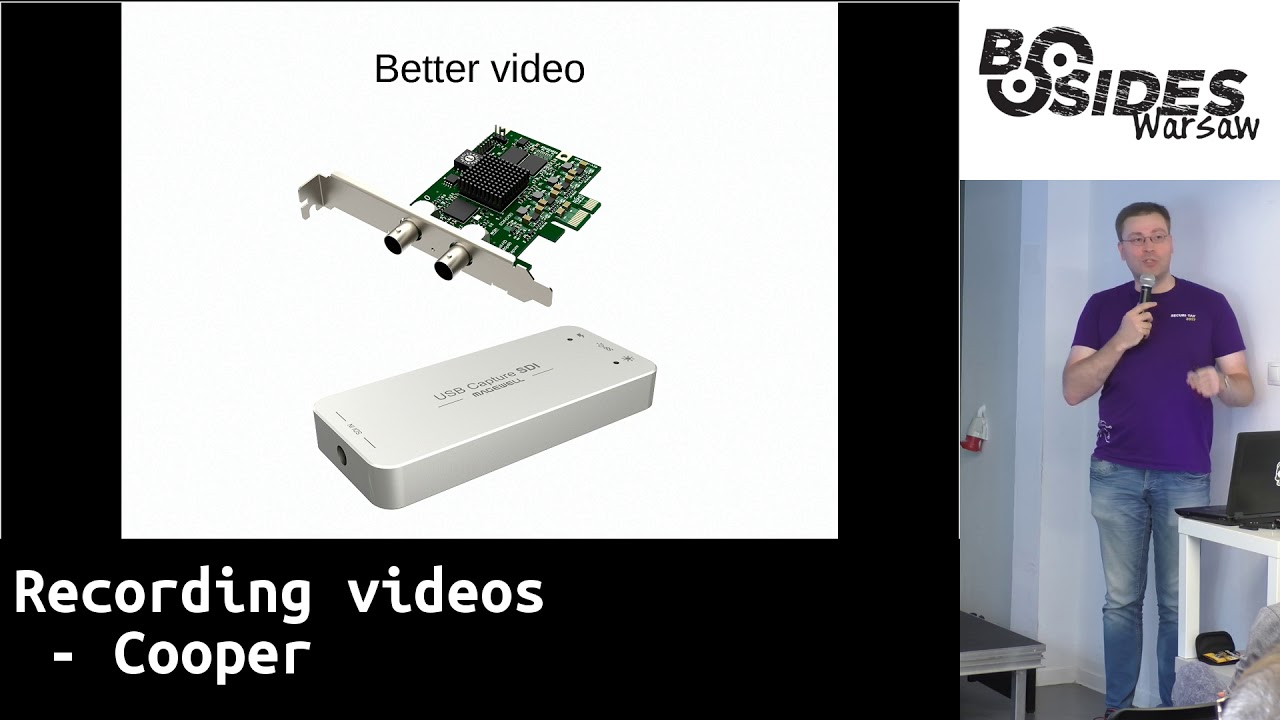
that into one of these things these things top left is an elk cattle iron geek uses that does Full HD I think but it's low frame rate meaning that if you have a upscale laptop that thing won't be able to capture it won't be able to understand it the one on the right is an other media it has it is used be free so it has enough bandwidth that's a problem with the al-khattab it's used - so not enough bandwidth to take a full HD image for the full 50 to 60 frames a second so the avermedia does not have that problem I use the thing on the bottom which is a mate well pro capture
USB some it's USB thing again you'll notice that it only has a hole in one end and I will get to that in a moment because I use the top - you just plug in an HDMI cable and everybody has an HDMI cable the problem is in my opinion with HDMI cables once you make them long they really quickly break and you'd be like well it worked like five minutes ago like on the same setup and all of a sudden it's like sorry no so I use this this is SDI it's basically digital coax Pro hopefully a lot of you people know it from like the old days 10 PC and all that and networking bits I use the
connector on the right the left one is for fairly new kits which is it happens is close to but not identical what that USB thing was using so moving on I captured with one of these the USB thing again it has a small small connectors mcx to the SDI cable connector which is that thing you might think that the card on the top has two inputs it does not the top one is the input and the bottom one is the output again it looks the signal so multiple devices can stand in tandem yeah set parties these things are kind of pricey there are about 300 euros each so and well you need to let's not
go there just yet so you need to the up feed everything of into a PC that's why I've using PCIe cards if you want to use a laptop you already like you need to use USB devices just by default I chose not to do that go the laptop route hiring he does I don't mainly because I need the horsepower of a really full powered CPU and the mobile devices just can't keep up with the way I want to record my things so one of the things I do you will notice with the camera over there that it's tilted I'm filming in portrait and one the camera itself does it like that but the reason I do this is if you
look at my streams you will notice that the camera section is a small vertical bit given knowing that you can either film in landscape and cut out the section that you need by which you would then throw out a fair chunk of the of the data provided to you by the camera sensor by tilting it you can use the full sensor so you get more image that I've put in if you then downsize that and denoise it a little bit you get really nice smooth images as opposed to because this is a not particularly expensive camera and before this I was using quite literally the cheapest HDMI camera you can find which is about 200
euros ish those things make a make a lot of noise so there's speckling going on and as a result your video compressors really poorly and it kind of looks very busy even at times when there's nothing going on particularly when you have a black background so if you just tilt the camera you get just a better image one of the things I used to do before to do that was to use a 3d printed mount and that had the downside of breaking by the way if you have a chance avoid Charles the go Airport because ya know I went through there and two of them broke I don't know they throw with your suitcase or whatever
combining it all usually when I go with my Sokol fixed setup you get this full-on PC yeah it's big but this is so as a result this is what I use when I just drive to places yes I did drive from Apple doing the Netherlands to Warsaw took two days but it's compact enough I can I have four of these fixed things and I have an additional three mobile which I'll show in a picture later and I okay there we go and the I can I can fit all six of those I can fix six of those in the back of my in the boot of my car and it'll close and it will tilt nice and no problems so let's
quickly go over the screen the the b-sides logo that you see here cuz yes this image was just taken this is OBS that's the logo that's what I used to record the combination of everything but just in case I have those four little X terms here on the top which individually records the camera the laptop the audio and another there's a third capture card in there because redundancy so even if OBS were to fail I still have everything I need to combine to make a proper video because the one mistake that people tend to make when I'm using multiple setups I have volunteers operating the thing they need to tell it to start recording to stop recording and people forget or
to just delay it or whatever so I can just go to the separate recordings I make combine everything and done obviously when obvious does everything it's much much faster to edit in the end but so the mobile thing looks like this and most people would find this kind of scary the audio thing is that thing over there you have that capturecard there's another one near it but I don't see it right now what you basically have is the PC without the box I asked venues to provide me with the power supply unit because it's bulky and heavy hence not very nice for planes I prefer I ask them to provide the tripod because it's again so high so big it's
difficult to bring with you and usually also Marcin to provide the screen this in this particular case it happens to be my own yeah record everything or an SSD which is there because of weight not because you need to speed because you really don't yeah put it all together throw it online and yeah Bob's your uncle so that's kind of what I think I wanted to say yep because I had to keep it brief I hope this was sufficiently brief Angelica so are there questions the best question well the best experience I had involved the heckard comb t-shirt so I have from the no con conference I have this really cool t-shirt that that has some
scribbles at the front and people always our first assuming like ooh this looks Arabic or something maybe he's a terrorist it's it reads hacker phonetically in Hindi so I'm there at in at an airport in in India for know Kong Goa and over there airport security is of the type where they basically need a reason not to shoot you and understanding therefore the game waiting for the guy with the one to do his thing so you stand like that and he does hacker awesome so yeah and I also didn't like the fact that my suitcase at that point so knocking Goa is a three-track so I needed to bring three rigs I can fit two
in a single Pelican but the the Pelican that is the size of carry-on luggage which is great for Ichi that who doesn't care about the weight because this is I think 28 kilos in that it's like a big hunk of metal basically so when I try to put and take that through when I went to India I had everything in a regular suitcase and that thing weighed 36 kilos coming in coming back I took a few bottles of booze I mean hate tourists so yeah hey I do am human so yeah also it was like too heavy you need to take something out so of all the gizmos you see down here which do all sorts of
conversions to go from whatever they'll have to provide to HDMI and the capture cards in the the sound capturing thing is in there again just a big heavy little box of metal and try to take that through security and as a separate thing now as carry-on and yeah going to the security bins like yeah I don't think you want to put this through the machine oh no no no it'll be fine yeah okay okay I warned you so they pull through it yeah think bling seems like yeah I think we're gonna have to inspect that yes any more how many how many gadgets do you have with you every time you go like what was it maybe the second question
what what's the typical compatibility issue that you have with all sorts of you know mixers cables and I usually have problems with old Mac books because for some reason they have a framerate in its line in their output to HDMI that is not standard and as a result what I get is like smooth image paint nothing smooth image paint nothing which is really knowing to fix well often also happens is that people show up with a laptop going like yeah this thing only does VGA and in 98% of situations the only thing they ever worked with was VGA but there is a plug for something else the only exception is that thing which actually genuinely only as VGA oh and at hardware
il which was last September there was a guy who coming up with a laptop which was suitably ancient it ran XP so quick fix yeah that doesn't often happen now all you ice things tend to be easy the pro main problem is the combination of whatever the left provides getting that pin and the compatibility of the projector which tends to be kind of lacking this particular one for instance we're now feeding at 720p whereas everything here tends to be one ATP and yeah so that's the sort of thing me to fix I'm just noticing that this machine is making noise which is probably because I'm looking at the live stream oh yes we're doing live stream it's a
default feature of OBS and highly recommended anything else okay the last one how do you max all the videos I combined them like do you like when you three me do you like mix all the videos at once or then and then you don't edit the video afterwards or you edit the videos afterwards I don't know I do both so first of all when you're live stream that is literally just a very long video and that go straight to YouTube and I don't touch it anymore because one of the things YouTube dues is presses the video this is also sort of required because the video apple juice here is about 10 megabits a second and
if you were to look of that looked a few that on your land on your mobile or whatever a it would eat through your bundle like you wouldn't believe and be you need a fairly quick connection to be able to smoothly view that so instead what goes to youtube is pears but I also store locally and even when I'm not live streaming the thing that I'm so locally is the exact same thing that I'm streaming and the only thing I have to do which is for my own to make for myself just to make it easier to edit later is I I tell OBS to in between talks you say okay stop recording start recording makes a new file and then the
file that is made I can then quickly go and like cut here cut there clean up the audio done to go from a recording to an actual video that we later publish on YouTube takes about five minutes and most of this time is waiting for IO and we'll build it a little bit of effort on my part to clean out the audio so time a lot nice work from then thumbs up okay thank you so far thank for this and enjoy the rest of the conference [Applause]
Related talks
 31:04
31:04 41:15
41:15 29:30
29:30 45:10
45:10 22:54
22:54 48:41
48:41